







Question: 5y Part2: Nonlinear optimization (50 points) Exercise 1: consider the function f(x,y) = x++y2+1 The following MATLAB code plot the level sets (contour) of the
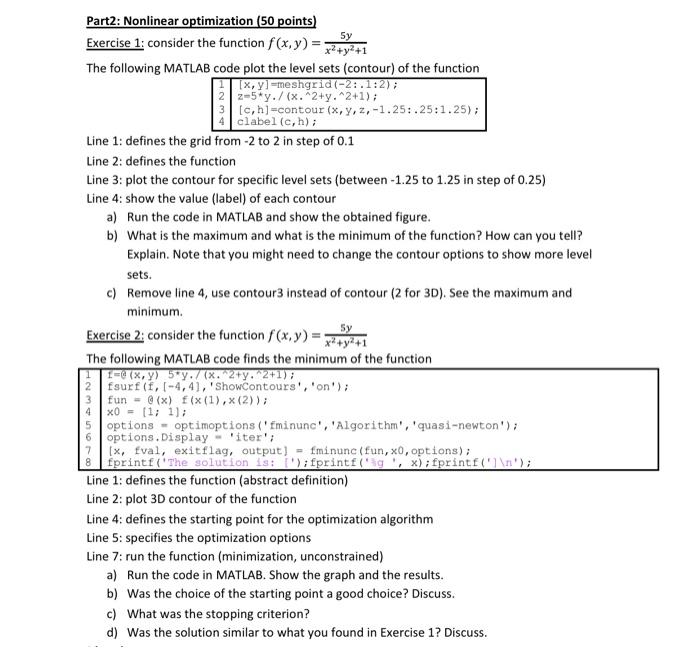
5y Part2: Nonlinear optimization (50 points) Exercise 1: consider the function f(x,y) = x++y2+1 The following MATLAB code plot the level sets (contour) of the function (x, y]=meshgrid(-2:.1:2); 2-5*y./(x. 2+y^2+1); Ic, h]-contour (x,y,2,-1.25: .25:1.25); 4 clabel (c, h); Line 1: defines the grid from -2 to 2 in step of 0.1 Line 2: defines the function Line 3: plot the contour for specific level sets (between-1.25 to 1.25 in step of 0.25) Line 4: show the value (label) of each contour a) Run the code in MATLAB and show the obtained figure. b) What is the maximum and what is the minimum of the function? How can you tell? Explain. Note that you might need to change the contour options to show more level sets. c) Remove line 4, use contour3 instead of contour (2 for 3D). See the maximum and minimum. Exercise 2: consider the function f(x,y) = x++y*+1 The following MATLAB code finds the minimum of the function 1= (x,y) 5 y. 7 (x. 2+y^2+1); 2 fsurf (f, 1-441, 'showContours', 'on'); fun - @(x) f(x(1),X (2)); x0 = (1, 1); options - optimoptions(minunc', 'Algorithm', 'quasi-newton'); 6 options. Display 'iter'; [x, Eval, exitflag, output! - Iminunc(fun, x0, options); 8 fprintf('The solution 18: I');fprintf("ag ',x); fprintf(" "); Line 1: defines the function (abstract definition) Line 2: plot 3D contour of the function Line 4: defines the starting point for the optimization algorithm Line 5: specifies the optimization options Line 7: run the function (minimization, unconstrained) a) Run the code in MATLAB. Show the graph and the results. b) Was the choice of the starting point a good choice? Discuss. c) What was the stopping criterion? d) was the solution similar to what you found in Exercise 1? Discuss. 3 4 7
Step by Step Solution
There are 3 Steps involved in it

Get step-by-step solutions from verified subject matter experts
 Study Help