







Question: 7. Design a control system for controlling a conveyor/robotic arm system as illustrated below. The conveyor/robotic arm system cannot start unless it has power. The
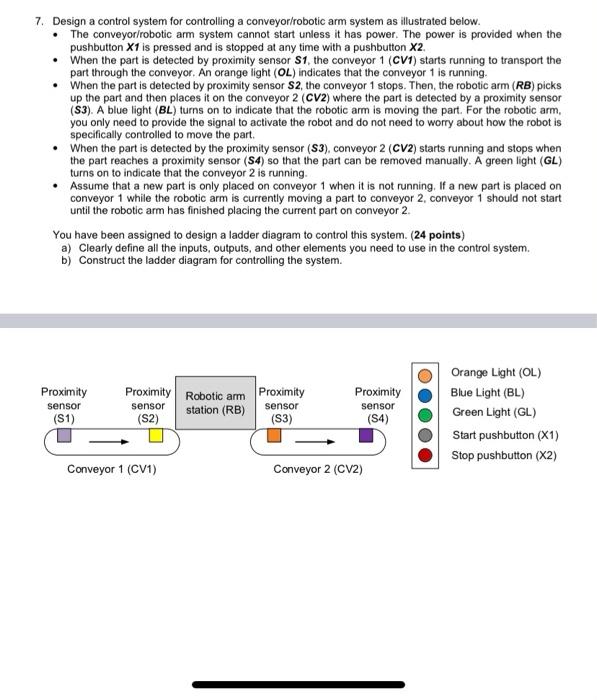
7. Design a control system for controlling a conveyor/robotic arm system as illustrated below. The conveyor/robotic arm system cannot start unless it has power. The power is provided when the pushbutton X1 is pressed and is stopped at any time with a pushbutton X2 When the part is detected by proximity sensor S1, the conveyor 1 (CV1) starts running to transport the part through the conveyor. An orange light (OL) indicates that the conveyor 1 is running. When the part is detected by proximity sensor S2, the conveyor 1 stops. Then, the robotic arm (RB) picks up the part and then places it on the conveyor 2 (CV2) where the part is detected by a proximity sensor (S3). A blue light (BL) turns on to indicate that the robotic arm is moving the part. For the robotic arm, you only need to provide the signal to activate the robot and do not need to worry about how the robot is specifically controlled to move the part. . When the part is detected by the proximity sensor (53), conveyor 2 (CV2) starts running and stops when the part reaches a proximity sensor (S4) so that the part can be removed manually. A green light (GL) turns on to indicate that the conveyor 2 is running. Assume that a new part is only placed on conveyor 1 when it is not running, If a new part is placed on conveyor 1 while the robotic arm is currently moving a part to conveyor 2, conveyor 1 should not start until the robotic arm has finished placing the current part on conveyor 2. You have been assigned to design a ladder diagram to control this system. (24 points) a) Clearly define all the inputs, outputs, and other elements you need to use in the control system. b) Construct the ladder diagram for controlling the system. Proximity sensor (S1) Proximity Robotic arm Proximity sensor station (RB) sensor (S2) (S3) Proximity sensor (S4) Orange Light (OL) Blue Light (BL) Green Light (GL) Start pushbutton (X1) Stop pushbutton (X2) Conveyor 1 (CV1) Conveyor 2 (CV2)
Step by Step Solution
There are 3 Steps involved in it

Get step-by-step solutions from verified subject matter experts
 Study Help