







Question: 8) Now use the Rectangle class to complete the following tasks Create another object of the Rectangle class named box2 with a width of 100
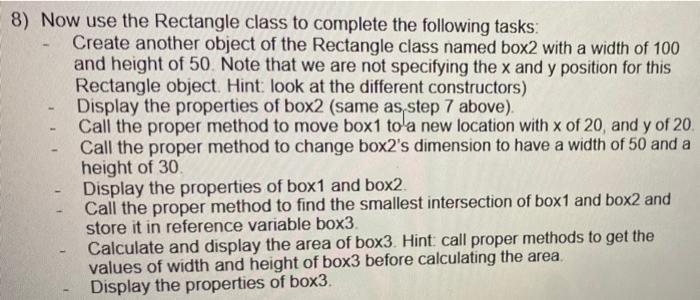
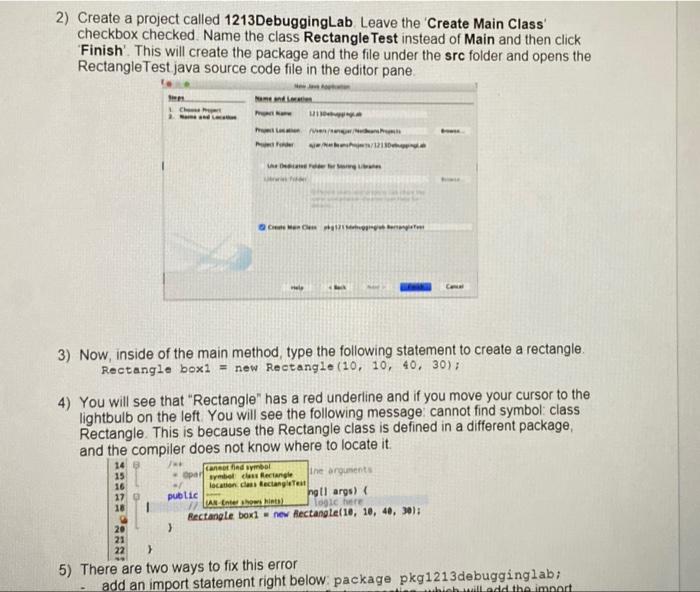
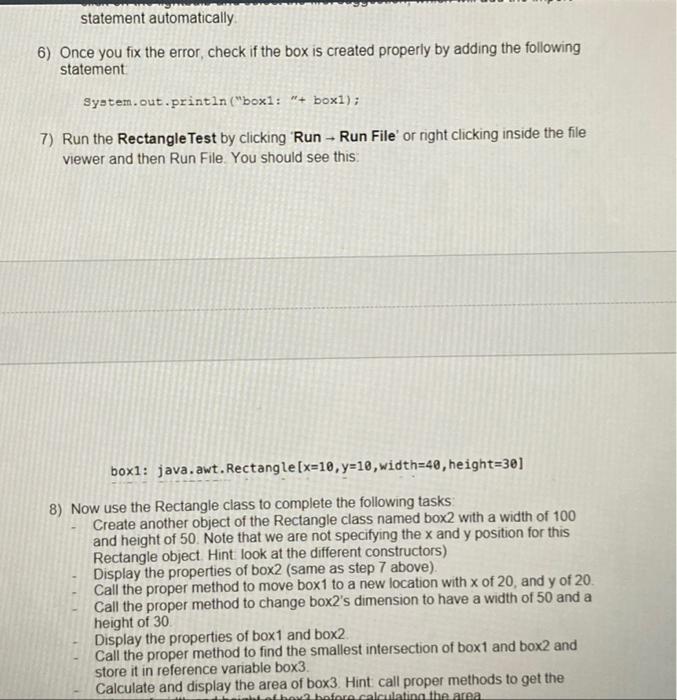
8) Now use the Rectangle class to complete the following tasks Create another object of the Rectangle class named box2 with a width of 100 and height of 50. Note that we are not specifying the x and y position for this Rectangle object. Hint look at the different constructors) Display the properties of box2 (same as step 7 above) Call the proper method to move box1 to a new location with x of 20, and y of 20 Call the proper method to change box2's dimension to have a width of 50 and a height of 30 Display the properties of box1 and box2. Call the proper method to find the smallest intersection of box1 and box2 and store it in reference variable box3 Calculate and display the area of box3. Hint: call proper methods to get the values of width and height of box3 before calculating the area, Display the properties of box3. 2) Create a project called 1213DebuggingLab Leave the Create Main Class checkbox checked. Name the class Rectangle Test instead of Main and then click 'Finish. This will create the package and the file under the src folder and opens the Rectangle Test java source code file in the editor pane ch www123 Com 3) Now, inside of the main method, type the following statement to create a rectangle Rectangle boxi = new Rectangle (10, 10, 40, 30); 4) You will see that "Rectangle" has a red underline and if you move your cursor to the lightbulb on the left You will see the following message cannot find symbol class Rectangle. This is because the Rectangle class is defined in a different package, and the compiler does not know where to locate it 14 Cand symbol 15 Opal symbol class Rectangle the arguments 16 location clans Bectangle 17 public ng ti args) 18 LAN Enter how histo logle here Rectangle boxi = new Rectangle(10, 10, 40, 30); 20 3 21 > 5) There are two ways to fix this error add an import statement right below package pkg1213debugginglab; which will add the import statement automatically 6) Once you fix the error, check if the box is created properly by adding the following statement System.out.println("boxl: "+ boxi); 7) Run the Rectangle Test by clicking "Run - Run File' or right clicking inside the file viewer and then Run File You should see this: box1: java.awt. Rectangle[x=10,y=10, width=40, height=30] 8) Now use the Rectangle class to complete the following tasks Create another object of the Rectangle class named box2 with a width of 100 and height of 50. Note that we are not specifying the x and y position for this Rectangle object. Hint look at the different constructors) Display the properties of box2 (same as step 7 above). Call the proper method to move box1 to a new location with x of 20, and y of 20 Call the proper method to change box2's dimension to have a width of 50 and a height of 30 Display the properties of box1 and box2. Call the proper method to find the smallest intersection of box1 and box2 and store it in reference variable box3. Calculate and display the area of box3. Hint call proper methods to get the of how afara calculating the area 8) Now use the Rectangle class to complete the following tasks Create another object of the Rectangle class named box2 with a width of 100 and height of 50. Note that we are not specifying the x and y position for this Rectangle object. Hint look at the different constructors) Display the properties of box2 (same as step 7 above) Call the proper method to move box1 to a new location with x of 20, and y of 20 Call the proper method to change box2's dimension to have a width of 50 and a height of 30 Display the properties of box1 and box2. Call the proper method to find the smallest intersection of box1 and box2 and store it in reference variable box3 Calculate and display the area of box3. Hint: call proper methods to get the values of width and height of box3 before calculating the area, Display the properties of box3. 2) Create a project called 1213DebuggingLab Leave the Create Main Class checkbox checked. Name the class Rectangle Test instead of Main and then click 'Finish. This will create the package and the file under the src folder and opens the Rectangle Test java source code file in the editor pane ch www123 Com 3) Now, inside of the main method, type the following statement to create a rectangle Rectangle boxi = new Rectangle (10, 10, 40, 30); 4) You will see that "Rectangle" has a red underline and if you move your cursor to the lightbulb on the left You will see the following message cannot find symbol class Rectangle. This is because the Rectangle class is defined in a different package, and the compiler does not know where to locate it 14 Cand symbol 15 Opal symbol class Rectangle the arguments 16 location clans Bectangle 17 public ng ti args) 18 LAN Enter how histo logle here Rectangle boxi = new Rectangle(10, 10, 40, 30); 20 3 21 > 5) There are two ways to fix this error add an import statement right below package pkg1213debugginglab; which will add the import statement automatically 6) Once you fix the error, check if the box is created properly by adding the following statement System.out.println("boxl: "+ boxi); 7) Run the Rectangle Test by clicking "Run - Run File' or right clicking inside the file viewer and then Run File You should see this: box1: java.awt. Rectangle[x=10,y=10, width=40, height=30] 8) Now use the Rectangle class to complete the following tasks Create another object of the Rectangle class named box2 with a width of 100 and height of 50. Note that we are not specifying the x and y position for this Rectangle object. Hint look at the different constructors) Display the properties of box2 (same as step 7 above). Call the proper method to move box1 to a new location with x of 20, and y of 20 Call the proper method to change box2's dimension to have a width of 50 and a height of 30 Display the properties of box1 and box2. Call the proper method to find the smallest intersection of box1 and box2 and store it in reference variable box3. Calculate and display the area of box3. Hint call proper methods to get the of how afara calculating the area
Step by Step Solution
There are 3 Steps involved in it

Get step-by-step solutions from verified subject matter experts
 Study Help