







Question: 8-7. Modify exercise 7-2 on comparing strings so it is now done in a GUI application frame class definition with a main instead of a
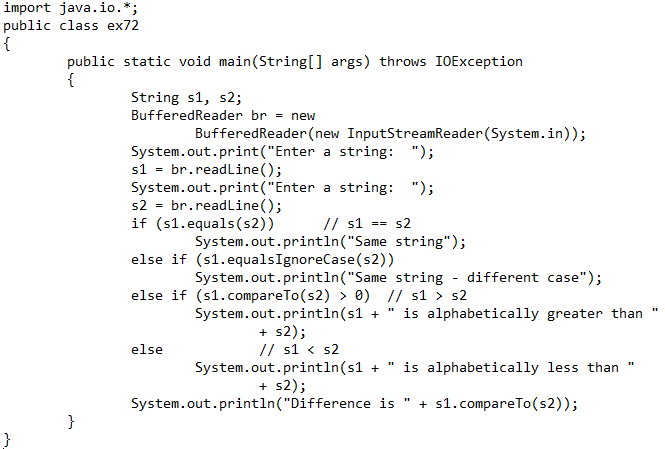
8-7. Modify exercise 7-2 on comparing strings so it is now done in a GUI application frame class definition with a main instead of a console application. The GUI components will be data fields of the class definition. The prompts will now be in labels and the input will now be textfields. The user will hit enter in the second textfield to get the results in two other answer labels. The results (which is greater and the difference amount) will be in these two other answer labels. Declare everything at the top, use the constructor to add the components to your container (use background and foreground colors and the flow layout), and use actionPerformed to do three things: get the text out of the textfields for the two strings (instead of readLines), to perform the nested if else with the comparisons, and the setting of the answers in the two answer labels - which is greater and the difference (instead of printlns). Use a little main method to construct yourself.
Step by Step Solution
There are 3 Steps involved in it

Get step-by-step solutions from verified subject matter experts
 Study Help