



Question: 9 33 21 Et av AaBbccdee AaBbCcDdEe AaBbCcDc AaBbCcDdEt Aar No Spacing Heading 1 Heading 2 Title Normal 16. The formula to put in E176
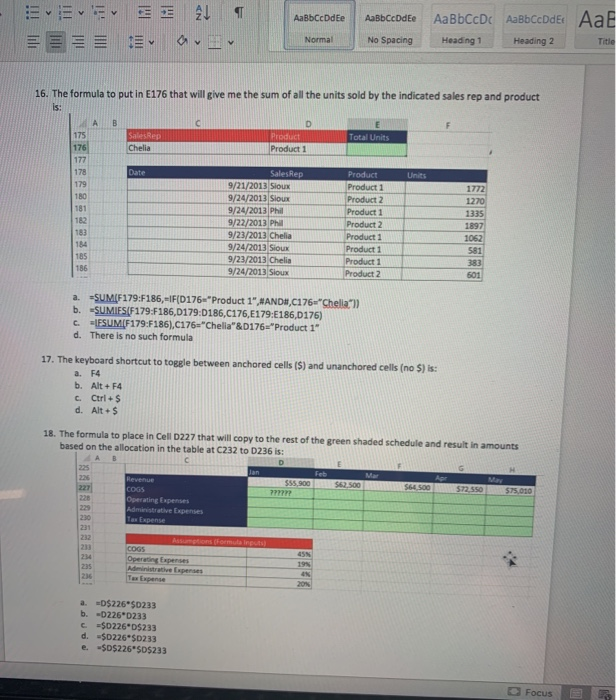
9 33 21 Et av AaBbccdee AaBbCcDdEe AaBbCcDc AaBbCcDdEt Aar No Spacing Heading 1 Heading 2 Title Normal 16. The formula to put in E176 that will give me the sum of all the units sold by the indicated sales rep and product Total Units Product 1 Unit 1772 1220 SalesRep ITALIANA ALI 9/21/2013 Sioux 9/24/2013 Sioux 9/24/2013 Phil 9/22/2013 Phil 9/23/2013 Chelia 9/24/2013 Sioux 9/23/2013 Chelia 9/24/2013 Sioux Product Product 1 Product 2 Product 1 Product 2 Product 1 Product 1 Product 1 Product 2 1062 581 501 a. -SUMIF179:F186, IF(D176 "Product 1",#AND,C176"Chella) b. SUMIES(F179:F186,D179:D186,C176,E179:6186,0176) c. IESUM[F179:F186),C176="Chella"&D176="Product 1" d. There is no such formula 17. The keyboard shortcut to toggle between anchored cells ($) and unanchored cells (no S) is: a. F4 b. Alt+F4 C. Ctrl + $ d. Alt + $ 18. The formula to place in Cell D227 that will copy to the rest of the green shaded schedule and result in amounts based on the allocation in the table at C232 to 1236 is: Feb $55.900 S Mar 500 $64 500 $72.550 $75.000 Revenue COGS Operating Expenses Administrative Expenses Tax Expense 232 Anomale COGS Operating Expenses Administrative Expenses a. =D$226*$0233 b. -0226 0233 c =$0226*05233 d. $0226*$0233 e $D$226"$0$233 Focus B
Step by Step Solution
There are 3 Steps involved in it

Get step-by-step solutions from verified subject matter experts