





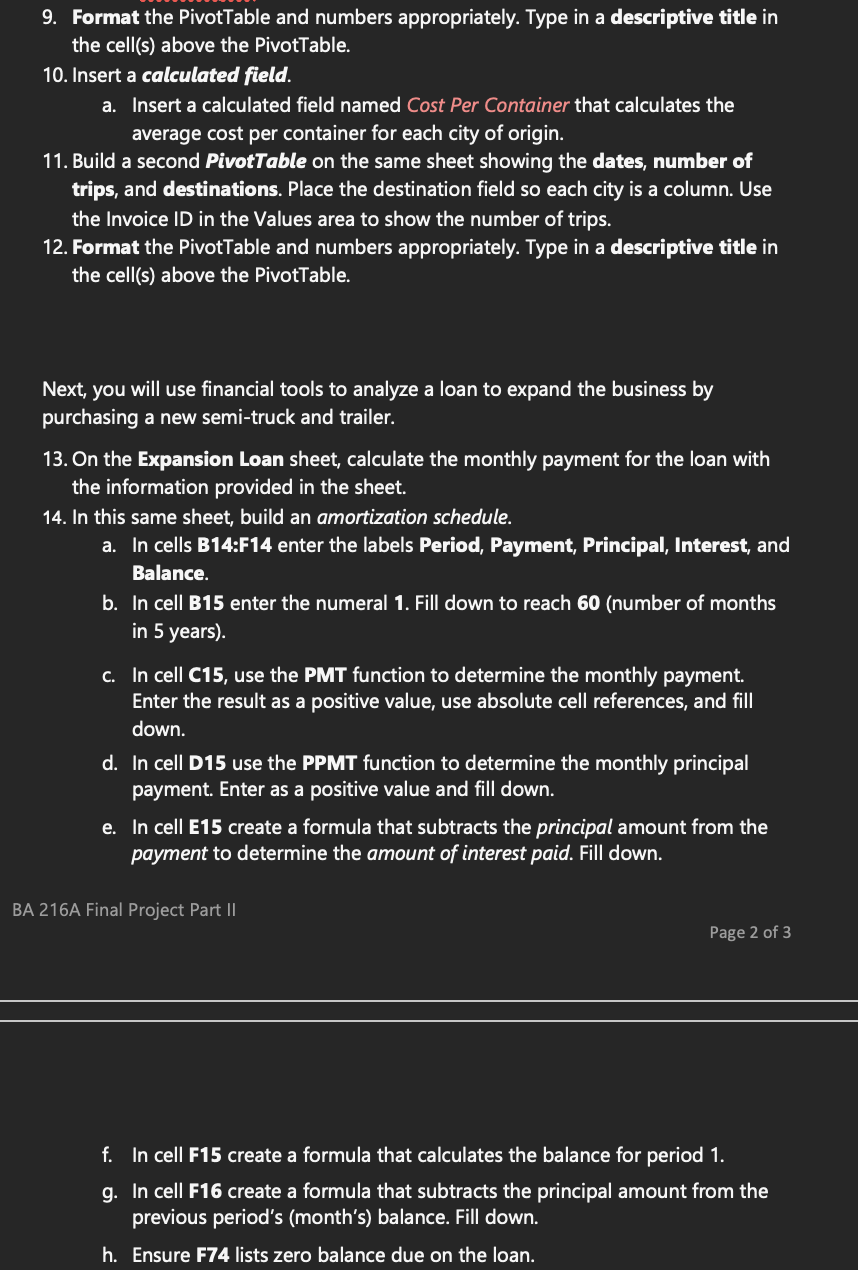
Question: 9. Format the PivotTable and numbers appropriately. Type in a descriptive title in the cell(s) above the PivotTable. 10. Insert a calculated field. a. Insert
9. Format the PivotTable and numbers9. Format the PivotTable and numbers
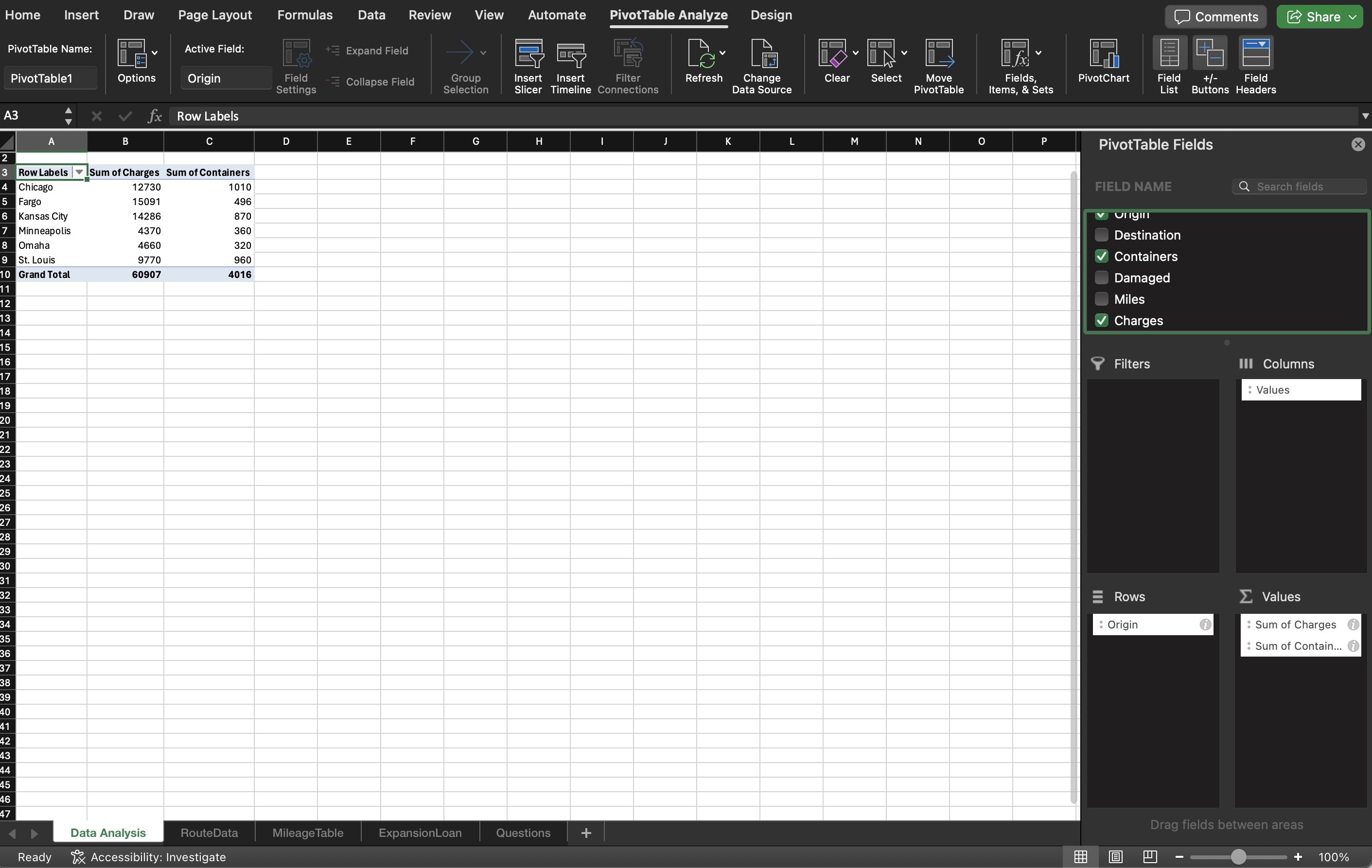
9. Format the PivotTable and numbers appropriately. Type in a descriptive title in the cell(s) above the PivotTable. 10. Insert a calculated field. a. Insert a calculated field named Cost Per Container that calculates the average cost per container for each city of origin. 11. Build a second PivotTable on the same sheet showing the dates, number of trips, and destinations. Place the destination field so each city is a column. Use the Invoice ID in the Values area to show the number of trips. 12. Format the PivotTable and numbers appropriately. Type in a descriptive title in the cell(s) above the PivotTable. Next, you will use financial tools to analyze a loan to expand the business by purchasing a new semi-truck and trailer. 13. On the Expansion Loan sheet, calculate the monthly payment for the loan with the information provided in the sheet. 14. In this same sheet, build an amortization schedule. a. In cells B14:F14 enter the labels Period, Payment, Principal, Interest, and Balance. . In cell B15 enter the numeral 1. Fill down to reach 60 (number of months in 5 years). In cell C15, use the PMT function to determine the monthly payment. Enter the result as a positive value, use absolute cell references, and fill down. . In cell D15 use the PPMT function to determine the monthly principal payment. Enter as a positive value and fill down. . In cell E15 create a formula that subtracts the principal amount from the eam MR te ee) eae | eel BA 216A Final Project Part II Page 2 of 3 In cell F15 create a formula that calculates the balance for period 1. . In cell F16 create a formula that subtracts the principal amount from the previous period's (month's) balance. Fill down. . Ensure F74 lists zero balance due on the loan. Home Insert Draw Page Layout Formulas Data Review View Automate PivotTable Analyze Design Comments Share PivotTable Name: Active Field: + Expand Field PivotTable1 Options Origin Field Collapse Field Group nsert Insert Filter Refresh Change Clear Select Move Fields, PivotChart Field +- Field Settings Selection Slicer Timeline Connections Data Source PivotTable Items, & Sets List Buttons Headers A3 X V fx Row Labels B C D E F G H M N O P PivotTable Fields X Row Labels | Sum of Charges Sum of Containers Chicag 12730 1010 FIELD NAME Q Search fields Fargo 1509 496 Kansas City 14286 870 V VIIyIII Minneapolis 4370 360 Destination Omaha 991 320 Containers St. Louis 9770 960 Grand Total 60907 4016 Damaged Miles Charges Filters Ill Columns : Values Rows E Values : Origin i Sum of Charges i Sum of Contain... i Drag fields between areas Data Analysis RouteData Mileage Table ExpansionLoan Questions + Ready Tx Accessibility: Investigate - + 100%

Step by Step Solution

There are 3 Steps involved in it

1 Expert Approved Answer
Step: 1 Unlock blur-text-image
Question Has Been Solved by an Expert!

Get step-by-step solutions from verified subject matter experts

Step: 2 Unlock
Step: 3 Unlock

Students Have Also Explored These Related Accounting Questions!