







Question: #9 please help with formula , heres what I have but its not correct 9. In the Regular Hours and Overtime Hours columns of your
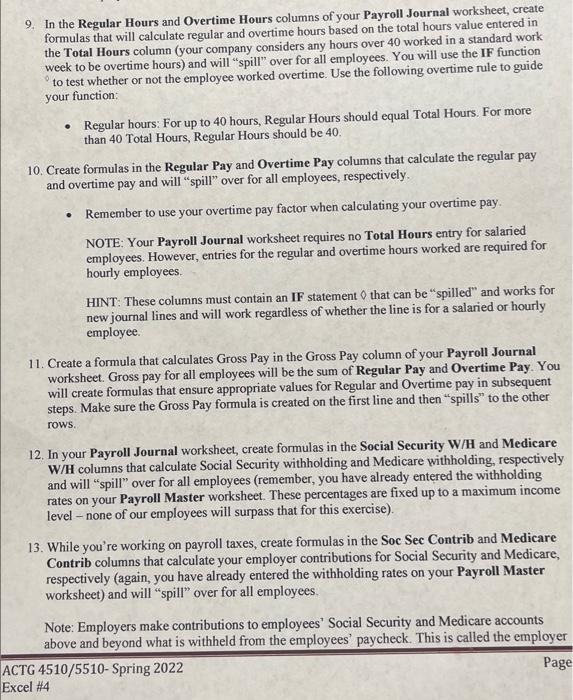
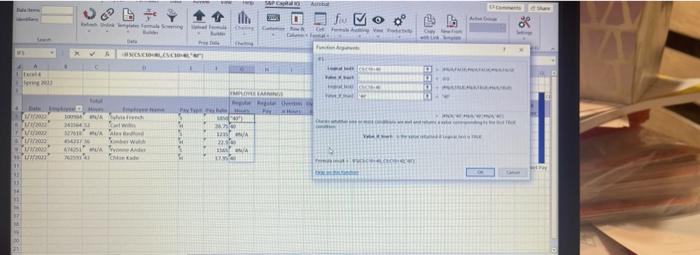
9. In the Regular Hours and Overtime Hours columns of your Payroll Journal worksheet, create formulas that will calculate regular and overtime hours based on the total hours value entered in the Total Hours column (your company considers any hours over 40 worked in a standard work week to be overtime hours) and will "spill" over for all employees. You will use the IF function to test whether or not the employee worked overtime. Use the following overtime rule to guide your function: Regular hours: For up to 40 hours, Regular Hours should equal Total Hours. For more than 40 Total Hours, Regular Hours should be 40. 10. Create formulas in the Regular Pay and Overtime Pay columns that calculate the regular pay and overtime pay and will "spill" over for all employees, respectively Remember to use your overtime pay factor when calculating your overtime pay. NOTE: Your Payroll Journal worksheet requires no Total Hours entry for salaried employees. However, entries for the regular and overtime hours worked are required for hourly employees. HINT: These columns must contain an IF statement that can be "spilled" and works for new journal lines and will work regardless of whether the line is for a salaried or hourly employee 11. Create a formula that calculates Gross Pay in the Gross Pay column of your Payroll Journal worksheet. Gross pay for all employees will be the sum of Regular Pay and Overtime Pay. You will create formulas that ensure appropriate values for Regular and Overtime pay in subsequent steps. Make sure the Gross Pay formula is created on the first line and then "spills to the other rows 12. In your Payroll Journal worksheet, create formulas in the Social Security W/H and Medicare W/H columns that calculate Social Security withholding and Medicare withholding, respectively and will "spill" over for all employees (remember, you have already entered the withholding rates on your Payroll Master worksheet. These percentages are fixed up to a maximum income level - none of our employees will surpass that for this exercise). 13. While you're working on payroll taxes, create formulas in the Soc Sec Contrib and Medicare Contrib columns that calculate your employer contributions for Social Security and Medicare, respectively (again, you have already entered the withholding rates on your Payroll Master worksheet) and will "spill" over for all employees. Note: Employers make contributions to employees' Social Security and Medicare accounts above I beyond what is withheld from the employees' paycheck. This is called the employer ACTG 4510/5510-Spring 2022 Page Excel #4 WC fu MOO 98 1 the - W YE w WA SA Un' C 9. In the Regular Hours and Overtime Hours columns of your Payroll Journal worksheet, create formulas that will calculate regular and overtime hours based on the total hours value entered in the Total Hours column (your company considers any hours over 40 worked in a standard work week to be overtime hours) and will "spill" over for all employees. You will use the IF function to test whether or not the employee worked overtime. Use the following overtime rule to guide your function: Regular hours: For up to 40 hours, Regular Hours should equal Total Hours. For more than 40 Total Hours, Regular Hours should be 40. 10. Create formulas in the Regular Pay and Overtime Pay columns that calculate the regular pay and overtime pay and will "spill" over for all employees, respectively Remember to use your overtime pay factor when calculating your overtime pay. NOTE: Your Payroll Journal worksheet requires no Total Hours entry for salaried employees. However, entries for the regular and overtime hours worked are required for hourly employees. HINT: These columns must contain an IF statement that can be "spilled" and works for new journal lines and will work regardless of whether the line is for a salaried or hourly employee 11. Create a formula that calculates Gross Pay in the Gross Pay column of your Payroll Journal worksheet. Gross pay for all employees will be the sum of Regular Pay and Overtime Pay. You will create formulas that ensure appropriate values for Regular and Overtime pay in subsequent steps. Make sure the Gross Pay formula is created on the first line and then "spills to the other rows 12. In your Payroll Journal worksheet, create formulas in the Social Security W/H and Medicare W/H columns that calculate Social Security withholding and Medicare withholding, respectively and will "spill" over for all employees (remember, you have already entered the withholding rates on your Payroll Master worksheet. These percentages are fixed up to a maximum income level - none of our employees will surpass that for this exercise). 13. While you're working on payroll taxes, create formulas in the Soc Sec Contrib and Medicare Contrib columns that calculate your employer contributions for Social Security and Medicare, respectively (again, you have already entered the withholding rates on your Payroll Master worksheet) and will "spill" over for all employees. Note: Employers make contributions to employees' Social Security and Medicare accounts above I beyond what is withheld from the employees' paycheck. This is called the employer ACTG 4510/5510-Spring 2022 Page Excel #4 WC fu MOO 98 1 the - W YE w WA SA Un' C
Step by Step Solution
There are 3 Steps involved in it

Get step-by-step solutions from verified subject matter experts
 Study Help