







Question: a = 5 b = 1 c = 9 d = 1 5 Part 1 Exercises 1 A ) Open a new script ( top
a
b
c
d
Part Exercises
A Open a new script top left button in Home menu and type your name and student ID number as comments
in the top two lines of the script, as designated below. Comments in MATLAB start with a percent sign,
MATLAB won't read anything after them, and these will be displayed as green text.
FirstName LastName
Student ID Number
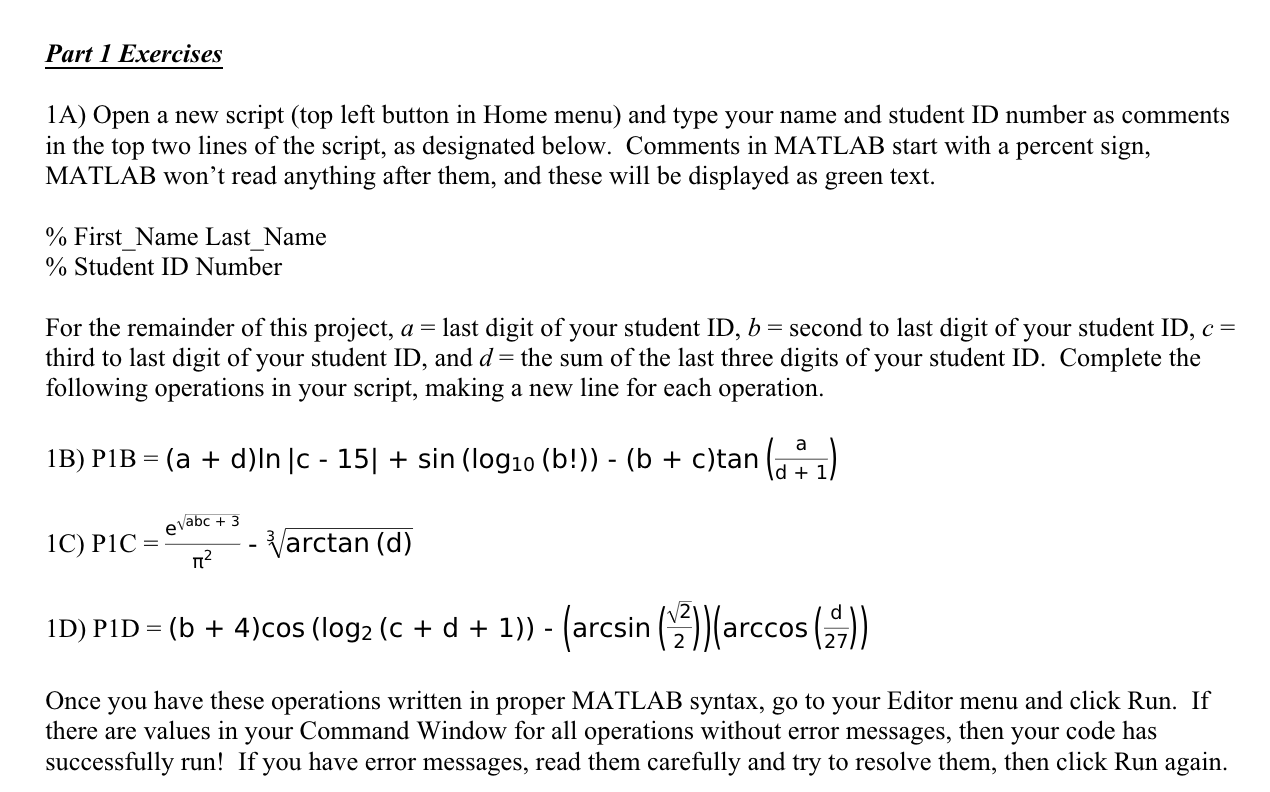
For the remainder of this project, last digit of your student ID second to last digit of your student ID
third to last digit of your student ID and the sum of the last three digits of your student ID Complete the
following operations in your script, making a new line for each operation.
B
C
D
Once you have these operations written in proper MATLAB syntax, go to your Editor menu and click Run. If
there are values in your Command Window for all operations without error messages, then your code has
successfully run! If you have error messages, read them carefully and try to resolve them, then click Run again.
Step by Step Solution
There are 3 Steps involved in it
1 Expert Approved Answer
Step: 1 Unlock

Question Has Been Solved by an Expert!
Get step-by-step solutions from verified subject matter experts
Step: 2 Unlock
Step: 3 Unlock
 Study Help