







Question: 1.5L} Open a new script (top left button in Home menu} and type your name and student ID number as comments in the top two
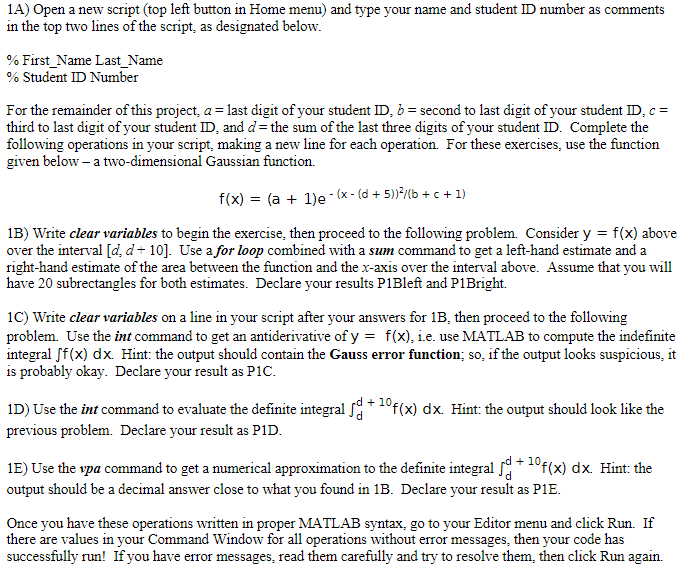
1.5L} Open a new script (top left button in Home menu} and type your name and student ID number as comments in the top two lines of the script= as designated below. as First_?~Iame Last_Name \"A: Student ID Number For the remainder of this project: a = last digit of your student ID: E: = second to last digit of your student ID. e = third to last digit of your student 1D= and n" = the sum of the last three digits of your student ID. Complete the following operations in your script. making a new line for each operation. For these exercises, use the function giyen below a twodimensional Gaussian function. x} 2 {a + 1l9 - Ix- {c + Ella-"lb c + 12- 113} Write clear variables to begin the exercise= then proceed to the following problem. Consider y = x} aboye oyer the interval [n'= n" - ID]. Use a for loop combined with a sum command to get a left-hand estimate and a right-hand estimate of the area between the function and the x-axis oyer the intenal aboye. Assume that you will hate 30 subrectangles for both estimates. Declare your results PlBleft and P1 Bright. 1C} Write clear variables on a line in your script after your answers for IE, then proceed to the following problem. [so the in: command to get an antideriyatiye of y = x]. i.e. use Iy-L'J'iTL-AB to compute the indefinite integral fx} dx. Hint: the output should contain the Gauss error function; so= if the output looks suspicious= it is probably okay. Declare your result as PIC. 1D} Use the inf command to eyaluate the definite integral IE: _ mfxl d )c Hint: the output should look like the previous problem. Declare your result as PlD. 1E) Use the spa command to get a numerical approximation to the definite integral IE: _ mx] d1 Hint: the output should be a decimal answer close to what you found in IE. Declare your result as PIE. Cuice you hate these operations written in proper h-LiTL-AB syntax. go to your Editor menu and click Run. If there are yalues in your Command Window for all operations without error messages= then your code has successfully run! If you hate error mes sages= read them carefully and try to resolye them. then click Run again
Step by Step Solution
There are 3 Steps involved in it

Get step-by-step solutions from verified subject matter experts
 Study Help