







Question: a) Complete Android Project named Billing Project from Lab 2 for reading billing information stored into collection of array objects which displays each element
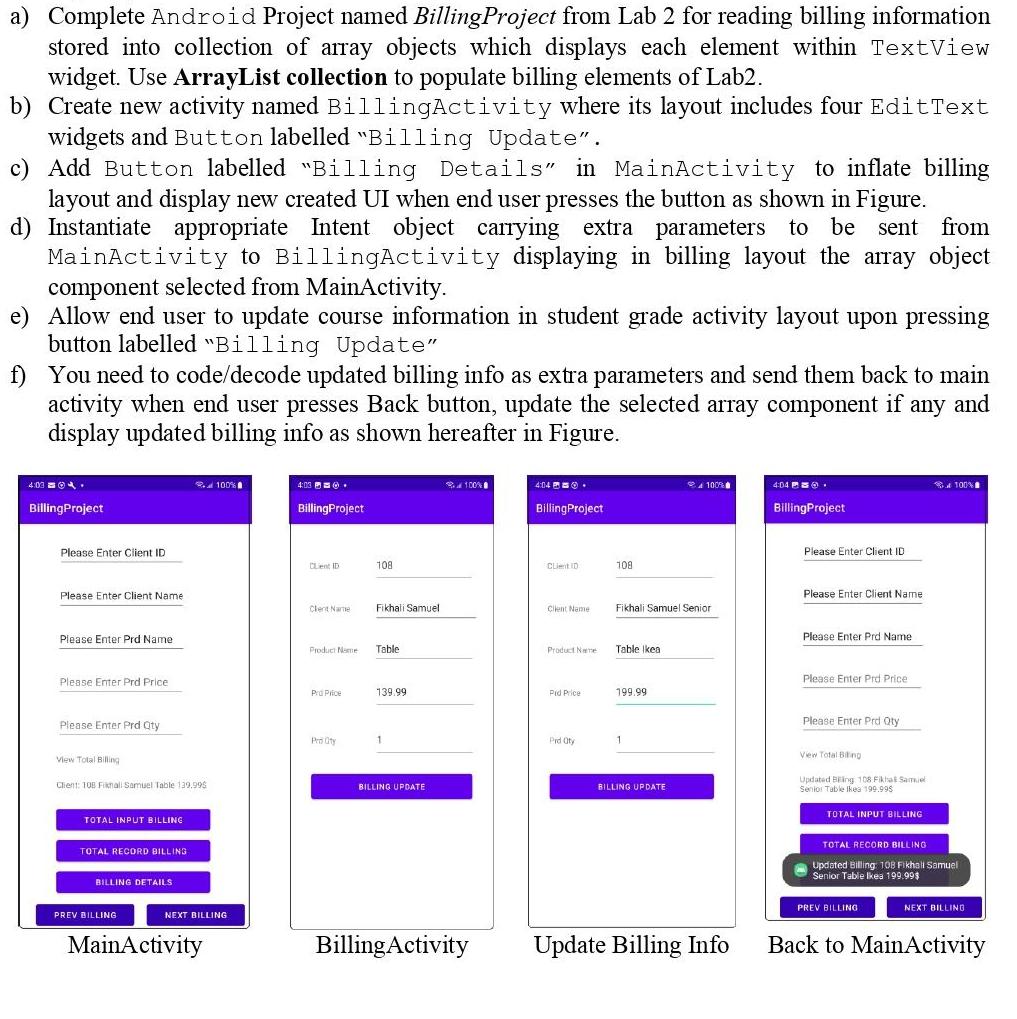
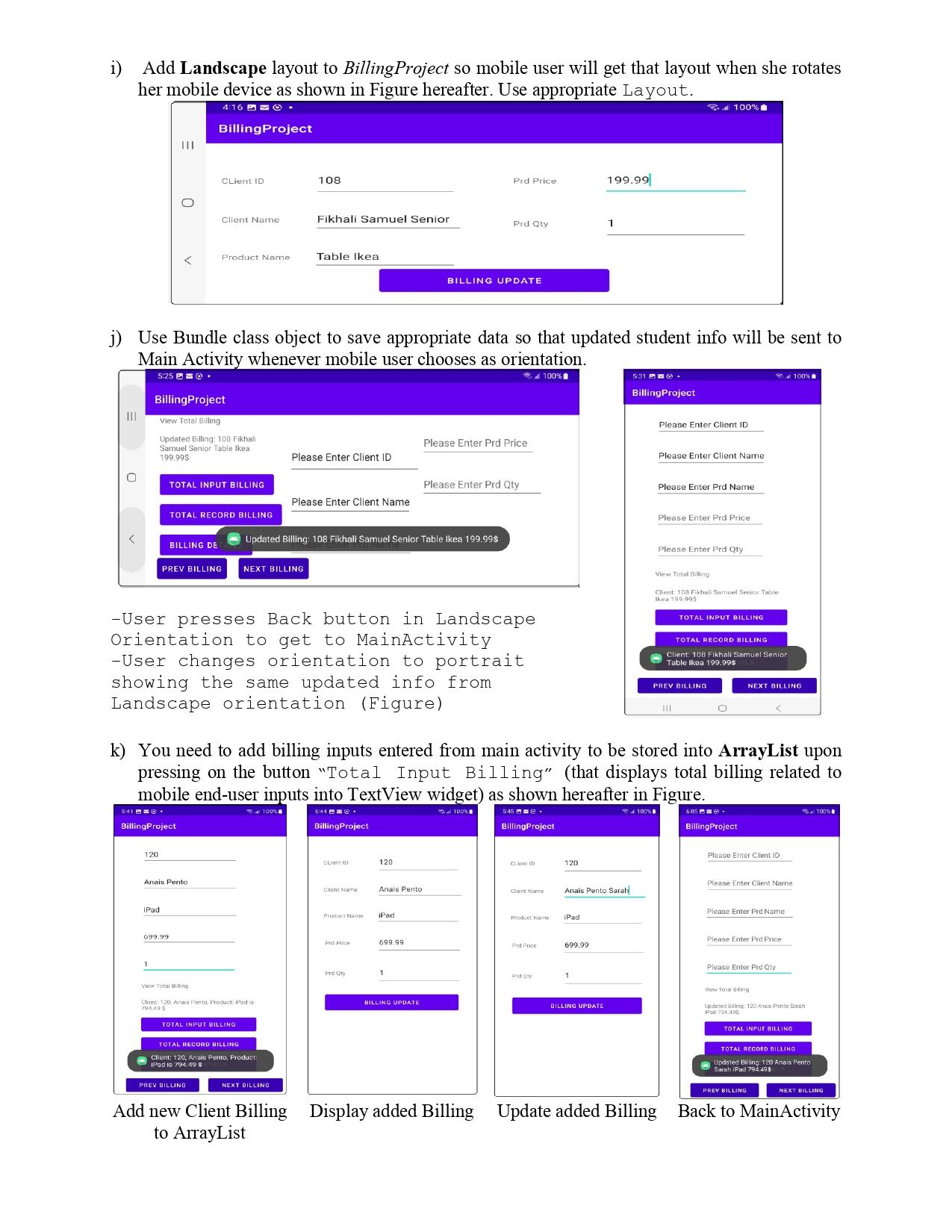
a) Complete Android Project named Billing Project from Lab 2 for reading billing information stored into collection of array objects which displays each element within TextView widget. Use ArrayList collection to populate billing elements of Lab2. b) Create new activity named BillingActivity where its layout includes four Edit Text widgets and Button labelled "Billing Update". c) Add Button labelled "Billing Details" in MainActivity to inflate billing layout and display new created UI when end user presses the button as shown in Figure. d) Instantiate appropriate Intent object carrying extra parameters to be sent from MainActivity to BillingActivity displaying in billing layout the array object component selected from MainActivity. e) Allow end user to update course information in student grade activity layout upon pressing button labelled "Billing Update" f) You need to code/decode updated billing info as extra parameters and send them back to main activity when end user presses Back button, update the selected array component if any and display updated billing info as shown hereafter in Figure. 4:03. Billing Project Please Enter Client ID Please Enter Client Name Please Enter Prd Name Please Enter Prd Price Please Enter Prd Qty View Total Billing Client: 108 Fikmall Samuel Table 139.99$ TOTAL INPUT BILLING TOTAL RECORD BILLING BILLING DETAILS PREV BILLING 100% NEXT BILLING MainActivity 4:03. Billing Project Lent ID Clent Name Product Name Pro Price 108 Fikhali Samuel Table 139.99 1 BILLING UPDATE 100% Billing Activity 4:04. BillingProject Client ID Cilent Name Product Name Pid Price Prd Oty 108 Fikhali Samuel Senior Table Ikea 199.99 1 4100 BILLING UPDATE Update Billing Info 4:04. Billing Project Please Enter Client ID Please Enter Client Name Please Enter Prd Name Please Enter Prd Price Please Enter Prd Qty View Total Biling Updated Bing 108 Fikhal Samuel Senior Table Ikea 199.99$ TOTAL INPUT BILLING 100% TOTAL RECORD BILLING Updated Billing: 108 Fikhall Samuel Senior Table Ikea 199.99$ PREV BILLING NEXT BILLING Back to MainActivity i) Add Landscape layout to BillingProject so mobile user will get that layout when she rotates her mobile device as shown in Figure hereafter. Use appropriate Layout. 4:16. ||| 5:25. 5:41. Billing Project View Total Billing Updated Billing: 108 Fikhali Samuel Senior Table Ikea 199.99$ 120 iPad 1 Billing Project BILLING DE BillingProject Client ID 699.99 Client Name j) Use Bundle class object to save appropriate data so that updated student info will be sent to Main Activity whenever mobile user chooses as orientation. 100% TOTAL INPUT BILLING Anais Pento Product Name: TOTAL RECORD BILLING PREV BILLING NEXT BILLING PREV BILLING View Total Biling Client: 120. Anais Pento. Product: Pad is 794,49 $ TOTAL INPUT BILLING -User presses Back button in Landscape Orientation to get to MainActivity -User changes orientation to portrait showing the same updated info from Landscape orientation (Figure) 108 TOTAL RECORD BILLING Client: 120, Anais Pento, Product: IPad io 794.49 $ Fikhali Samuel Senior Table Ikea 100% Please Enter Client ID NEXT BILLING Please Enter Client Name Updated Billing: 108 Fikhali Samuel Senior Table Ikea 199.99$ BillingProject CLion ID Cont Name Product Name Prd Price Frd Qty 120 Anais Pento iPad k) You need to add billing inputs entered from main activity to be stored into ArrayList upon pressing on the button "Total Input Billing" (that displays total billing related to mobile end-user inputs into TextView widget) as shown hereafter in Figure. 5:44. 5:45. 100% 699.99 Prd Price: BILLING UPDATE 1 Prd Qty BILLING UPDATE Please Enter Prd Price Please Enter Prd Qty Add new Client Billing Display added Billing to ArrayList BillingProject Client ID Product Name Prd Qty 120 iPad 199.99 Anais Pento Sarah 699.99 1 1 BILLING UPDATE 5:31. Billing Project Please Enter Client ID Please Enter Client Name 100% Please Enter Prd Name Please Enter Prd Price Please Enter Prd Qty View Total Billing Client: 108 Fikhali Samuel Senior Table Ikea 199.99$ TOTAL INPUT BILLING TOTAL RECORD BILLING Client: 108 Fikhali Samuel Senior Table Ikea 199.99$ PREV BILLING 111 6:05 BillingProject NEXT BILLING Please Enter Client ID Please Enter Client Name: Please Enter Prd Name Please Enter Prd Price 100% Please Enter Prd Qty Updated Billing: 120 Anais Pento Sarah iPad 794.499 TOTAL INPUT BILLING PREV BILLING TOTAL RECORD BILLING Updated Billing: 120 Anais Pento Sarah iPad 794.49$ 100% NEXT BILLING Update added Billing Back to MainActivity
Step by Step Solution
3.50 Rating (160 Votes )
There are 3 Steps involved in it
Create an Android Project named Billing Project to a... View full answer

Get step-by-step solutions from verified subject matter experts
 Study Help