





Question: a) Write a MATLAB script that uses a for loop to create an array of 1000 numbers where each element is twice the previous element,
 a) Write a MATLAB script that uses a for loop to

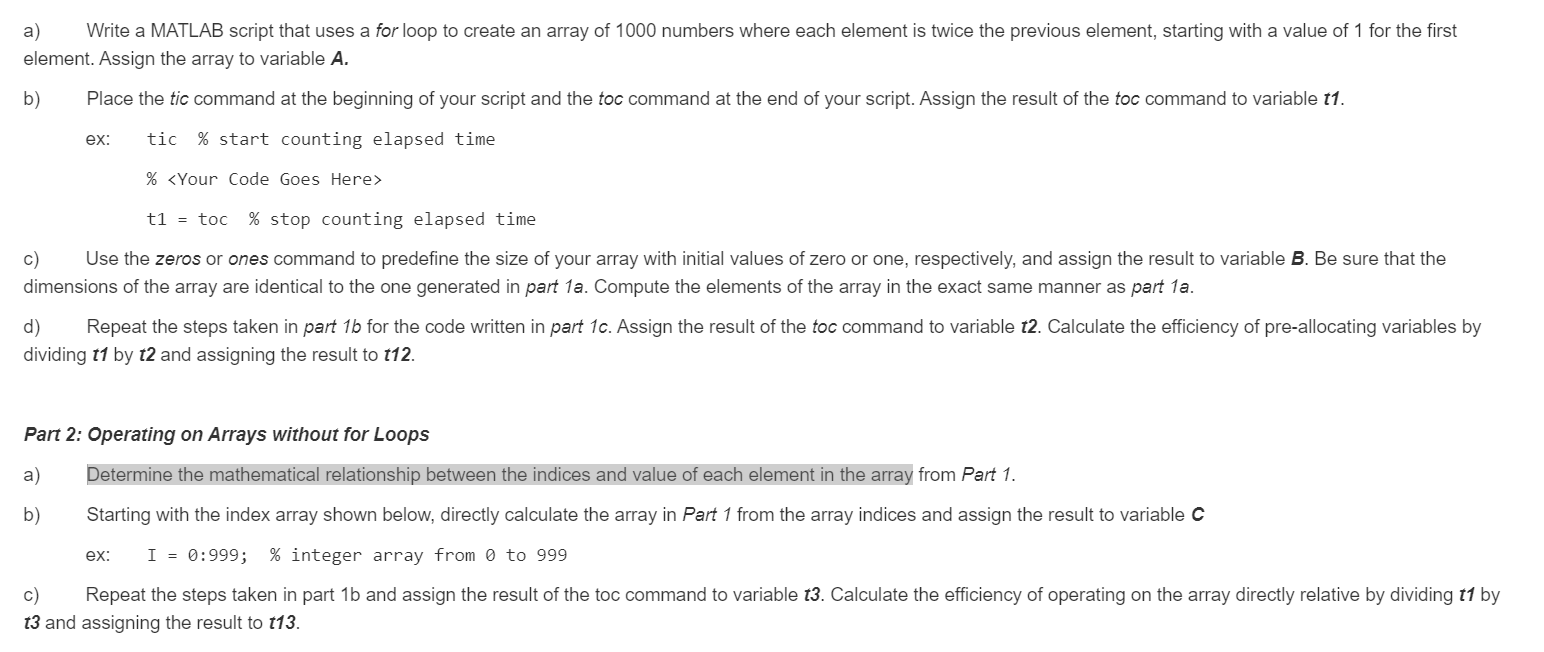
a) Write a MATLAB script that uses a for loop to create an array of 1000 numbers where each element is twice the previous element, starting with a value of 1 for the first element. Assign the array to variable A. b) Place the tic command at the beginning of your script and the toc command at the end of your script. Assign the result of the toc command to variable 11. ex: tic % start counting elapsed time % t1 = toc % stop counting elapsed time c) Use the zeros or ones command to predefine the size of your array with initial values of zero or one, respectively, and assign the result to variable B. Be sure that the dimensions of the array are identical to the one generated in part 1a. Compute the elements of the array in the exact same manner as part 1a. d) Repeat the steps taken in part 1b for the code written in part 10. Assign the result of the toc command to variable t2. Calculate the efficiency of pre-allocating variables by dividing 11 by t2 and assigning the result to t12. Part 2: Operating on Arrays without for Loops a) Determine the mathematical relationship between the indices and value of each element in the array from Part 1. b) Starting with the index array shown below, directly calculate the array in Part 1 from the array indices and assign the result to variable C ex: I = 0:999; % integer array from 0 to 999 c) Repeat the steps taken in part 1b and assign the result of the toc command to variable 13. Calculate the efficiency of operating on the array directly relative by dividing t1 by 13 and assigning the result to t13. a) Write a MATLAB script that uses a for loop to create an array of 1000 numbers where each element is twice the previous element, starting with a value of 1 for the first element. Assign the array to variable A. b) Place the tic command at the beginning of your script and the toc command at the end of your script. Assign the result of the toc command to variable 11. ex: tic % start counting elapsed time % t1 = toc % stop counting elapsed time c) Use the zeros or ones command to predefine the size of your array with initial values of zero or one, respectively, and assign the result to variable B. Be sure that the dimensions of the array are identical to the one generated in part 1a. Compute the elements of the array in the exact same manner as part 1a. d) Repeat the steps taken in part 1b for the code written in part 10. Assign the result of the toc command to variable t2. Calculate the efficiency of pre-allocating variables by dividing 11 by t2 and assigning the result to t12. Part 2: Operating on Arrays without for Loops a) Determine the mathematical relationship between the indices and value of each element in the array from Part 1. b) Starting with the index array shown below, directly calculate the array in Part 1 from the array indices and assign the result to variable C ex: I = 0:999; % integer array from 0 to 999 c) Repeat the steps taken in part 1b and assign the result of the toc command to variable 13. Calculate the efficiency of operating on the array directly relative by dividing t1 by 13 and assigning the result to t13

Step by Step Solution

There are 3 Steps involved in it

1 Expert Approved Answer
Step: 1 Unlock blur-text-image
Question Has Been Solved by an Expert!

Get step-by-step solutions from verified subject matter experts

Step: 2 Unlock
Step: 3 Unlock

Students Have Also Explored These Related Databases Questions!

Q:

to