







Question: a) Write a program to change picture colors according to the following criteria: Your program L9Q1initials.py must start with a commented ID Box AND
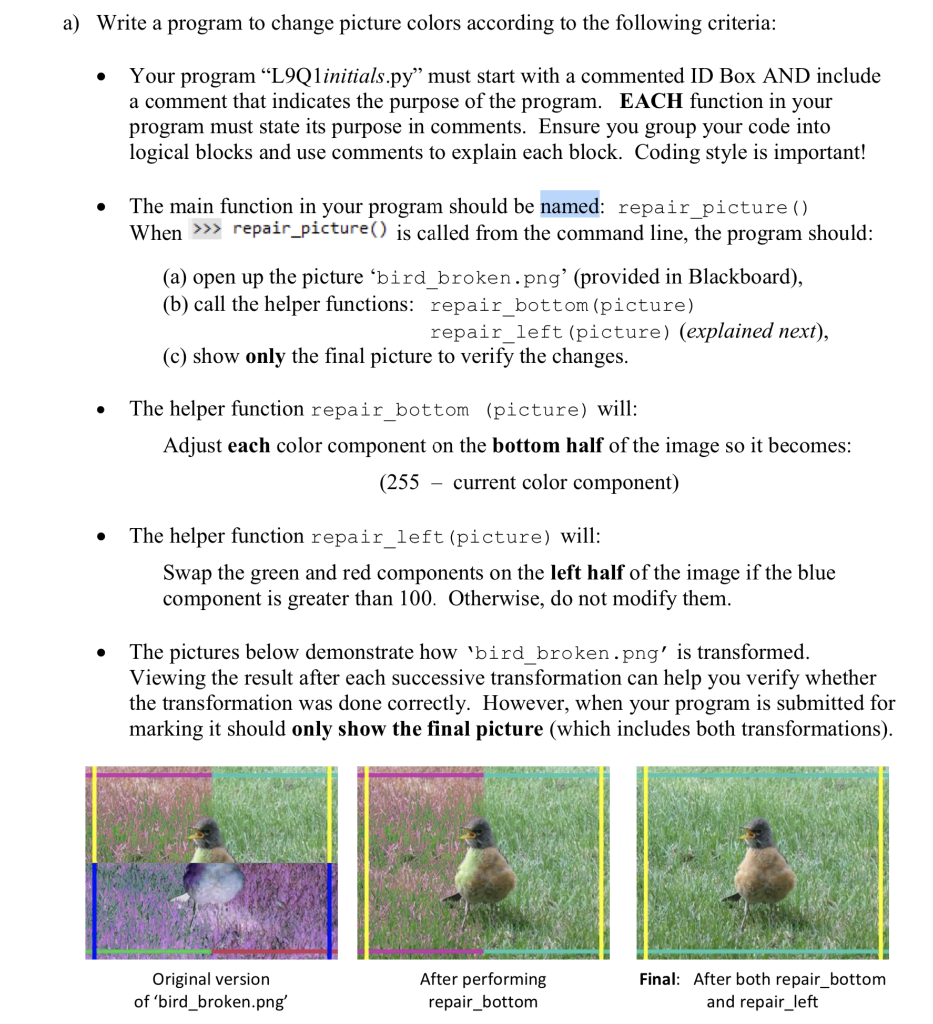
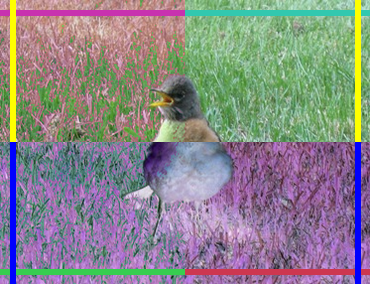
a) Write a program to change picture colors according to the following criteria: Your program "L9Q1initials.py" must start with a commented ID Box AND include a comment that indicates the purpose of the program. EACH function in your program must state its purpose in comments. Ensure you group your code into logical blocks and use comments to explain each block. Coding style is important! The main function in your program should be named: repair_picture () When >>> repair_picture() is called from the command line, the program should: (a) open up the picture 'bird_broken.png' (provided in Blackboard), (b) call the helper functions: repair_bottom (picture) repair_left (picture) (explained next), (c) show only the final picture to verify the changes. The helper function repair_bottom (picture) will: Adjust each color component on the bottom half of the image so it becomes: (255 - current color component) The helper function repair_left (picture) will: Swap the green and red components on the left half of the image if the blue component is greater than 100. Otherwise, do not modify them. The pictures below demonstrate how 'bird_broken.png' is transformed. Viewing the result after each successive transformation can help you verify whether the transformation was done correctly. However, when your program is submitted for marking it should only show the final picture (which includes both transformations). Original version of 'bird_broken.png' After performing repair_bottom Final: After both repair_bottom and repair_left VEYS DANE 2 92
Step by Step Solution
3.44 Rating (151 Votes )
There are 3 Steps involved in it
To solve this problem you need to write a Python program using image manipulation libraries such as PIL Python Imaging Library Heres a stepbystep guid... View full answer

Get step-by-step solutions from verified subject matter experts
 Study Help