







Question: A1B2: # A1B2.py, for IDSA A1 # Do NOT modify the given part, unless specified # TO BE COMPLETED by Student # FINISHED by: ,

 A1B2:
A1B2: 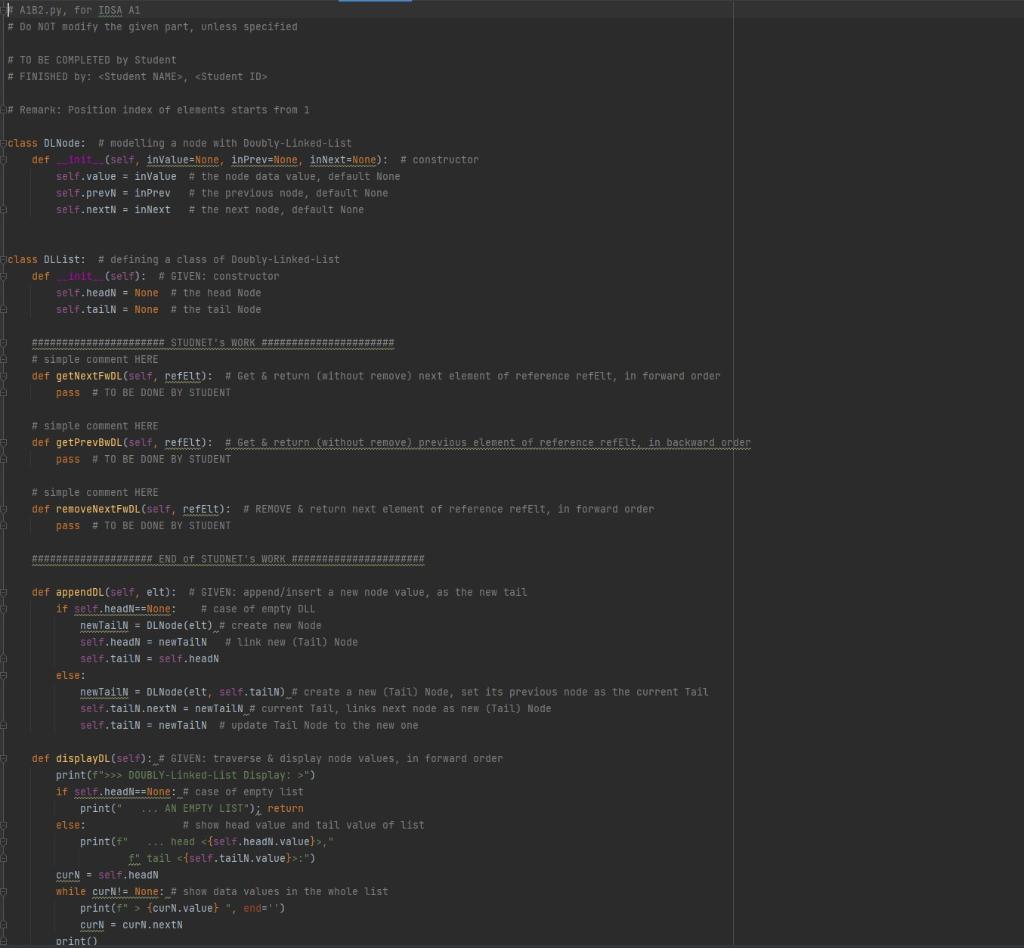
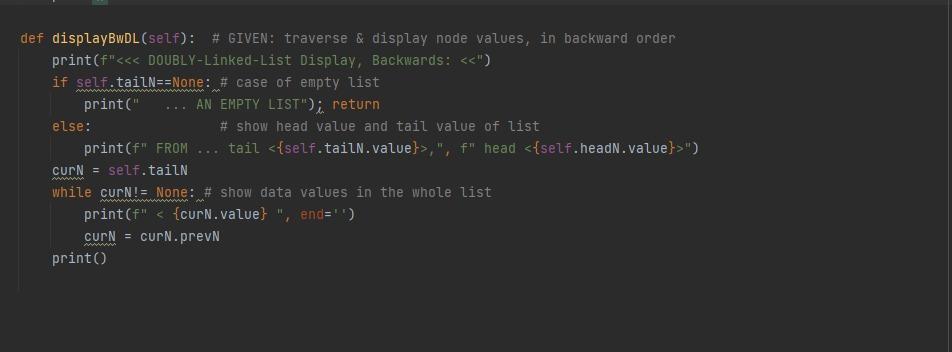
# A1B2.py, for IDSA A1 # Do NOT modify the given part, unless specified # TO BE COMPLETED by Student # FINISHED by:, # Remark: Position index of elements starts from 1 class DLNode: # modelling a node with Doubly-Linked-List def __init__(self, inValue=None, inPrev=None, inNext=None): # constructor self.value = inValue # the node data value, default None self.prevN = inPrev # the previous node, default None self.nextN = inNext # the next node, default None class DLList: # defining a class of Doubly-Linked-List def __init__(self): # GIVEN: constructor self.headN = None # the head Node self.tailN = None # the tail Node ###################### STUDNET's WORK ###################### # simple comment HERE def getNextFwDL(self, refElt): # Get & return (without remove) next element of reference refElt, in forward order pass # TO BE DONE BY STUDENT # simple comment HERE def getPrevBwDL(self, refElt): # Get & return (without remove) previous element of reference refElt, in backward order pass # TO BE DONE BY STUDENT # simple comment HERE def removeNextFwDL(self, refElt): # REMOVE & return next element of reference refElt, in forward order pass # TO BE DONE BY STUDENT #################### END of STUDNET's WORK ###################### def appendDL(self, elt): # GIVEN: append/insert a new node value, as the new tail if self.headN==None: # case of empty DLL newTailN = DLNode(elt) # create new Node self.headN = newTailN # link new (Tail) Node self.tailN = self.headN else: newTailN = DLNode(elt, self.tailN) # create a new (Tail) Node, set its previous node as the current Tail self.tailN.nextN = newTailN # current Tail, links next node as new (Tail) Node self.tailN = newTailN # update Tail Node to the new one def displayDL(self): # GIVEN: traverse & display node values, in forward order print(f">>> DOUBLY-Linked-List Display: >") if self.headN==None: # case of empty list print(" ... AN EMPTY LIST"); return else: # show head value and tail value of list print(f" ... head ," f" tail :") curN = self.headN while curN!= None: # show data values in the whole list print(f" > {curN.value} ", end='') curN = curN.nextN print() def displayBwDL(self): # GIVEN: traverse & display node values, in backward order print(f",", f" head ") curN = self.tailN while curN!= None: # show data values in the whole list print(f"
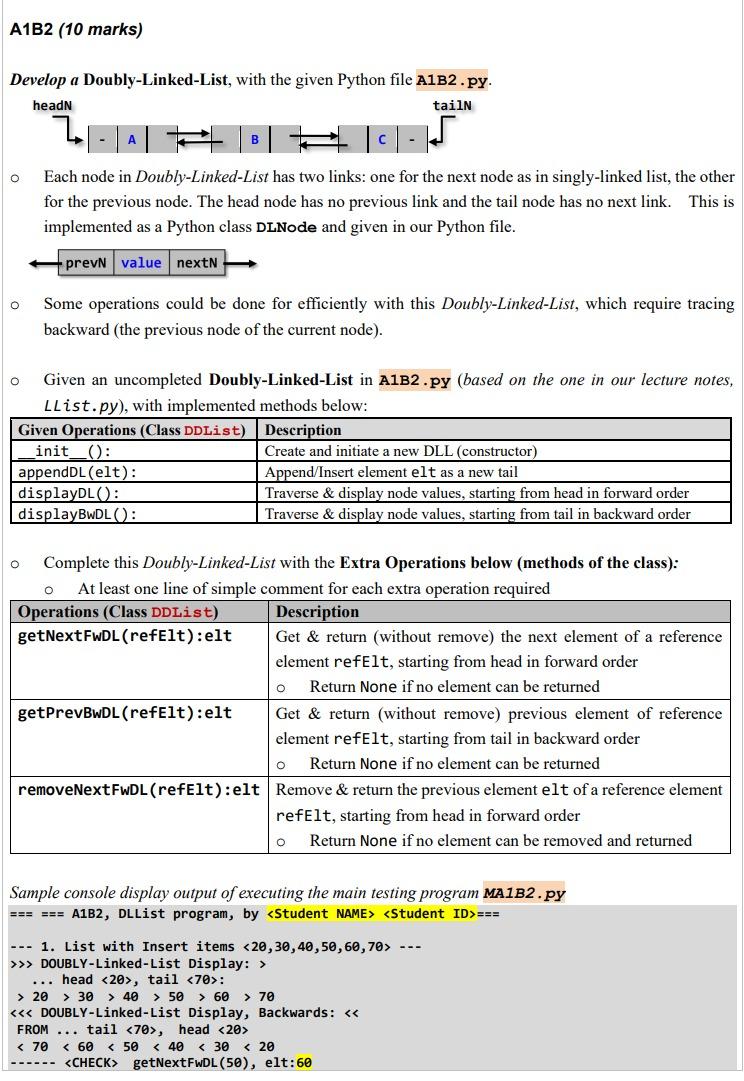
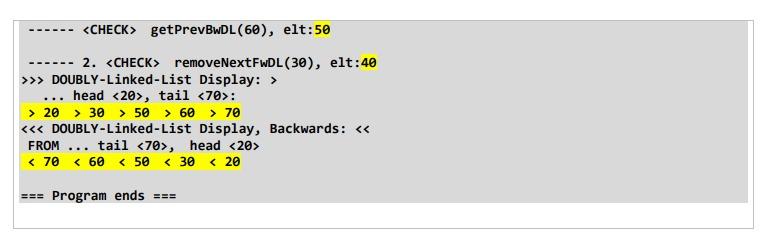
# MA1B2.py, for basic running and testing. # * DO NOT modify this given test file, except the STUDENT INFO part. # Main Testing Program from A1B2 import DLList def main(): print("=== === A1B2, DLList program, by ===") myL = DLList() myL.appendDL(20); myL.appendDL(30); myL.appendDL(40) myL.appendDL(50); myL.appendDL(60); myL.appendDL(70) print(" --- 1. List with Insert items ---") myL.displayDL() myL.displayBwDL() print(f" ------ getNextFwDL(50), elt:{myL.getNextFwDL(50)}") print(f" ------ getPrevBwDL(60), elt:{myL.getPrevBwDL(60)}") print(f" ------ 2. removeNextFwDL(30), elt:{myL.removeNextFwDL(30)}") myL.displayDL() myL.displayBwDL() print(" === Program ends === ") main() ORD UP! GRE ... Develop a Doubly-Linked-List, with the given Python file A1B2 .py. - Each node in Doubly-Linked-List has two links: one for the next node as in singly-linked list, the other for the previous node. The head node has no previous link and the tail node has no next link. This is implemented as a Python class DLNode and given in our Python file. - Some operations could be done for efficiently with this Doubly-Linked-List, which require tracing backward (the previous node of the current node). - Given an uncompleted Doubly-Linked-List in A1B2.py (based on the one in our lecture notes, LList.py), with implemented methods below: f - Complete this Doubly-Linked-List with the Extra Operations below (methods of the class): - At least one line of simple comment for each extra operation required Sample console display output of executing the main testing program MA1B2.pY --- 1. List with Insert items 20,30,40,50,60,70 >> DOUBLY-Linked-List Display: > head 20, tail 70 : >20>30>40>50>60>70 DOUBLY-Linked-List Display, Backwards: FROM ... tail 70, head 20 20>30>50>60>70 DOUBLY-Linked-List Display, Backwards: FROM ... tail 70, head 20
Step by Step Solution
There are 3 Steps involved in it

Get step-by-step solutions from verified subject matter experts
 Study Help