







Question: a=9 b=6 b=6 c=7 c= System 2. ac e-0.004s G(S) = Y(S) U(S) 782 + 3(b/15)s + c2 Symbology: M - Requires Math computation. It

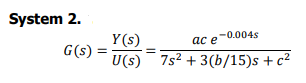
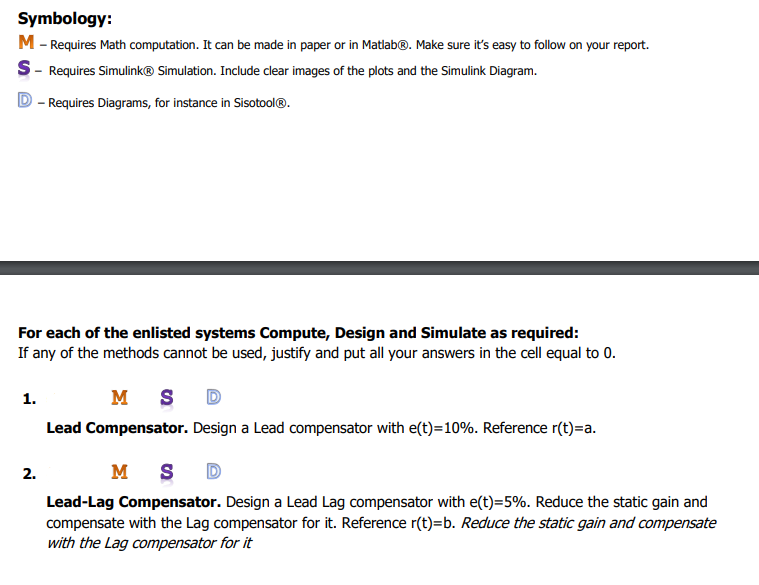
a=9 b=6 b=6 c=7 c= System 2. ac e-0.004s G(S) = Y(S) U(S) 782 + 3(b/15)s + c2 Symbology: M - Requires Math computation. It can be made in paper or in Matlab@. Make sure it's easy to follow on your report. S - Requires Simulink Simulation. Include clear images of the plots and the Simulink Diagram. D - Requires Diagrams, for instance in Sisotool. For each of the enlisted systems Compute, Design and Simulate as required: If any of the methods cannot be used, justify and put all your answers in the cell equal to 0. 1. MS D Lead Compensator. Design a Lead compensator with e(t)=10%. Reference r(t)=a. 2. M S D Lead-Lag Compensator. Design a Lead Lag compensator with e(t)=5%. Reduce the static gain and compensate with the Lag compensator for it. Reference r(t)=b. Reduce the static gain and compensate with the Lag compensator for it a=9 b=6 b=6 c=7 c= System 2. ac e-0.004s G(S) = Y(S) U(S) 782 + 3(b/15)s + c2 Symbology: M - Requires Math computation. It can be made in paper or in Matlab@. Make sure it's easy to follow on your report. S - Requires Simulink Simulation. Include clear images of the plots and the Simulink Diagram. D - Requires Diagrams, for instance in Sisotool. For each of the enlisted systems Compute, Design and Simulate as required: If any of the methods cannot be used, justify and put all your answers in the cell equal to 0. 1. MS D Lead Compensator. Design a Lead compensator with e(t)=10%. Reference r(t)=a. 2. M S D Lead-Lag Compensator. Design a Lead Lag compensator with e(t)=5%. Reduce the static gain and compensate with the Lag compensator for it. Reference r(t)=b. Reduce the static gain and compensate with the Lag compensator for it
Step by Step Solution
There are 3 Steps involved in it

Get step-by-step solutions from verified subject matter experts
 Study Help