







Question: a.Consider the following lines entered on the Python shell: >>> number = 10 >>> id (number) 14072129 >>> type (number) >>> number 10 Draw (or
-
a.Consider the following lines entered on the Python shell:
>>> number = 10
>>> id (number)
14072129
>>> type (number)
>>> number
10
Draw (or describe) the object and label that the Python interpreter creates in response to the assignment number = 10 in the interactive shell above. Your drawing or description should have a similar level of detail as described below
-
Include your drawing or text description in the solution document.
-
b.Consider the following two assignments:
- my_games = ['Zelda', 'Pokemon', 'Splatoon']
- my_games[1] = 'Minecraft'
Draw (or describe) the objects and labels that the Python interpreter creates in response to the first assignment.
Then draw (or describe) the objects and labels that results from carrying out the second assignment immediately after the first assignment.
-
Include your drawings or text descriptions in the solution document.
im looking for a box with 'ID' 'TYPE' and 'Value' showing how it changes please. something simillar to this:
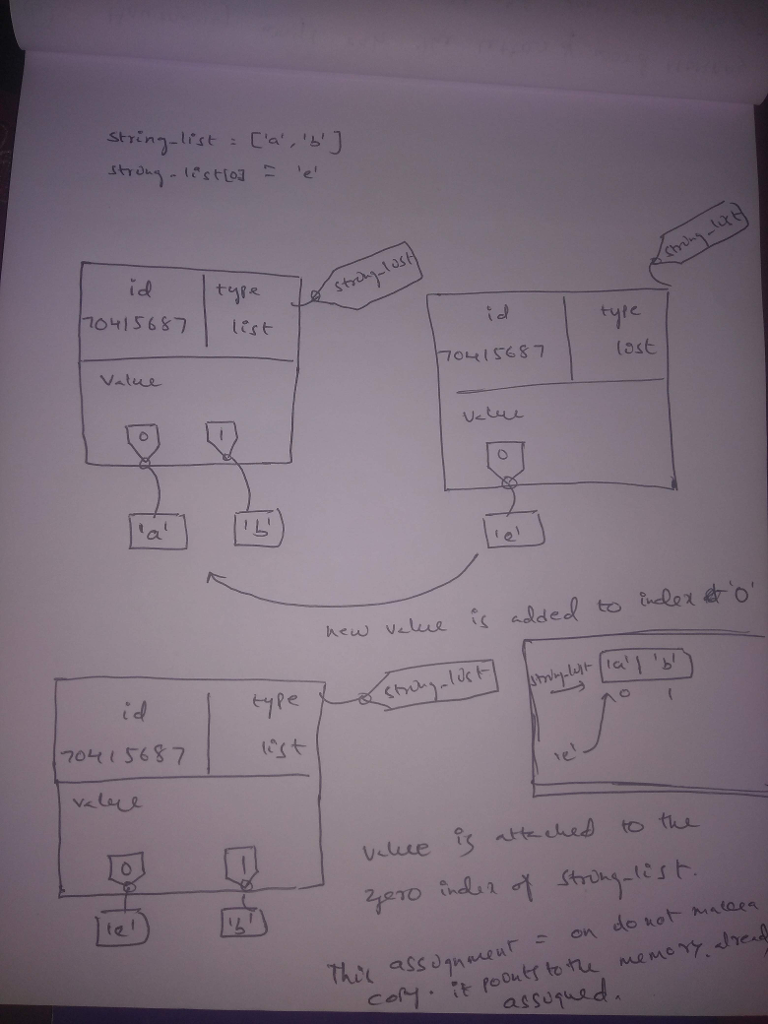
thanks
string list = ['a', 'b'] strong - testo] - le (string lat type id 170415687 strong-lost id list type lost 70415687 Value Value al new value is added to index of 'o' string lost strong list all 'b' id type 170415687 list valere 0 te! 14 valece is attached to the zero incles of string list. This assignment assuqueda on do not mallea cory. it poonts to the memory, alread
Step by Step Solution
There are 3 Steps involved in it

Get step-by-step solutions from verified subject matter experts
 Study Help