







Question: Activity 3 : Completing the GET Method In this activity you are required to fill in the code for GET method to display the To
Activity : Completing the GET Method
In this activity you are required to fill in the code for GET method to display the ToDolist as a
numbered list starting from index
Check the length of the ToDo List. If the ToDo List is empty, then the GET method will
respond with the message "Your ToDo list is empty. Well Done!!!"
If the ToDo List has items, then create a string list by concatenating all entries in the ToDo
List. To create the list use either map and join or forEach as you have done in
Activity
Send the response to the client by calling res. end using the appropriate message.
Check a sample run for the GET method below. The server responses are colored green.
Note that section in the book implements the GET method. However, you will need to
make some adjustments to the book's implementation to get the Sample Run below.
After testing the server, upload the updated todoSrv.js to BB
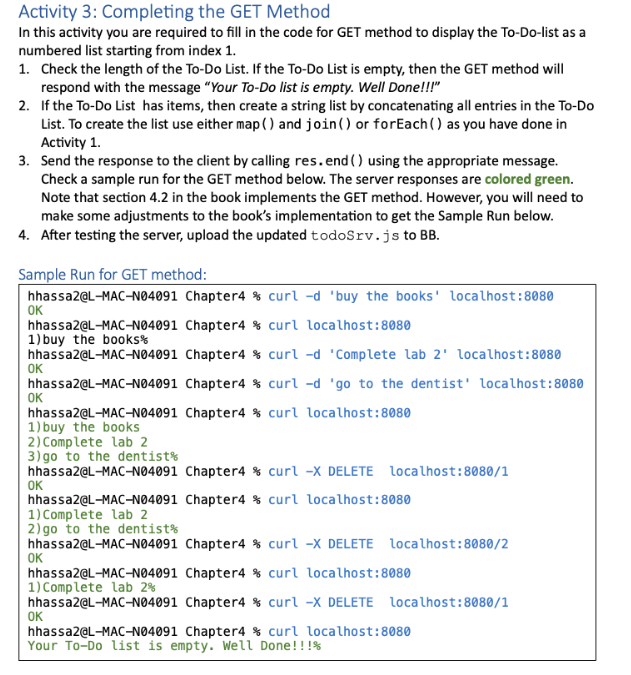
Sample Run for GET method:
hhassa@LMACN Chapter curl d 'buy the books' localhost:
OK
hhassa@LMACN Chapter curl localhost:
buy the books
hhassa@LMACN Chapter curl d 'Complete lab localhost:
OK
hhassa@LMACN Chapter curl d go to the dentist' localhost:
OK
hhassa@LMACN Chapter curl localhost:
buy the books
Complete lab
go to the dentist
hhassa@LMACN Chapter curl X DELETE localhost:
OK
hhassa@LMACN Chapter curl localhost:
Complete lab
go to the dentist
hhassa@LMACN Chapter curl X DELETE localhost:
OK
hhassa@LMACN Chapter curl localhost:
Complete lab
hhassa@LMACN Chapter curl X DELETE localhost:
OK
hhassa@LMACN Chapter curl localhost:
Your ToDo list is empty. Well Done!!!
Step by Step Solution
There are 3 Steps involved in it
1 Expert Approved Answer
Step: 1 Unlock

Question Has Been Solved by an Expert!
Get step-by-step solutions from verified subject matter experts
Step: 2 Unlock
Step: 3 Unlock
 Study Help