







Question: Address the topology using the given address ranges. 2. Configure the PCs with IP addresses, subnet masks, and Default Gateways 3. Configure the router interfaces
Address the topology using the given address ranges. 2. Configure the PCs with IP addresses, subnet masks, and Default Gateways 3. Configure the router interfaces and the needed static and/or default routing. 4. Test connectivity between PCs. They should be able to communicate. please enter the line of commands for the routers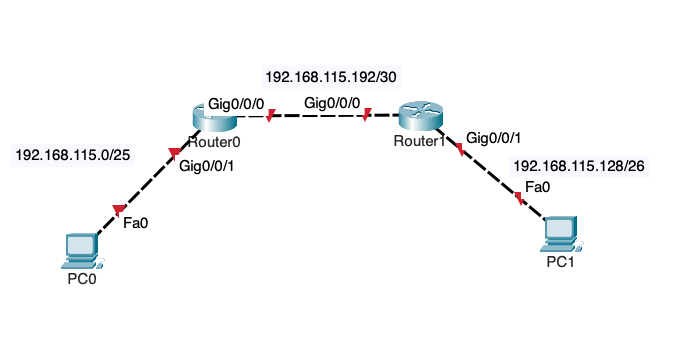
192.168.115.0/25 PCO Fa0 192.168.115.192/30 Gig0/0/0 Gig0/0/0 RouterO Gig0/0/1 Router Gig0/0/1 192.168.115.128/26 Fa0 PC1
Step by Step Solution
There are 3 Steps involved in it
1 Expert Approved Answer
Step: 1 Unlock

Question Has Been Solved by an Expert!
Get step-by-step solutions from verified subject matter experts
Step: 2 Unlock
Step: 3 Unlock
 Study Help