



Question: I want a solution with writing all codes Scenario: You are a network administrator of Bank Muscat. Your task is to configure the following: Create
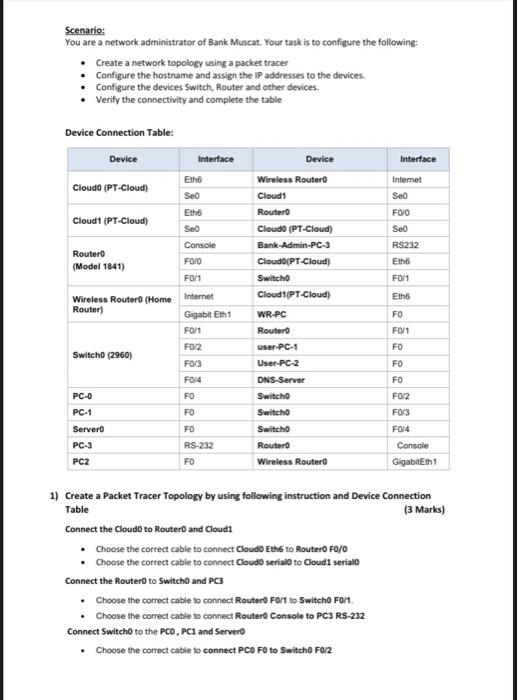
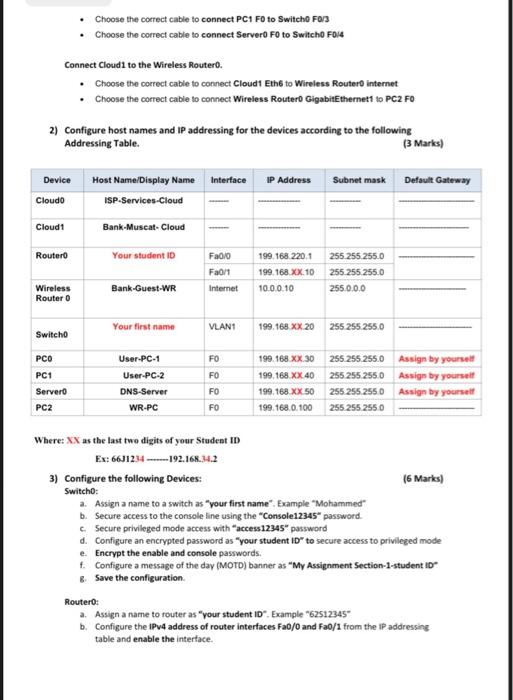
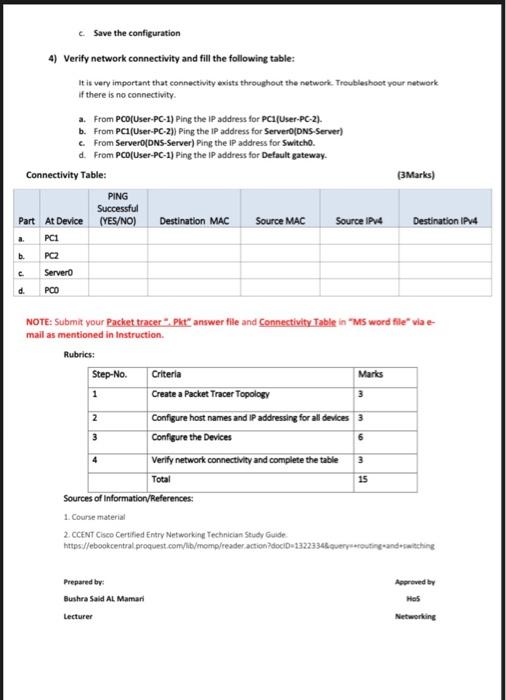
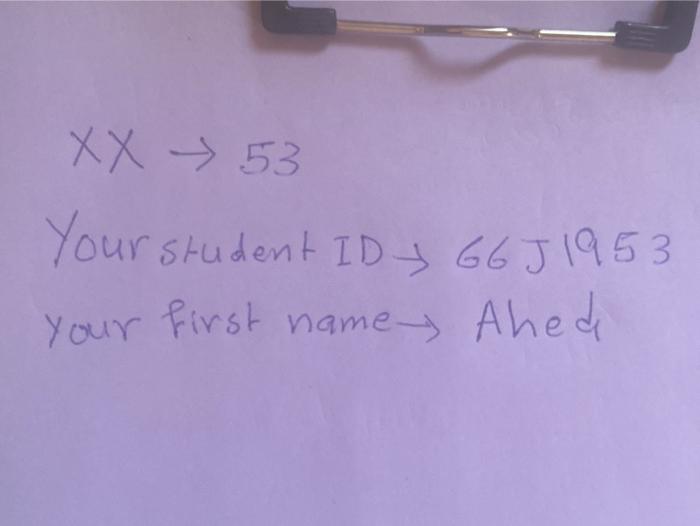
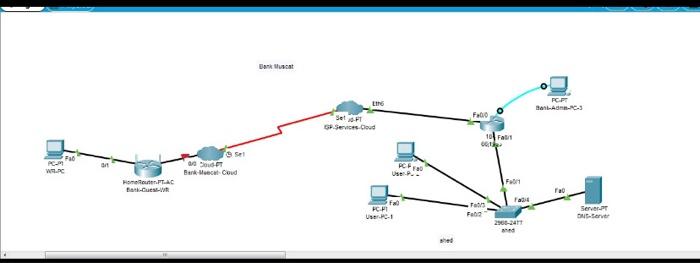
Scenario: You are a network administrator of Bank Muscat. Your task is to configure the following: Create a network topology using a packet tracer Configure the hostname and assign the IP addresses to the devices. Configure the devices Switch, Router and other devices. Verify the connectivity and complete the table Device Connection Table: Device Interface Device Interface Cloud (PT-Cloud) Eth Seo Internet Seo FOO Wireless Router Cloud Router Cloudo (PT-Cloud) Bank-Admin-PC-3 Cloudo(PT-Cloud Switch Seo RS232 Ethe FO/1 Eth Cloud 1(PT-Cloud) FO Eth Cloud (PT-Cloud) Seo Console Router FOJO (Model 1841) FOM Wireless Router (Home Internet Router) Gigabit Eth1 FOM FO/2 Switch (2960) FO/3 F014 PC-0 FO PC-1 FO Servero FO PC-3 RS-232 PC2 FO FO1 FO FO FO WR-PC Router user-PC-1 User-PC-2 DNS-Server Switcho Switcho Switcho Routero Wireless Router FO/2 FO/3 F0/4 Console GigabitEth 1) Create a Packet Tracer Topology by using following instruction and Device Connection Table (3 Marks) Connect the Cloud to Router and Cloudi Choose the correct cable to connect Cloud Eths to Routero Fo/o Choose the correct cable to connect Cloudo serialo to Cloudi serialo Connect the Router to Switch and PC3 Choose the correct cable to connect Router Fol to Switcho Fort Choose the correct cable to connect Router Console to PC3 RS-232 Connect Switch to the PCO, PCI and Server Choose the correct cable to connect PCO FO to Switcho Fa/2 Choose the correct cable to connect PC1 FO to Switch F0/3 . Choose the correct cable to connect Server FO to Switcho Fole Connect Cloud to the Wireless Routero. Choose the correct cable to connect Cloudt Ethe to Wireless Routero internet Choose the correct cable to connect Wireless Routero GigabitEthernet to PC2 FO 2) Configure host names and IP addressing for the devices according to the following Addressing Table (3 Marks) IP Address Subnet mask Default Gateway Device Cloudo Host Name/DisplayName Interface ISP-Services-Cloud Bank-Muscat-Cloud Cloudt Router Your student ID Faolo Faolt Internet 199.168.220.1 199.168.XX. 10 10.0.0.10 255.255.255.0 255.255.255.0 255.0.0.0 Wireless Router 0 Bank-Guest-WR Your first name VLAN 199.168.XX.20 255.255.255.0 Switcho FO FO PCO PC1 Servero PC2 User-PC-1 User-PC-2 DNS-Server WR-PC 199.168.XX.30 199. 168. XX.40 199,168 XX 50 199.168.0.100 255.255.255.0 Assign by yourself 255 255 255 0 Assign by yourself 255 255.2550 Assign by yourself 255.255.255.0 FO FO Where: XX as the last two digits of your Student ID Ex: 66J1234 -------192.168.4.2 3) Configure the following Devices: 16 Marks) Switcho a. Assign a name to a switch as your first name". Example "Mohammed b. Secure access to the console line using the "Console12345 password Secure privileged mode access with access 12345" password d. Configure an encrypted password as "your student 1D" to secure access to privileged mode e. Encrypt the enable and console passwords. t. Configure a message of the day (MOTD) banner as My Assignment Section-1-student ID & Save the configuration Router: a. Assign a name to router as your student ID. Example "62512345" b. Configure the IPv4 address of router interfaces Fa0/0 and Fa0/1 from the IP addressing table and enable the interface. Save the configuration 4) Verify network connectivity and fill the following table: It is very important that connectivity exists throughout the network Troubleshoot your network if there is no connectivity a. From PCO(User-PC-1) Ping the IP address for PC (User-PC-2). b. From PC1(User-PC-2)} Ping the IP address for Server DNS-Server) c. From Server DNS-Server) Ping the IP address for Switcho. d. From PCO(User-PC-1) Ping the IP address for Default gateway. Connectivity Table: PING Successful Part At Device (YES/NO) Destination MAC Source MAC Source IPv4 (3Marks) Destination IPv4 .. PCI b. PC2 c Servero d. PCO 2 NOTE: Submit your Packet tracer Pkt answer tile and Connectivity Table in "Ms word file via e- mail as mentioned in Instruction Rubrics: Step-No. Criteria Marks 1 Create a Packet Tracer Topology 3 Configure host names and IP addressing for all devices 3 Configure the Devices Verify network connectivity and complete the table Total 15 Sources of Information/References: 1. Course material 2. CCENT Cisco Certified Entry Networking Technician Study Guide https://ebookcentral proquest.com/lib/momp/reader action?docID=122233.4.querrerouting and switching 3 6 3 Approved by Prepared by: Bushra Said Al Mamari Lecturer Networking XX 53 Your student ID 66J 1953 your first name Ahede Buscat BLAC3 LING SetF1 SP Services Coud F00 toate oth PC WRC OS ET Bank Meca Cord FC HomePAC F FC F Fa: DHDerve Server 2002 Scenario: You are a network administrator of Bank Muscat. Your task is to configure the following: Create a network topology using a packet tracer Configure the hostname and assign the IP addresses to the devices. Configure the devices Switch, Router and other devices. Verify the connectivity and complete the table Device Connection Table: Device Interface Device Interface Cloud (PT-Cloud) Eth Seo Internet Seo FOO Wireless Router Cloud Router Cloudo (PT-Cloud) Bank-Admin-PC-3 Cloudo(PT-Cloud Switch Seo RS232 Ethe FO/1 Eth Cloud 1(PT-Cloud) FO Eth Cloud (PT-Cloud) Seo Console Router FOJO (Model 1841) FOM Wireless Router (Home Internet Router) Gigabit Eth1 FOM FO/2 Switch (2960) FO/3 F014 PC-0 FO PC-1 FO Servero FO PC-3 RS-232 PC2 FO FO1 FO FO FO WR-PC Router user-PC-1 User-PC-2 DNS-Server Switcho Switcho Switcho Routero Wireless Router FO/2 FO/3 F0/4 Console GigabitEth 1) Create a Packet Tracer Topology by using following instruction and Device Connection Table (3 Marks) Connect the Cloud to Router and Cloudi Choose the correct cable to connect Cloud Eths to Routero Fo/o Choose the correct cable to connect Cloudo serialo to Cloudi serialo Connect the Router to Switch and PC3 Choose the correct cable to connect Router Fol to Switcho Fort Choose the correct cable to connect Router Console to PC3 RS-232 Connect Switch to the PCO, PCI and Server Choose the correct cable to connect PCO FO to Switcho Fa/2 Choose the correct cable to connect PC1 FO to Switch F0/3 . Choose the correct cable to connect Server FO to Switcho Fole Connect Cloud to the Wireless Routero. Choose the correct cable to connect Cloudt Ethe to Wireless Routero internet Choose the correct cable to connect Wireless Routero GigabitEthernet to PC2 FO 2) Configure host names and IP addressing for the devices according to the following Addressing Table (3 Marks) IP Address Subnet mask Default Gateway Device Cloudo Host Name/DisplayName Interface ISP-Services-Cloud Bank-Muscat-Cloud Cloudt Router Your student ID Faolo Faolt Internet 199.168.220.1 199.168.XX. 10 10.0.0.10 255.255.255.0 255.255.255.0 255.0.0.0 Wireless Router 0 Bank-Guest-WR Your first name VLAN 199.168.XX.20 255.255.255.0 Switcho FO FO PCO PC1 Servero PC2 User-PC-1 User-PC-2 DNS-Server WR-PC 199.168.XX.30 199. 168. XX.40 199,168 XX 50 199.168.0.100 255.255.255.0 Assign by yourself 255 255 255 0 Assign by yourself 255 255.2550 Assign by yourself 255.255.255.0 FO FO Where: XX as the last two digits of your Student ID Ex: 66J1234 -------192.168.4.2 3) Configure the following Devices: 16 Marks) Switcho a. Assign a name to a switch as your first name". Example "Mohammed b. Secure access to the console line using the "Console12345 password Secure privileged mode access with access 12345" password d. Configure an encrypted password as "your student 1D" to secure access to privileged mode e. Encrypt the enable and console passwords. t. Configure a message of the day (MOTD) banner as My Assignment Section-1-student ID & Save the configuration Router: a. Assign a name to router as your student ID. Example "62512345" b. Configure the IPv4 address of router interfaces Fa0/0 and Fa0/1 from the IP addressing table and enable the interface. Save the configuration 4) Verify network connectivity and fill the following table: It is very important that connectivity exists throughout the network Troubleshoot your network if there is no connectivity a. From PCO(User-PC-1) Ping the IP address for PC (User-PC-2). b. From PC1(User-PC-2)} Ping the IP address for Server DNS-Server) c. From Server DNS-Server) Ping the IP address for Switcho. d. From PCO(User-PC-1) Ping the IP address for Default gateway. Connectivity Table: PING Successful Part At Device (YES/NO) Destination MAC Source MAC Source IPv4 (3Marks) Destination IPv4 .. PCI b. PC2 c Servero d. PCO 2 NOTE: Submit your Packet tracer Pkt answer tile and Connectivity Table in "Ms word file via e- mail as mentioned in Instruction Rubrics: Step-No. Criteria Marks 1 Create a Packet Tracer Topology 3 Configure host names and IP addressing for all devices 3 Configure the Devices Verify network connectivity and complete the table Total 15 Sources of Information/References: 1. Course material 2. CCENT Cisco Certified Entry Networking Technician Study Guide https://ebookcentral proquest.com/lib/momp/reader action?docID=122233.4.querrerouting and switching 3 6 3 Approved by Prepared by: Bushra Said Al Mamari Lecturer Networking XX 53 Your student ID 66J 1953 your first name Ahede Buscat BLAC3 LING SetF1 SP Services Coud F00 toate oth PC WRC OS ET Bank Meca Cord FC HomePAC F FC F Fa: DHDerve Server 2002
Step by Step Solution
There are 3 Steps involved in it

Get step-by-step solutions from verified subject matter experts