







Question: Addressing Table Device Interface IP Address Subnet Mask S1 255.255.255.0 VLAN 1 VLAN 1 S2 192.168.1.1 192.168.1.2 192.168.1.10 192.168.1.11 NIC PC-A PC-B 255.255.255.0 255.255.255.0 255.255.255.0
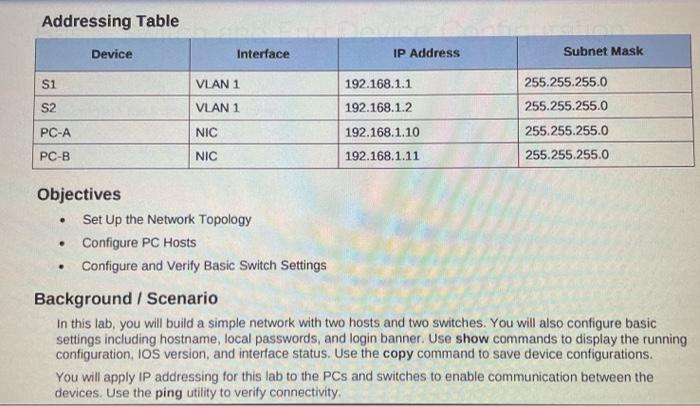
Addressing Table Device Interface IP Address Subnet Mask S1 255.255.255.0 VLAN 1 VLAN 1 S2 192.168.1.1 192.168.1.2 192.168.1.10 192.168.1.11 NIC PC-A PC-B 255.255.255.0 255.255.255.0 255.255.255.0 NIC . . . Objectives Set Up the Network Topology Configure PC Hosts Configure and verify Basic Switch Settings Background / Scenario In this lab, you will build a simple network with two hosts and two switches. You will also configure basic settings including hostname, local passwords, and login banner. Use show commands to display the running configuration, IOS version, and interface status. Use the copy command to save device configurations. You will apply IP addressing for this lab to the PCs and switches to enable communication between the devices. Use the ping utility to verify connectivity
Step by Step Solution
There are 3 Steps involved in it

Get step-by-step solutions from verified subject matter experts
 Study Help