







Question: Adjust the query below to return the name and old_name of the countries! Adjust the composite data type and rename it to name_oldname_type. If old_name
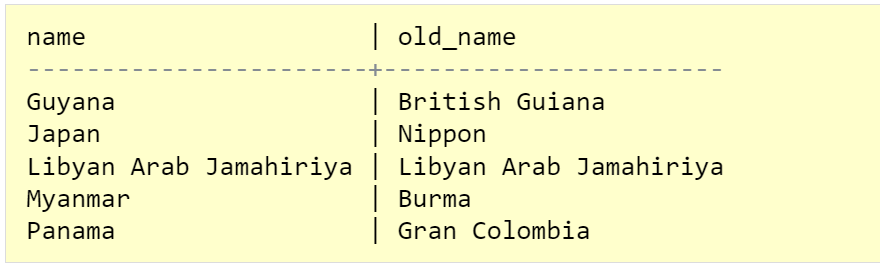
Adjust the query below to return the name and old_name of the countries! Adjust the composite data type and rename it to name_oldname_type. If old_name is an empty text string '', then replace it with name. This can be done easily by combining the functions COALESCE() and NULLIF(). In the function call, select countries whose names contain 'pan' or 'yan' (case-insensitive). Expected result:
Query to be Adjusted:
-- Create a composite data type nps_type: DROP TYPE IF EXISTS nps_type CASCADE; CREATE TYPE nps_type AS (name TEXT, population INT, surfacearea REAL);
-- Function definition: CREATE OR REPLACE FUNCTION get_country(TEXT) RETURNS SETOF nps_type AS $$ SELECT name, population, surfacearea FROM world.country WHERE LOWER(name) SIMILAR TO '%' || LOWER($1) || '%' ORDER BY name; $$ STABLE LANGUAGE SQL;
-- Function call: SELECT * FROM get_country('[MN]e') AS countries;
Expected Result:
HINT
The new composite data type will have two values name TEXT and old_name TEXT.
An empty text string old_name can be replaced with name via COALESCE(NULLIF(old_name, ''), name).
\begin{tabular}{l|l} name & old_name \\ \hline Guyana & British Guiana \\ Japan & Nippon \\ Libyan Arab Jamahiriya & Libyan Arab Jamahiriya \\ Myanmar & Burma \\ Panama & Gran Colombia \end{tabular}
Step by Step Solution
There are 3 Steps involved in it

Get step-by-step solutions from verified subject matter experts
 Study Help