







Question: ALL MODIFY CODES MUST BE IN r 1. In the lecture, we wrote an R function to apply the batch gradient descent algorithm to fit



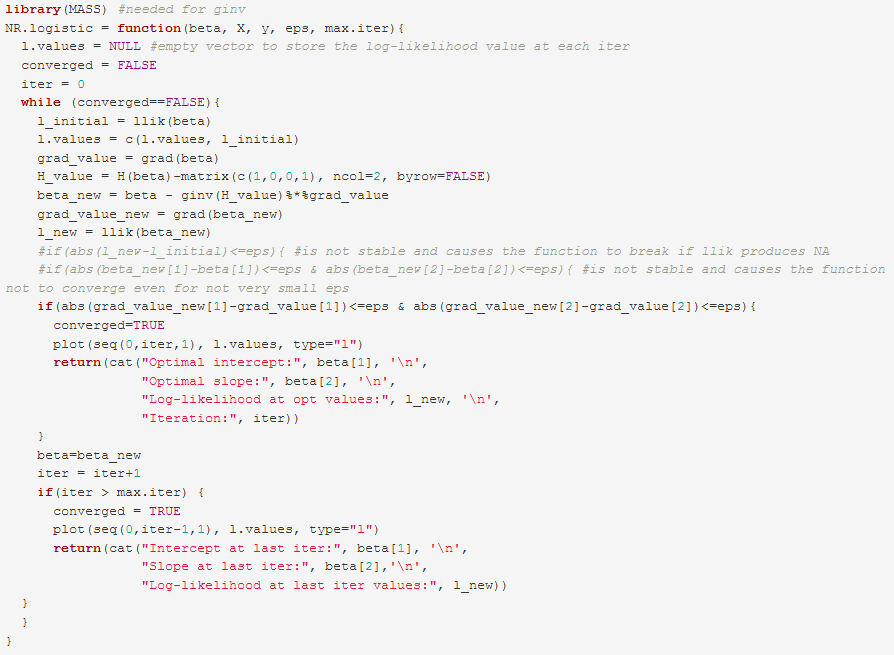
ALL MODIFY CODES MUST BE IN "r"
1. In the lecture, we wrote an R function to apply the batch gradient descent algorithm to fit a linear regression model describing the relationship between the variables dist and speed in the cars data. Modify that function to make it implement the stochastic gradient descent algorithm to solve the same probem. Compare the results and computing time for the two algorithms (batch versus stochastic gradient descent). To ensure a fair comparison, make sure to use the same inputs for both algorithms (initial values, learning rate, convergence threshhold, and maximum number of iterations). For these paramters, use the samee inputs we used in the lecture. In your comparison, include the following: b. Which algorithm takes longer to converge? (Hint: to monitor the time each algorithm takes, use the command system. time when you apply each of the two algorithms to the data). If you name the two functions gd.lreg and sgd. lreg, you can make R report the time each function takes to run on the data using the following code: system.time({sgd. lreg (speed, dist, 0.001, le-10, 1000000))) library (MASS) #needed for ginv NR. logistic = function (beta, x, y, eps, max.iter) { 1.values = NULL #empty vector to store the log-likelihood value at each iter converged = FALSE iter = 0 while (converged==FALSE) { 1_initial = llik (beta) 1.values = c(1.values, i_initial) grad_value = grad (beta) H_value = H (beta) -matrix(c(1,0,0,1), ncol-2, byrow=FALSE) beta_new = beta - ginv (H_value) ***grad_value grad_value_new = grad (beta_new) l new = llik (beta new) #if (abs (1 new-l initial) max. iter) { converged = TRUE plot (seg(0, iter-1,1), 1.values, type="1") return(cat ("Intercept at last iter:", beta[1], ' ', "Slope at last iter:", beta[2], ' ', "Log-likelihood at last iter values:", 1_new)) 1. In the lecture, we wrote an R function to apply the batch gradient descent algorithm to fit a linear regression model describing the relationship between the variables dist and speed in the cars data. Modify that function to make it implement the stochastic gradient descent algorithm to solve the same probem. Compare the results and computing time for the two algorithms (batch versus stochastic gradient descent). To ensure a fair comparison, make sure to use the same inputs for both algorithms (initial values, learning rate, convergence threshhold, and maximum number of iterations). For these paramters, use the samee inputs we used in the lecture. In your comparison, include the following: b. Which algorithm takes longer to converge? (Hint: to monitor the time each algorithm takes, use the command system. time when you apply each of the two algorithms to the data). If you name the two functions gd.lreg and sgd. lreg, you can make R report the time each function takes to run on the data using the following code: system.time({sgd. lreg (speed, dist, 0.001, le-10, 1000000))) library (MASS) #needed for ginv NR. logistic = function (beta, x, y, eps, max.iter) { 1.values = NULL #empty vector to store the log-likelihood value at each iter converged = FALSE iter = 0 while (converged==FALSE) { 1_initial = llik (beta) 1.values = c(1.values, i_initial) grad_value = grad (beta) H_value = H (beta) -matrix(c(1,0,0,1), ncol-2, byrow=FALSE) beta_new = beta - ginv (H_value) ***grad_value grad_value_new = grad (beta_new) l new = llik (beta new) #if (abs (1 new-l initial) max. iter) { converged = TRUE plot (seg(0, iter-1,1), 1.values, type="1") return(cat ("Intercept at last iter:", beta[1], ' ', "Slope at last iter:", beta[2], ' ', "Log-likelihood at last iter values:", 1_new))
Step by Step Solution
There are 3 Steps involved in it

Get step-by-step solutions from verified subject matter experts
 Study Help