







Question: All scripts should be placed in the bin / directory, in the user account s home directory. As a convenience, this directory is included in
All scripts should be placed in the bin directory, in the user accounts home directory. As a convenience,
this directory is included in the users PATH. Scripts should have exactly the specified filename, and note that
only those files will be submitted, so your scripts will need to be self contained
There are several test files in directories audio and playlists that may be helpful for testing scripts,
and examples are given below to clarify how your scripts should work. However, students are encouraged to
thoroughly test each script on other files before submitting the TA will use other files to test your scripts
catmush
Write a Bash script named catmu sh that takes one or more MUformat playlist files as arguments, and
displays the duration, title, and artist information for each track, and the total duration for the playlist.
Input format
The script output should be based on the #EXTINF lines in the playlist files, which will always have the form
#EXTINF : seconds, trackinfo
where seconds is an integer and trackinfo is the remaining characters on the line. Your script should handle
MSU text files where line feeds may be indicated by a linefeed character LF or
a carriagereturn
character CR or r or a carriagereturn character followed by a linefeed character. The playlists
directory has examples of each.
Output format
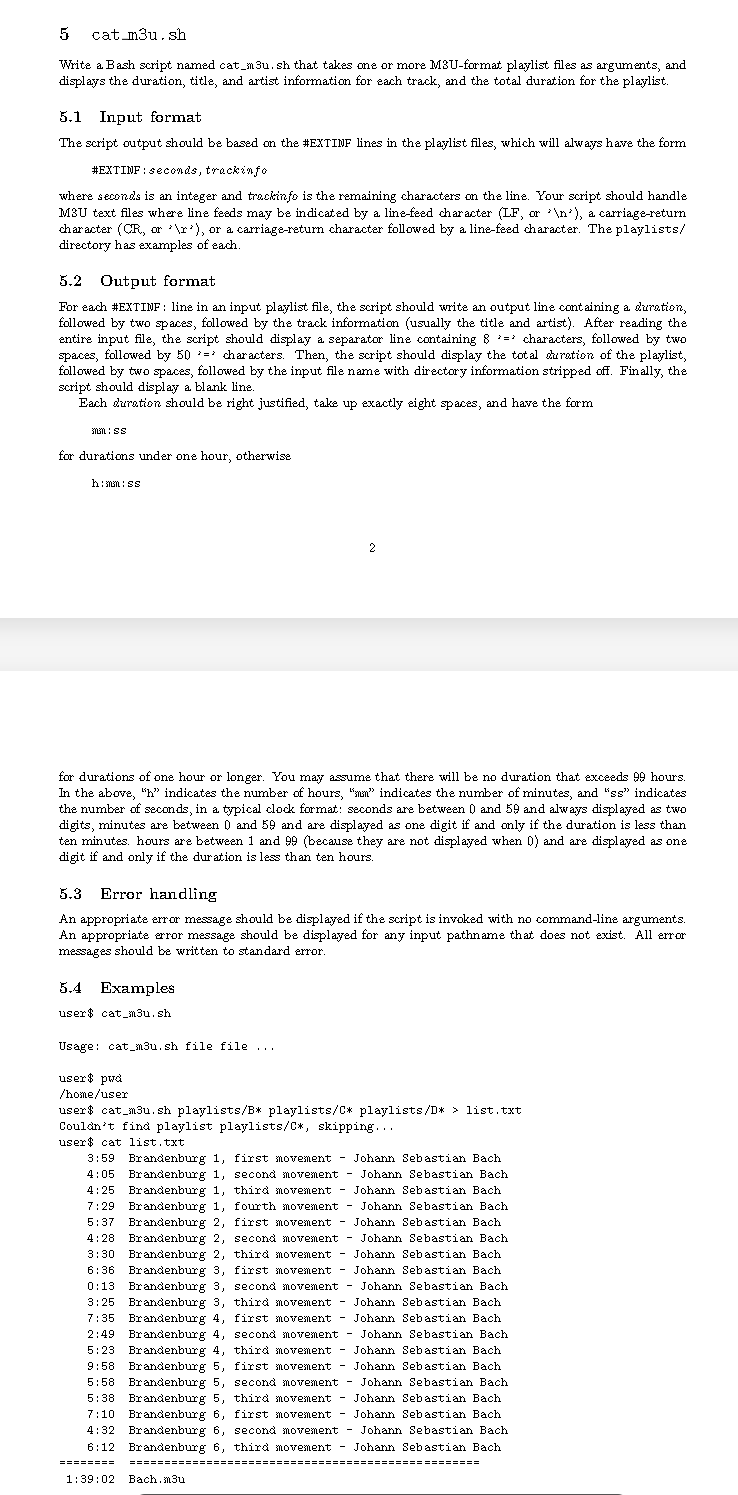
For each #EXTINF: line in an input playlist file, the script should write an output line containing a duration,
followed by two spaces, followed by the track information usually the title and artist After reading the
entire input file, the script should display a separator line containing : characters, followed by two
spaces, followed by characters. Then, the script should display the total duration of the playlist,
followed by two spaces, followed by the input file name with directory information stripped off. Finally, the
script should display a blank line.
Each duration should be right justified, take up exactly eight spaces, and have the form
loti: ss
for durations under one hour, otherwise
h: man: ss
for durations of one hour or longer. You may assume that there will be no duration that exceeds hours.
In the above, h indicates the number of hours, "sunn" indicates the number of minutes, and ss indicates
the number of seconds, in a typical clock format: seconds are between and and always displayed as two
digits, minutes are between and and are displayed as one digit if and only if the duration is less than
ten minutes. hours are between and because they are not displayed when and are displayed as one
digit if and only if the duration is less than ten hours.
Error handling
An appropriate error message should be displayed if the script is invoked with no commandline arguments.
An appropriate error message should be displayed for any input pathname that does not exist. All error
messages should be written to standard error.
Examples
user catnush
Usage: catmush file file
user $ pwd
homeuser
user$ catmush playlistsB playlistsC playlistsD list.txt
Couldn't find playlist playlistsC skipping...
user$ cat list.txt
: Brandenburg first movement Joharn Sebastian Bach
: Brandenburg second movement Joharn Sebastian Bach
: Brandenburg third movement Joharn Sebastian Bach
: Brandenburg fourth movement Johann Sebastian Bach
: Brandenburg first movement Joharn Sebastian Bach
: Brandenburg second movement Joharn Sebastian Bach
: Brandenburg third movement Johann Sebastian Bach
: Brandenburg first movement Joharn Sebastian Bach
: Brandenburg second movement Joharn Sebastian Bach
: Brandenburg third movement Johann Sebastian Bach
: Brandenburg first movement Joharn Sebastian Bach
: Brandenburg second movement Johann Sebastian Bach
: Brandenburg third movement Johann Sebastian Bach
: Brandenburg first movement Joharn Sebastian Bach
: Brandenburg second movement Johann Sebastian Bach
: Brandenburg third movement Joharn Sebastian Bach
: Brandenburg first movement Johann Sebastian Bach
: Brandenburg second movement Johann Sebastian Bach
: Brandenburg third movement Joharn Sebastian Bach
:: Bach,mu
Step by Step Solution
There are 3 Steps involved in it
1 Expert Approved Answer
Step: 1 Unlock

Question Has Been Solved by an Expert!
Get step-by-step solutions from verified subject matter experts
Step: 2 Unlock
Step: 3 Unlock
 Study Help