







Question: ALL THE DOCUMENTS ARE PROVIDED, ONLY THING THERE IS ' jquery.sparkline.2.1.2.js ' needs to be downloaded: HERE IS THE CSS CODE: header h1.mdl-layout-title { font-size:
ALL THE DOCUMENTS ARE PROVIDED,
ONLY THING THERE IS ' jquery.sparkline.2.1.2.js ' needs to be downloaded:
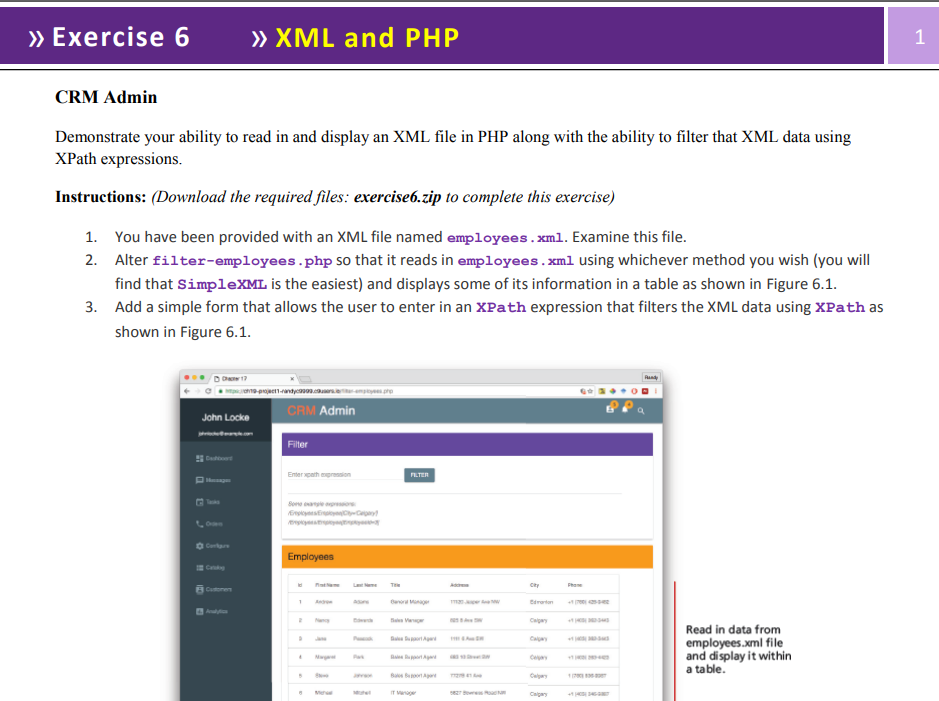
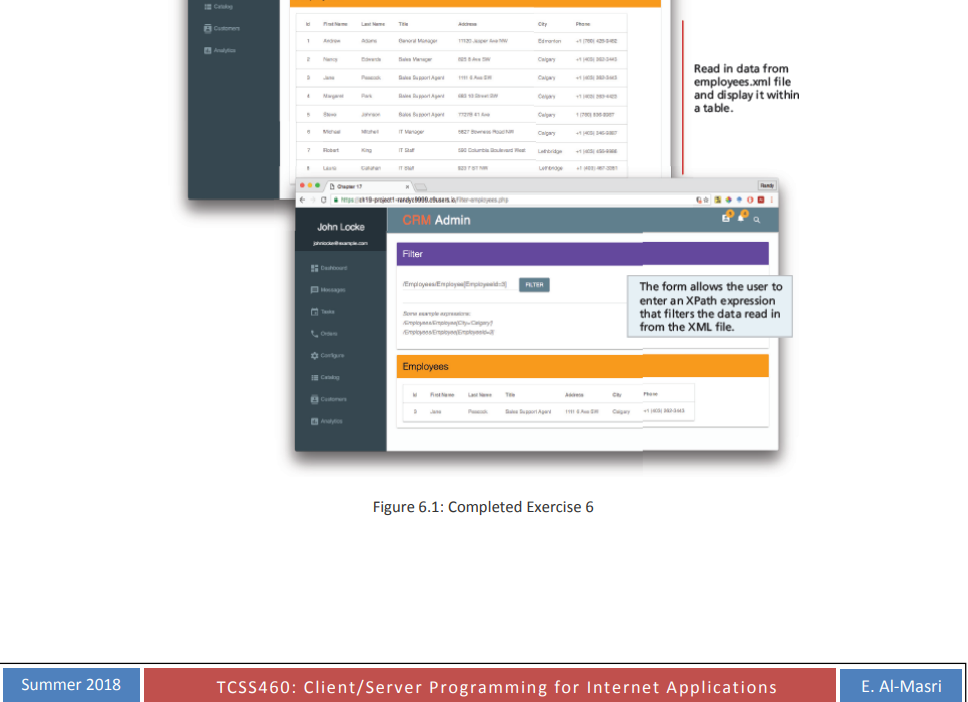
HERE IS THE CSS CODE:
header h1.mdl-layout-title {
font-size: 32px;
color: white;
}
header h1 span {
color: #ff6e40;
}
.profile {
background-color: #263238;
display: flex;
align-items: center;
justify-content: center;
flex-wrap: wrap;
padding: 10px;
}
.profile span {
font-size: 90%;
}
.avatar {
width: 96px;
height: 96px;
border-radius: 50%;
display: block;
}
.page-content {
margin: 10px;
}
main header {
margin: 0;
min-height: 40px;
padding-left: 10px;
padding-top: 5px;
}
main header h4 {
margin: 0;
font-size: 18px;
}
.card-lesson {
min-width: 200px;
min-height: 100px;
}
.card-lesson > .mdl-card__actions {
display: flex;
box-sizing: border-box;
align-items: center;
}
.card-lesson > .mdl-card__title {
align-items: flex-start;
}
.card-lesson > .mdl-card__title > h4 {
margin-top: 0;
}
.card-lesson > .mdl-card__title, .card-lesson > .mdl-card__supporting-text, .card-lesson > .mdl-card__actions, .card-lesson > .mdl-card__actions > .mdl-button {
_color: #fff;
}
.inlinesparkline {width: 70%;}
HERE IS THE 'includes' FOLDER --> header.inc.php:
CRM Admin
id="fixed-header-drawer-exp">
HERE IS THE 'includes' FOLDER --> left-nav.inc.php:
John Locke
johnlocke@example.com
dashboard Dashboard
message Messages
event Tasks
call Orders
settings Configure
view_list Catalog
contacts Customers
insert_chart Analytics
HERE IS THE 'employees.xml ':
HERE IS THE filter-employees.php:
?>
Filter
Employees
| Id | First Name | Last Name | Title | Address | City | Phone |
|---|
Exercise 6XML and PHP CRM Admin Demonstrate your ability to read in and display an XML file in PHP along with the ability to filter that XML data using XPath expressions. Instructions: (Download the required files: exerciseb.zip to complete this exercise) You have been provided with an XML file named employees.xml. Examine this file Alter filter-employees.php so that it reads in employees.xml using whichever method you wish (you will find that SimpleXML is the easiest) and displays some of its information in a table as shown in Figure 6.1 Add a simple form that allows the user to enter in an XPath expression that filters the XML data using XPath as shown in Figure 6.1 1. 2. 3. D 1 Admin John Locke Filter Enter xpath Cutonen Read in data from employees.xml file and display it within a table Exercise 6XML and PHP CRM Admin Demonstrate your ability to read in and display an XML file in PHP along with the ability to filter that XML data using XPath expressions. Instructions: (Download the required files: exerciseb.zip to complete this exercise) You have been provided with an XML file named employees.xml. Examine this file Alter filter-employees.php so that it reads in employees.xml using whichever method you wish (you will find that SimpleXML is the easiest) and displays some of its information in a table as shown in Figure 6.1 Add a simple form that allows the user to enter in an XPath expression that filters the XML data using XPath as shown in Figure 6.1 1. 2. 3. D 1 Admin John Locke Filter Enter xpath Cutonen Read in data from employees.xml file and display it within a table
Step by Step Solution
There are 3 Steps involved in it

Get step-by-step solutions from verified subject matter experts
 Study Help