







Question: Android (Java) ActionBar and second activity Create a second Activity and call it AddNewVehicle. On this activity add an ImageView at the top and add
Android (Java)
ActionBar and second activity
Create a second Activity and call it AddNewVehicle. On this activity add an ImageView at the top and add Five EditTexts below the ImageView. These EditTexts must get the vehicles make, model, year, type and cost. Also include a button to submit the new vehicle.
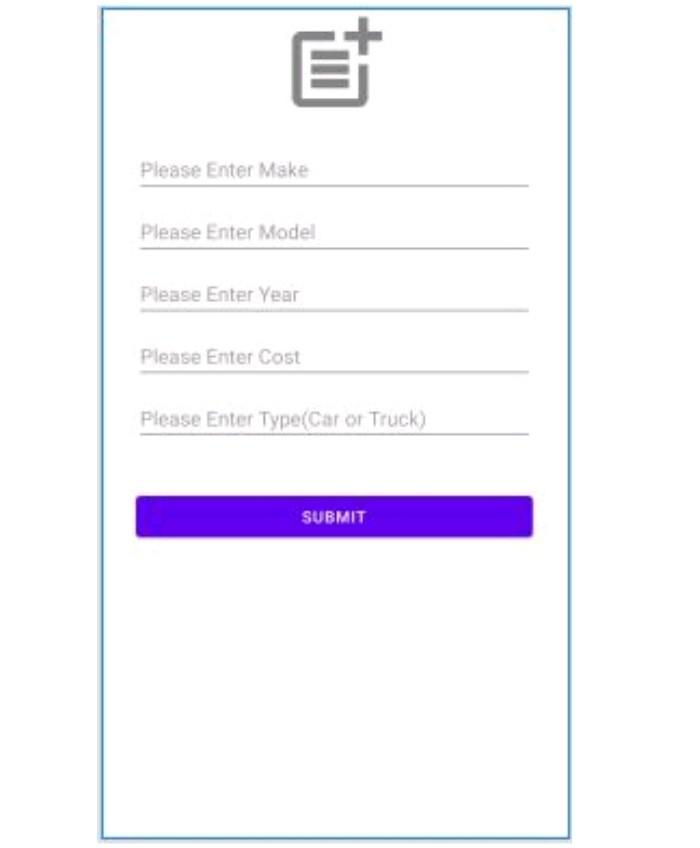
Implement the ActionBar as seen on the video. Every Activity must have a descriptive title. Add a create new vehicle item in the ActionBar for the MainActivity. When the user clicks the create new vehicle item in the ActionBar of the MainActivity, the AddNewVehicleActivity should launch using the startActivityForResult() method.
************************************** Create all needed initializations in the AddNewVehicle activity. When the user clicks on the button to submit a new vehicle, get the vehicles make, model, year, type and cost and add a new Vehicle object to the Application classs ArrayList. Set the result to OK and finish the activity. When your application arrives back at the MainActivity, the RecyclerView must show the newly created vehicle.
Et Please enter Make Please Enter Model Please Enter Year Please Enter Cost Please Enter Type(Car or Truck) SUBMIT
Step by Step Solution
There are 3 Steps involved in it

Get step-by-step solutions from verified subject matter experts
 Study Help