







Question: android studio hi there when i try to do the example on the book and i can't figure it out this is what I got
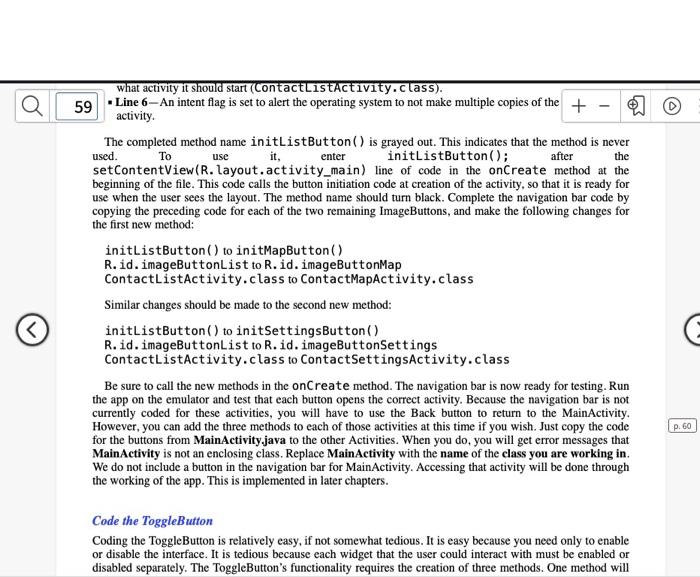
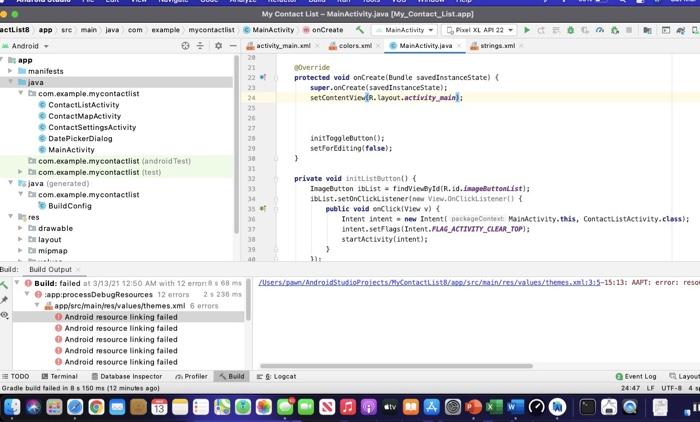
use the what activity it should start (ContactListActivity.class). 59 Line 6-An intent flag is set to alert the operating system to not make multiple copies of the + activity. The completed method name initListButton() is grayed out. This indicates that the method is never used. To it, enter initListButton(); after setContentView(R.layout.activity_main) line of code in the onCreate method at the beginning of the file. This code calls the button initiation code at creation of the activity, so that it is ready for use when the user sees the layout. The method name should turn black. Complete the navigation bar code by copying the preceding code for each of the two remaining ImageButtons, and make the following changes for the first new method: initListButton() to initMapButton() R.id. imageButtonList to R.id. imageButtonMap ContactListActivity.class to ContactMapActivity.class Similar changes should be made to the second new method: initListButton() to initSettingsButton() R.id. imageButtonList to R.id. imageButtonSettings ContactListActivity.class to ContactSettingsActivity.class Be sure to call the new methods in the onCreate method. The navigation bar is now ready for testing. Run the app on the emulator and test that each button opens the correct activity. Because the navigation bar is not currently coded for these activities, you will have to use the Back button to return to the MainActivity. However, you can add the three methods to each of those activities at this time if you wish. Just copy the code for the buttons from MainActivity.java to the other Activities. When you do, you will get error messages that MainActivity is not an enclosing class. Replace MainActivity with the name of the class you are working in. We do not include a button in the navigation bar for MainActivity. Accessing that activity will be done through the working of the app. This is implemented in later chapters. p. 60 Code the ToggleButton Coding the ToggleButton is relatively easy, if not somewhat tedious. It is easy because you need only to enable or disable the interface. It is tedious because each widget that the user could interact with must be enabled or disabled separately. The ToggleButton's functionality requires the creation of three methods. One method will 25 33 34 My Contact List - MainActivity.java (My_Contact_list.app) actListe app remain java com example mycontactlist MainActivity onCreate MainActivity Plan XL AP: 22 Android- activity_main.xml colors.xml MainActivity.java strings.xml app 20 21 manifests @Override 22 java protected void onCreate(Bundle savedInstanceState) but com.example.mycontactlist super.onCreate(savedInstanceState) 24 ContactListActivity setContentView.layout.activity, moins 25 ContactMapActivity 26 ContactSettings Activity 27 DatePickerDialog init ToggleButton(); MainActivity 20 setforEditing false); De com.example.mycontactlist (android Test) 30 > 21 com.example.mycontactlist (test) java (generated) private void initlistButton() { 33 com.example.mycontactlist ImageButton iblist - findViewById(R.id.imageButtonList); Iblist.setOnClickListener(new View.OnClickListener BuildContig 35 public void onClick(View) Intent intent new Intenti DaciaContext, Molnactivity.this, ContactListActivity.class); Di drawable Intent. setFlags (Intent.FLAG_ACTIVITY_CLEAR_TOP): layout 38 startActivity intent); mipmap 29 > Build Build Output Build: failed at 3/13/25 12:50 AM with 12 con 68 m Users/on/AndroidstudioProiects contactList/00/Src/main/res/values/themes.xml:25-15:13: APT: error: resa app processDebugResources 12 errors app/src/main/res/values/themes.xml 6 errors Android resource linking failed Android resource linking failed Android resource linking failed Android resource linking failed Android resource linking failed TODO Terminal Database Inspector Profiler Build Logcat @Event Log Layou Gradle buldtailed in 8.150 mt (12 minutes ago 24:47 LF UTF-8 4 res
Step by Step Solution
There are 3 Steps involved in it

Get step-by-step solutions from verified subject matter experts
 Study Help