







Question: Android Studio / / Koltlin Language Write an Android Application that demonstrates the activity life cycle and fragments lifecycle. The main activity should have two
Android StudioKoltlin Language
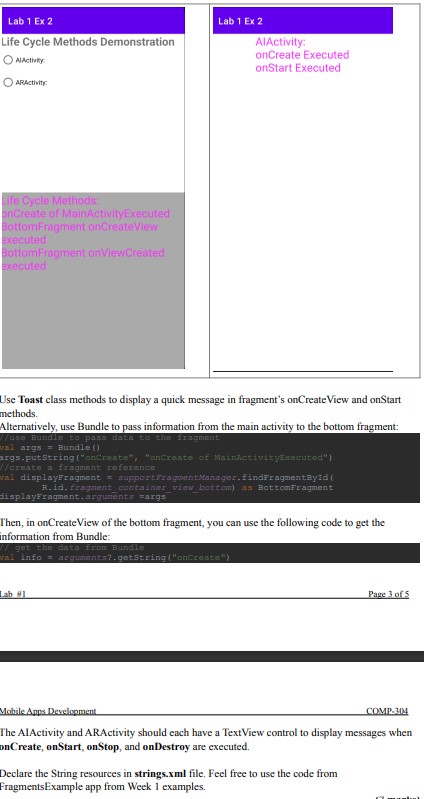
Write an Android Application that demonstrates the activity life cycle and fragments lifecycle.
The main activity should have two fragments. The top fragment contains a list view control
whose items are the names of two other activities, AIActivity and VRActivity. The bottom
fragment uses a text view control to display the list of life cycle methods that take place when the
main activity starts.Lab Ex
Life Cycle Methods Demonstration
AActivity:
ARfctivity:
Lab Ex
AlActivity:
onCreate Executed
onStart Executed
Use Toast class methods to display a quick message in fragment's onCreateView and onStart
methods.
Alternatively, use Bundle to pass information from the main activity to the bottom fragment:
displayeragment. arguments args
Then, in onCreateView of the bottom fragment, you can use the following code to get the
information from Bundle:
pret the dates from Eurade
Lab #
The AIActivity and ARActivity should each have a TextView control to display messages when
onCreate, onStart, onStop, and onDestroy are executed.
Declare the String resources in strings.xml file. Feel free to use the code from
FragmentsExample app from Week examples.
Step by Step Solution
There are 3 Steps involved in it
1 Expert Approved Answer
Step: 1 Unlock

To create an Android application that demonstrates the activity and fragment lifecycle using Kotlin follow the detailed steps below Step 1 Set Up Your Android Project Create a new Android Studio Proje... View full answer
Question Has Been Solved by an Expert!
Get step-by-step solutions from verified subject matter experts
Step: 2 Unlock
Step: 3 Unlock
 Study Help