







Question: Write an Android Application that demonstrates the activity life cycle and fragments. The main activity should have two fragments. The top fragment contains a list
Write an Android Application that demonstrates the activity life cycle and fragments. The main activity should have two fragments. The top fragment contains a list view control whose items are the names of two other activities, AIActivity and VRActivity. The bottom fragment uses a text view control to display the list of life cycle methods that take place when the main activity starts.
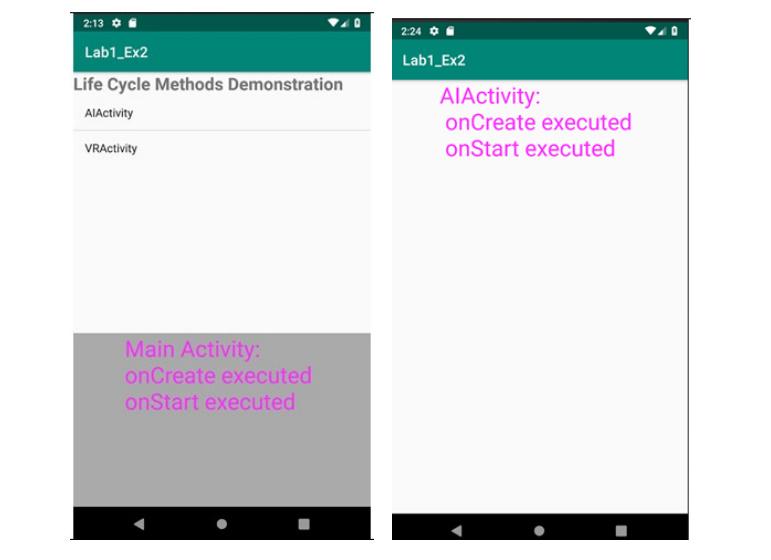
Use Toast class methods to display a quick message in fragments onCreateView and onStart methods. The AIActivity and ARActivity should each have a TextView control to display messages when onCreate, onStart, onStop, and onDestroy are executed. Declare the String resources in strings.xml file
2:13 Lab1_Ex2 Life Cycle Methods Demonstration AlActivity 2:24 o Lab1_Ex2 AIActivity: onCreate executed on Start executed VRActivity Main Activity: onCreate executed onStart executed
Step by Step Solution
There are 3 Steps involved in it

Get step-by-step solutions from verified subject matter experts
 Study Help