







Question: append is a class in java that write content in the document i have created the document class and have a filereading class that read
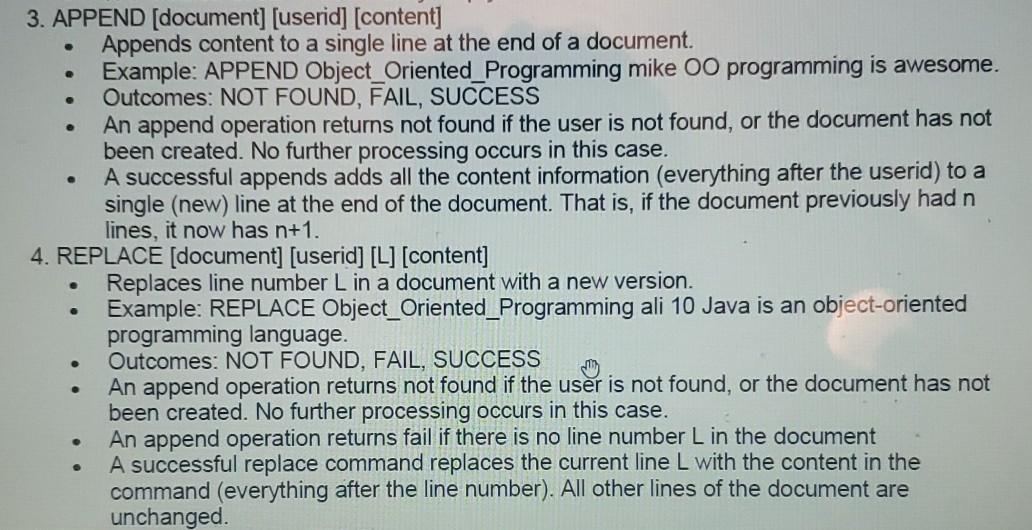
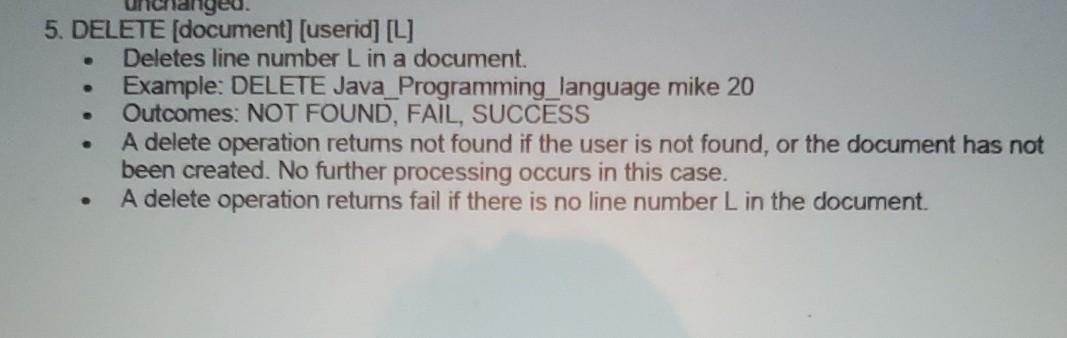
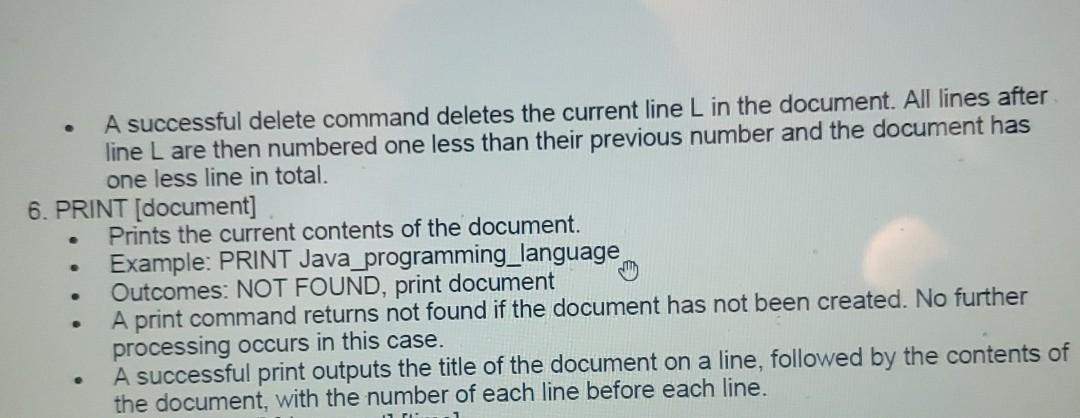
append is a class in java that write content in the document i have created the document class and have a filereading class that read all the command. i want to add content in the document i have created how to do that using LinkedList as data structure.
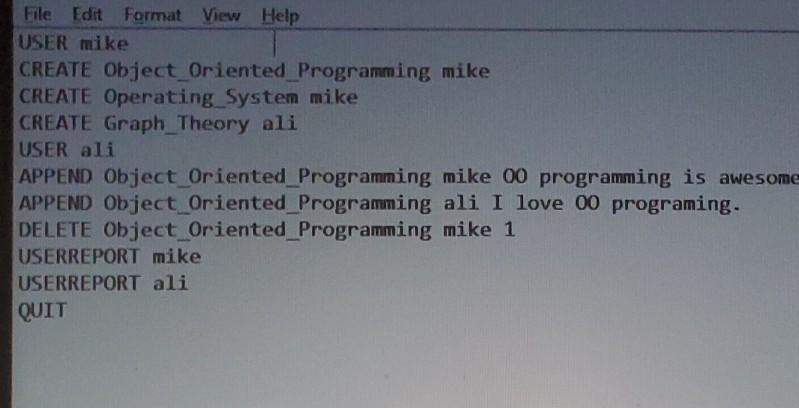
this is text file and have a command like user mike so it will create user mike and that user is stored in linked list. similarly command create will create a empty document with title on it. and append command add the content in specific document. how to add content in specific document refers to the photos posted above...similarly there is a command delete which delete specific line from specific document. please help me with this.
e 3. APPEND (document) [userid] [content] Appends content to a single line at the end of a document. Example: APPEND Object_Oriented_Programming mike OO programming is awesome. Outcomes: NOT FOUND, FAIL, SUCCESS An append operation returns not found if the user is not found, or the document has not been created. No further processing occurs in this case. A successful appends adds all the content information (everything after the userid) to a single (new) line at the end of the document. That is, if the document previously had n lines, it now has n+1. 4. REPLACE (document] [userid] [L] (content] Replaces line number L in a document with a new version. Example: REPLACE Object_Oriented_Programming ali 10 Java is an object-oriented programming language. Outcomes: NOT FOUND, FAIL, SUCCESS An append operation returns not found if the user is not found, or the document has not been created. No further processing occurs in this case. An append operation returns fail if there is no line number L in the document A successful replace command replaces the current line L with the content in the command (everything after the line number). All other lines of the document are unchanged. O . 5. DELETE (document] [userid] [L] Deletes line number Lin a document. Example: DELETE Java_Programming language mike 20 Outcomes: NOT FOUND, FAIL, SUCCESS A delete operation retums not found if the user is not found, or the document has not been created. No further processing occurs in this case. A delete operation returns fail if there is no line number L in the document. A successful delete command deletes the current line L in the document. All lines after line L are then numbered one less than their previous number and the document has one less line in total. 6. PRINT (document] Prints the current contents of the document. Example: PRINT Java programming_language Outcomes: NOT FOUND, print document A print command returns not found if the document has not been created. No further processing occurs in this case. A successful print outputs the title of the document on a line, followed by the contents of the document, with the number of each line before each line. . . File Edit Format View Help USER mike CREATE Object Oriented Programming mike CREATE Operating_System mike CREATE Graph_Theory ali USER ali APPEND Object Oriented_Programming mike 00 programming is awesome APPEND Object_Oriented Programming ali I love 00 programing. DELETE Object Oriented Programming mike 1 USERREPORT mike USERREPORT ali QUIT e 3. APPEND (document) [userid] [content] Appends content to a single line at the end of a document. Example: APPEND Object_Oriented_Programming mike OO programming is awesome. Outcomes: NOT FOUND, FAIL, SUCCESS An append operation returns not found if the user is not found, or the document has not been created. No further processing occurs in this case. A successful appends adds all the content information (everything after the userid) to a single (new) line at the end of the document. That is, if the document previously had n lines, it now has n+1. 4. REPLACE (document] [userid] [L] (content] Replaces line number L in a document with a new version. Example: REPLACE Object_Oriented_Programming ali 10 Java is an object-oriented programming language. Outcomes: NOT FOUND, FAIL, SUCCESS An append operation returns not found if the user is not found, or the document has not been created. No further processing occurs in this case. An append operation returns fail if there is no line number L in the document A successful replace command replaces the current line L with the content in the command (everything after the line number). All other lines of the document are unchanged. O . 5. DELETE (document] [userid] [L] Deletes line number Lin a document. Example: DELETE Java_Programming language mike 20 Outcomes: NOT FOUND, FAIL, SUCCESS A delete operation retums not found if the user is not found, or the document has not been created. No further processing occurs in this case. A delete operation returns fail if there is no line number L in the document. A successful delete command deletes the current line L in the document. All lines after line L are then numbered one less than their previous number and the document has one less line in total. 6. PRINT (document] Prints the current contents of the document. Example: PRINT Java programming_language Outcomes: NOT FOUND, print document A print command returns not found if the document has not been created. No further processing occurs in this case. A successful print outputs the title of the document on a line, followed by the contents of the document, with the number of each line before each line. . . File Edit Format View Help USER mike CREATE Object Oriented Programming mike CREATE Operating_System mike CREATE Graph_Theory ali USER ali APPEND Object Oriented_Programming mike 00 programming is awesome APPEND Object_Oriented Programming ali I love 00 programing. DELETE Object Oriented Programming mike 1 USERREPORT mike USERREPORT ali QUIT
Step by Step Solution
There are 3 Steps involved in it

Get step-by-step solutions from verified subject matter experts
 Study Help