







Question: Appendix 2 Computer Project Exercises 627 TABLE A2.9 Conveyor Belt Project Conveyor Belt Project: WBS Hardware Hardware specifications Hardware design Hardware documentation Prototypes Order circuit
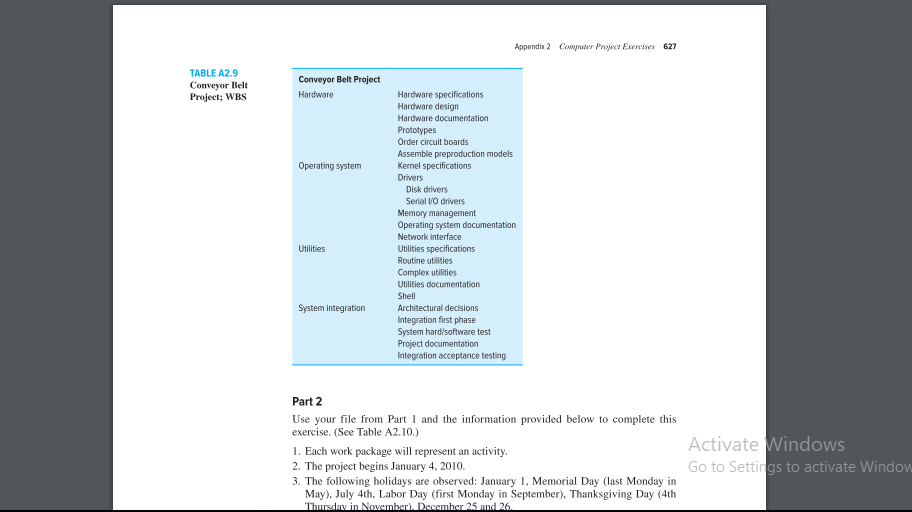
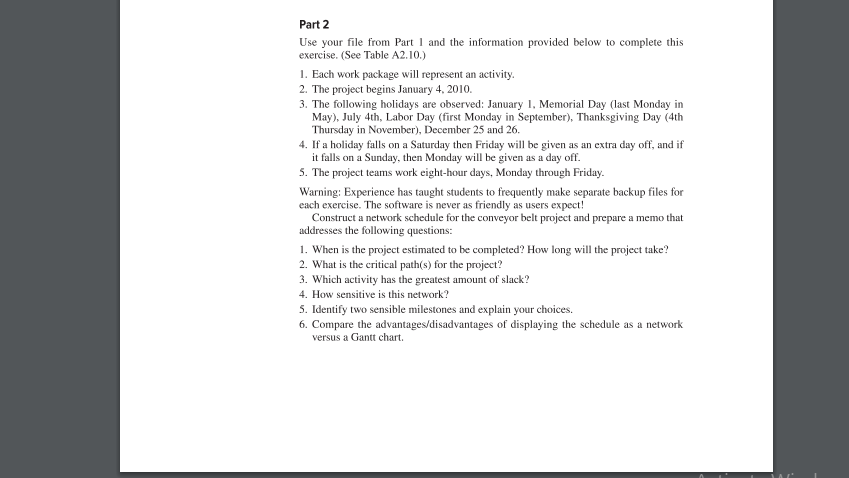
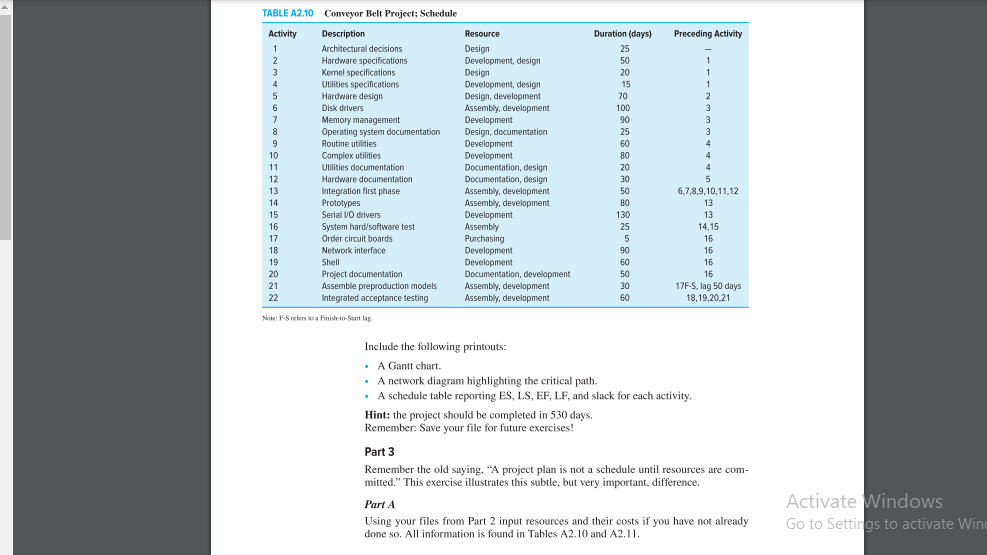
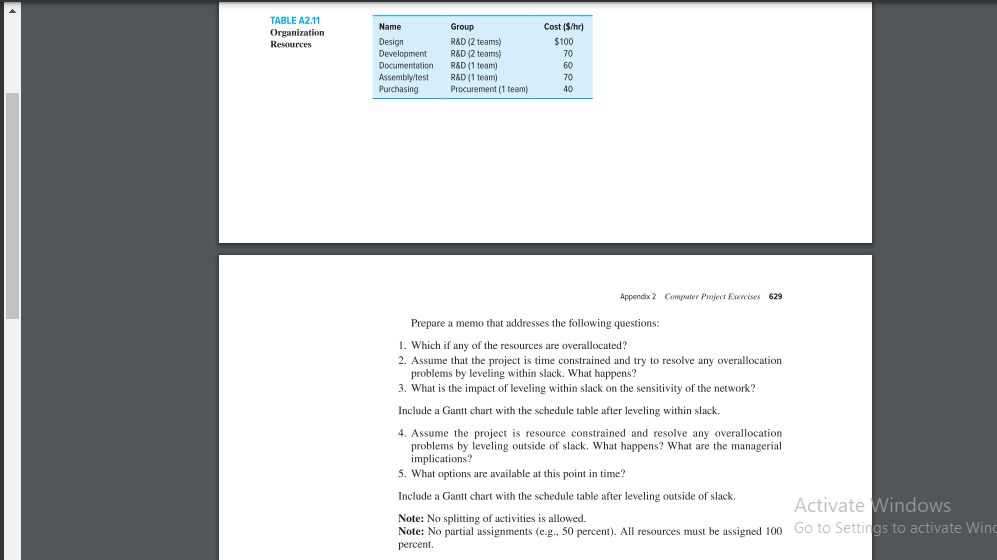
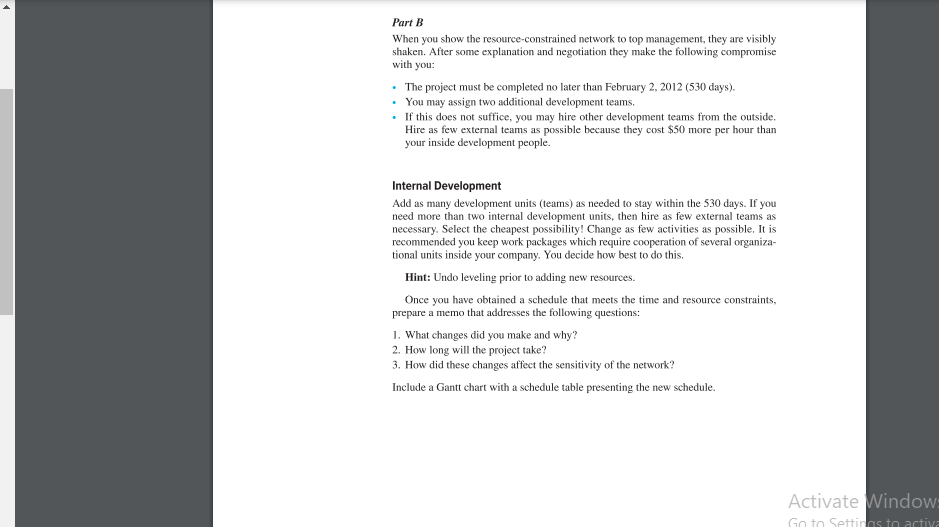
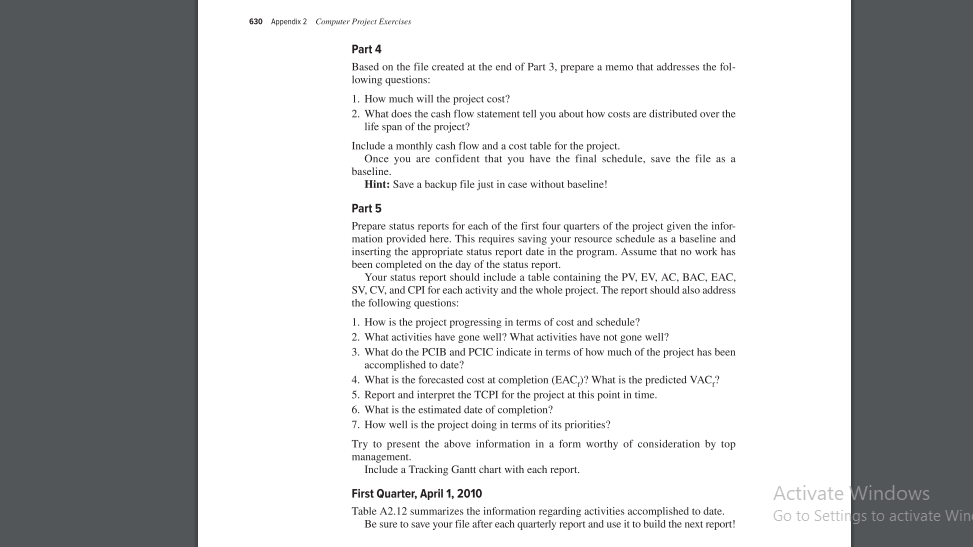
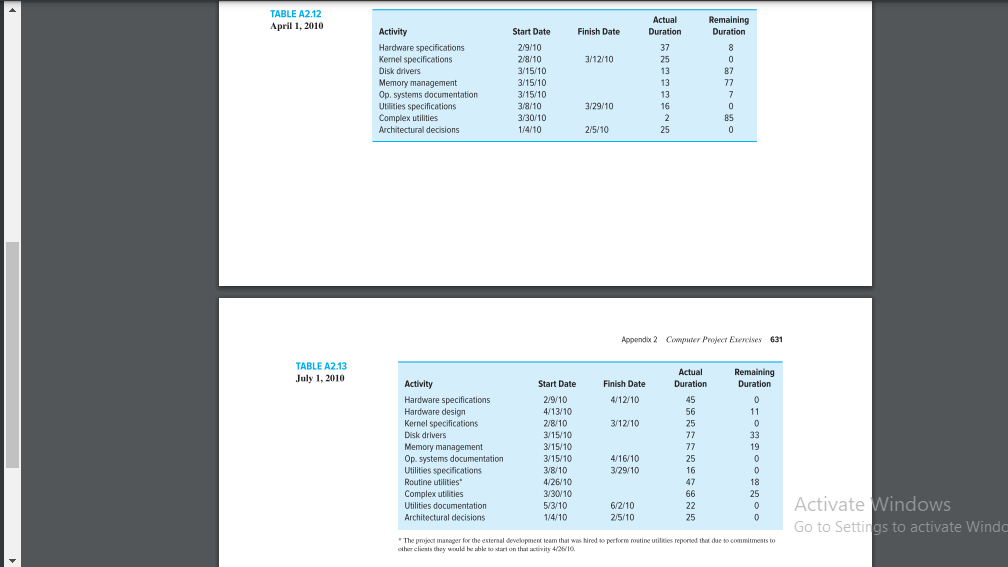
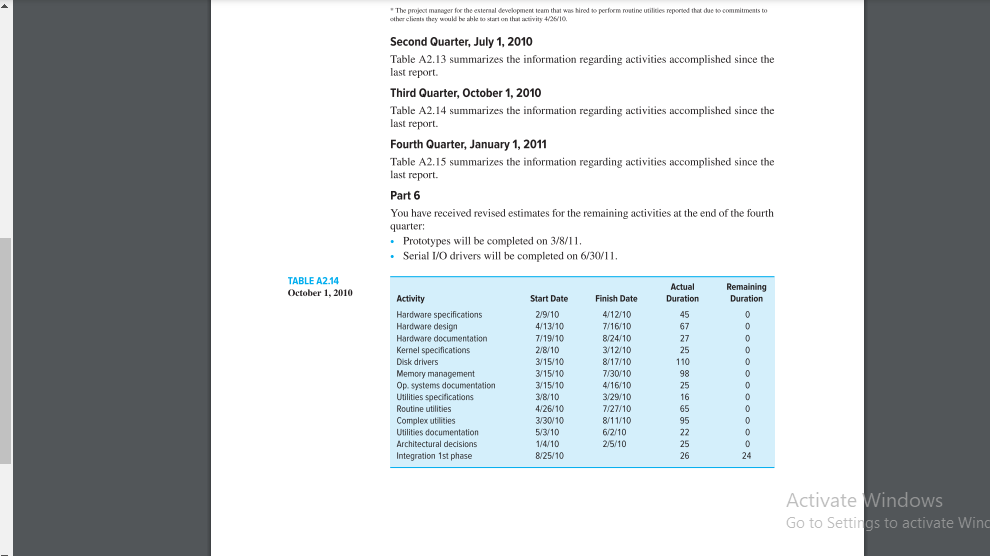
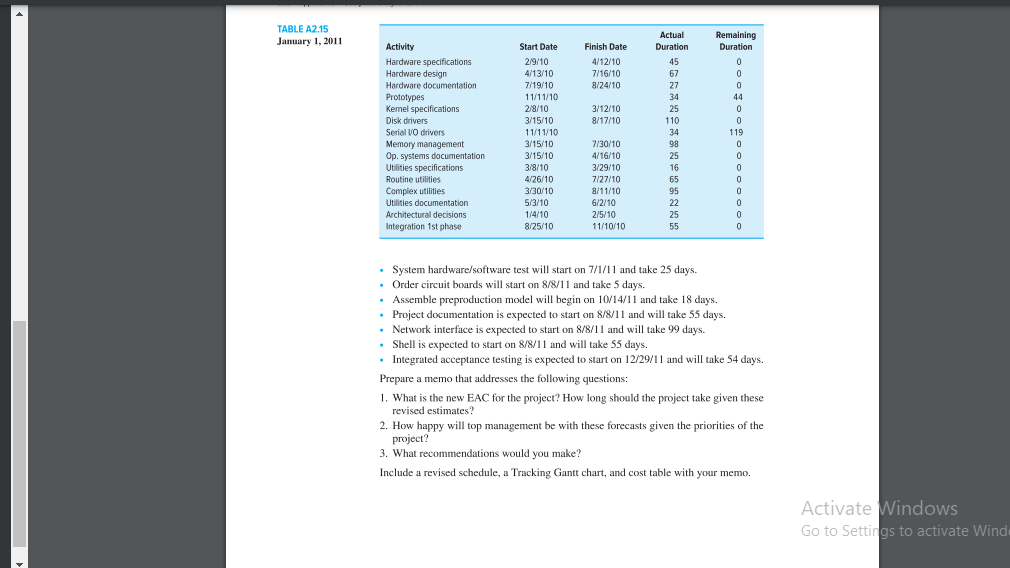
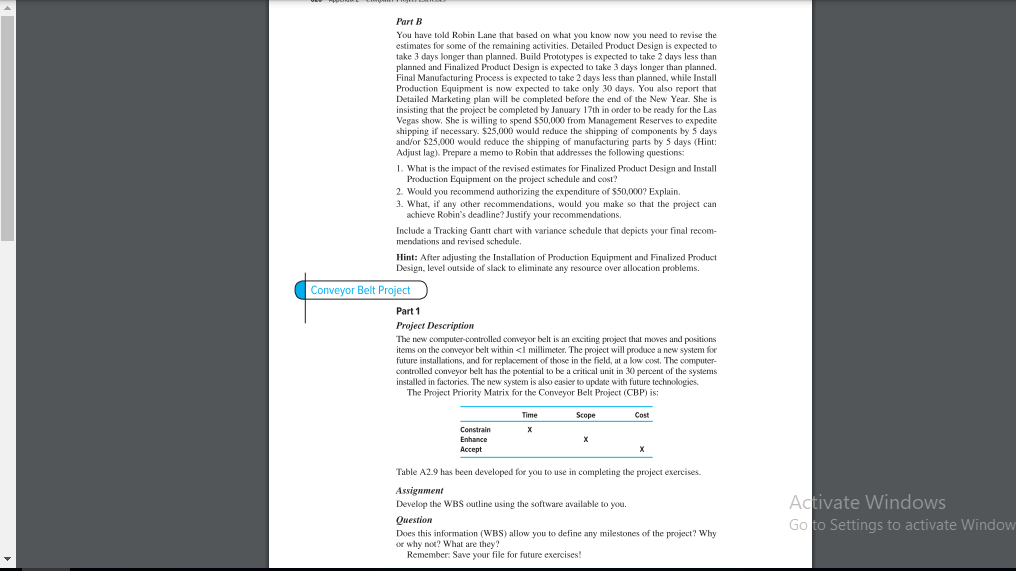
Appendix 2 Computer Project Exercises 627 TABLE A2.9 Conveyor Belt Project Conveyor Belt Project: WBS Hardware Hardware specifications Hardware design Hardware documentation Prototypes Order circuit boards Assemble preproduction models Operating system Kernel specifications Drivers Disk drivers Serial VO drivers Memory management Operating system documentation Network interface Utilities Utilities specifications Routine utilities Complex utilities Utilities documentation Shell System integration Architectural decisions Integration first phase System hard software test Project documentation Integration acceptance testing Part 2 Use your file from Part I and the information provided below to complete this exercise. (See Table A2.10.) 1. Each work package will represent an activity. Activate Windows 2. The project begins January 4. 2010. Go to Settings to activate Window 3. The following holidays are observed: January 1. Memorial Day (last Monday in May), July 4th, Labor Day (first Monday in September), Thanksgiving Day (4th Thursday in Novemberi. December 25 and 26.Part 2 Use your file from Part I and the information provided below to complete this exercise. (See Table A2.10.) 1. Each work package will represent an activity. 2. The project begins January 4. 2010. 3. The following holidays are observed: January 1. Memorial Day (last Monday in May), July 4th, Labor Day (first Monday in September), Thanksgiving Day (4th Thursday in November), December 25 and 26. 4. If a holiday falls on a Saturday then Friday will be given as an extra day off, and if it falls on a Sunday, then Monday will be given as a day off. 5. The project teams work eight-hour days, Monday through Friday. Warning: Experience has taught students to frequently make separate backup files for each exercise. The software is never as friendly as users expect! Construct a network schedule for the conveyor belt project and prepare a memo that addresses the following questions: 1. When is the project estimated to be completed? How long will the project take? 2. What is the critical path(s) for the project? 3. Which activity has the greatest amount of slack? 4. How sensitive is this network? 5. Identify two sensible milestones and explain your choices. 6. Compare the advantages/disadvantages of displaying the schedule as a network versus a Gantt chart.TABLE A2.10 Conveyor Belt Project; Schedule Activity Description Resource Duration (days) Preceding Activity 1 Architectural decisions Design 25 Hardware specifications Development, design 50 Kemel specifications Design 20 Utilities specifications Development, design 15 Hardware design Design, development 70 Disk drivers Assembly, development 100 Memory management Development 90 Operating system documentation Design, documentation 25 Routine utilities Development 60 10 Complex utilities Development 11 Utilities documentation Documentation, design 20 12 Hardware documentation Documentation, design 30 13 Integration first phase Assembly, development 50 6,7,8,9, 10,11,12 14 Prototypes Assembly, development 80 13 15 Serial VO drivers Development 130 13 16 System hard/software test Assembly 25 14,15 17 Order circuit boards Purchasing 5 16 18 Network interface Development 90 16 19 Shell Development 60 16 20 Project documentation Documentation, development 50 16 21 Assemble preproduction models Assembly, development 30 17F-S, lag 50 days 22 Integrated acceptance testing Assembly, development 60 18, 19.20.21 Now; F-S refers to a Finish-to-Start lag Include the following printouts: A Gantt chart. A network diagram highlighting the critical path. . A schedule table reporting ES, LS, EF, LF, and slack for each activity. Hint: the project should be completed in 530 days. Remember. Save your file for future exercises! Part 3 Remember the old saying, "A project plan is not a schedule until resources are com- mitted." This exercise illustrates this subtle, but very important, difference. Part A Activate Windows Using your files from Part 2 input resources and their costs if you have not already Go to Settings to activate Win done so. All information is found in Tables A2.10 and A2.11.TABLE A2.11 Name Group Cost ($/hr) Organization Resources Design R&D (2 teams) $100 Development R&D (2 teams) 70 Documentation RAD (1 team) 60 Assembly/test RAD (1 team) 70 Purchasing Procurement (1 team) 40 Appendix 2 Computer Project Exercises 629 Prepare a memo that addresses the following questions: 1. Which if any of the resources are overallocated? 2. Assume that the project is time constrained and try to resolve any overallocation problems by leveling within slack. What happens? 3. What is the impact of leveling within slack on the sensitivity of the network? Include a Gantt chart with the schedule table after leveling within slack. 4. Assume the project is resource constrained and resolve any overallocation problems by leveling outside of slack. What happens? What are the managerial implications? 5. What options are available at this point in time? Include a Gantt chart with the schedule table after leveling outside of slack. Activate Windows Note: No splitting of activities is allowed. Note: No partial assignments (e-g., 50 percent). All resources must be assigned 100 Go to Settings to activate Wing percent.Part B When you show the resource-constrained network to top management, they are visibly shaken. After some explanation and negotiation they make the following compromise with you: The project must be completed no later than February 2, 2012 (530 days). . You may assign two additional development teams, . If this does not suffice, you may hire other development teams from the outside. Hire as few external teams as possible because they cost $50 more per hour than your inside development people. Internal Development Add as many development units (teams) as needed to stay within the 530 days. If you need more than two internal development units, then hire as few external teams as necessary. Select the cheapest possibility! Change as few activities as possible, It is recommended you keep work packages which require cooperation of several organiza- tional units inside your company. You decide how best to do this, Hint: Undo leveling prior to adding new resources. Once you have obtained a schedule that meets the time and resource constraints, prepare a memo that addresses the following questions: 1. What changes did you make and why? 2. How long will the project take? 3. How did these changes affect the sensitivity of the network? Include a Gantt chart with a schedule table presenting the new schedule. Activate Window Go to Setting activ630 Appendix 2 Computer Project Exercises Part 4 Based on the file created at the end of Part 3, prepare a memo that addresses the fol- lowing questions: 1. How much will the project cost? 2. What does the cash flow statement tell you about how costs are distributed over the life span of the project? Include a monthly cash flow and a cost table for the project. Once you are confident that you have the final schedule, save the file as a baseline. Hint: Save a backup file just in case without baseline! Part 5 Prepare status reports for each of the first four quarters of the project given the infor- mation provided here. This requires saving your resource schedule as a baseline and inserting the appropriate status report date in the program. Assume that no work has been completed on the day of the status report. Your status report should include a table containing the PV, EV, AC. BAC, EAC. SV. CV, and CPI for each activity and the whole project. The report should also address the following questions: 1. How is the project progressing in terms of cost and schedule? 2. What activities have gone well? What activities have not gone well? 3. What do the PCIB and PCIC indicate in terms of how much of the project has been accomplished to date? 4. What is the forecasted cost at completion (EAC)? What is the predicted VAC,? 5. Report and interpret the TCPI for the project at this point in time. 6. What is the estimated date of completion? 7. How well is the project doing in terms of its priorities? Try to present the above information in a form worthy of consideration by top management. Include a Tracking Gantt chart with each report. First Quarter, April 1, 2010 Activate Windows Table A2.12 summarizes the information regarding activities accomplished to date. Be sure to save your file after each quarterly report and use it to build the next report! Go to Settings to activate WinTABLE A2.12 Actual Remaining April 1, 2010 Activity Start Date Finish Date Duration Duration Hardware specifications 2/9/10 37 Kemel specifications 2/3/10 3/12/10 25 Disk drivers 3/15/10 13 87 Memory management 3/15/10 13 77 Op. systems documentation 3/15/10 13 Utilities specifications 3/8/10 3/29/10 16 Complex utilities 3/30/10 2 Architectural decisions 1/4/10 2/5/10 25 Appendix 2 Computer Project Exercises 631 TABLE A2.13 Actual Remaining July 1, 2010 Activity Start Date Finish Date Duration Duration Hardware specifications 2/9/10 4/12/10 45 Hardware design 4/13/10 56 11 Kernel specifications 2/8/10 3/12/10 25 Disk drivers 3/15/10 77 33 Memory management 3/15/10 37 19 Op. systems documentation 3/15/10 4/16/10 25 Utilities specifications 3/8/10 3/29/10 16 Routine utilities 4/26/10 47 18 Complex utilities 3/30/10 66 25 Utilities documentation 5/3/10 6/2/10 22 Activate Windows Architectural decisions 1/4/10 2/5/10 25 Go to Settings to activate Windo "The project manager for the external development team that was hired to perform routine utilidies reported that due to commitments to other clients they would be shle bo start on that activity 4/26/10." The project manager for the external development team that was hired to perform routine utilides reported that due to commitments to other clients they would be able to start on that activity 4/26/16. Second Quarter, July 1, 2010 Table A2.13 summarizes the information regarding activities accomplished since the last report. Third Quarter, October 1, 2010 Table A2.14 summarizes the information regarding activities accomplished since the last report. Fourth Quarter, January 1, 2011 Table A2.15 summarizes the information regarding activities accomplished since the last report. Part 6 You have received revised estimates for the remaining activities at the end of the fourth quarter: . Prototypes will be completed on 3/8/1 1. . Serial 1/O drivers will be completed on 6/30/1 1. TABLE A2.14 Actual Remaining October 1, 2010 Activity Start Date Finish Date Duration Duration Hardware specifications 2/9/10 4/12/10 45 Hardware design 4/13/10 7/16/10 67 Hardware documentation 7/19/10 8/24/10 27 Kernel specifications 2/8/10 3/12/10 25 Disk drivers 3/15/10 8/17/10 110 Memory management 3/15/10 7/30/10 98 Op. systems documentation 3/15/10 4/16/10 25 Utilities specifications 3/8/10 3/29/10 16 Routine utilities 4/26/10 7/27/10 65 Complex utilities 3/30/10 8/1 1/10 95 Utilities documentation 5/3/10 6/2/10 22 Architectural decisions 1/4/10 2/5/10 25 Integration 1st phase 8/25/10 26 24 Activate Windows Go to Settings to activate WindTABLE A2.15 Actual Remaining January 1, 2011 Activity Start Date Finish Date Duration Duration Hardware specifications 2/9/10 4/12/10 45 Hardware design 4/13/10 7/16/10 67 Hardware documentation 7/19/10 3/24/10 27 0 Prototypes 11/1 1/10 34 44 Kemel specifications 2/8/10 3/12/10 25 0 Disk drivers 3/15/10 8/17/10 110 0 Serial VO drivers 11/1 1/10 34 119 Memory management 3/15/10 7/30/10 98 0 Op. systems documentation 3/15/10 4/16/10 25 Utilities specifications 3/8/10 3/29/10 16 Routine utilities 4/26/10 7/27/10 65 Complex utilities 3/30/10 8/1 1/10 95 Utilities documentation 5/3/10 6/2/10 22 Architectural decisions 1/4/10 2/5/10 25 Integration 1st phase 8/25/10 11/10/10 55 System hardware/software test will start on 7/1/1 1 and take 25 days. . Order circuit boards will start on 8/8/1 1 and take 5 days. . Assemble preproduction model will begin on 10/14/11 and take 18 days. . Project documentation is expected to start on 8/8/11 and will take 55 days. Network interface is expected to start on 8/8/1 1 and will take 99 days. . Shell is expected to start on 8/8/11 and will take 55 days. . Integrated acceptance testing is expected to start on 12/29/11 and will take 54 days. Prepare a memo that addresses the following questions: 1. What is the new EAC for the project? How long should the project take given these revised estimates? 2. How happy will top management be with these forecasts given the priorities of the project? 3. What recommendations would you make? Include a revised schedule, a Tracking Gantt chart, and cost table with your memo. Activate Windows Go to Settings to activate WindPart B You have told Robin Lane that based on what you know now you need to revise the estimates for some of the remaining activities. Detailed Product Design is expected to take 3 days longer than planned. Build Prototypes is expected to take 2 days less than planned and Finalized Product Design is expected to take 3 days longer than planned. Final Manufacturing Process is expected to take 2 days less than planned, while Install Production Equipment is now expected to take only 30 days, You also report that Detailed Marketing plan will be completed before the end of the New Year. She is insisting that the project be completed by January 17th in order to be ready for the Las Vegas show, She is willing to spend $50,000 from Management Reserves to expedite shipping if necessary. $25,000 would reduce the shipping of components by 5 days and/or $25.000 would reduce the shipping of manufacturing parts by 5 days (Hint: Adjust lag). Prepare a memo to Robin that addresses the following questions: 1. What is the impact of the revised estimates for Finalized Product Design and Install Production Equipment on the project schedule and cost? 2. Would you recommend authorizing the expenditure of $50,0007 Explain. 3. What. if any other recommendations, would you make so that the project can achieve Robin's deadline? Justify your recommendations. Include a Tracking Gantt chart with variance schedule that depicts your final recom- mendations and revised schedule. Hint: After adjusting the Installation of Production Equipment and Finalized Product Design. level outside of slack to eliminate any resource over allocation problems. Conveyor Belt Project Part 1 Project Description The new computer-controlled conveyor belt is an exciting project that moves and positions items on the conveyor belt within
Step by Step Solution
There are 3 Steps involved in it

Get step-by-step solutions from verified subject matter experts
 Study Help