Question: APPLY Data File needed for this Case Problem: NP_EX_6-4.xlsx Seacation Alana Ngata is an inventory manager for Seacation, a major manufacturer and distributor of boating
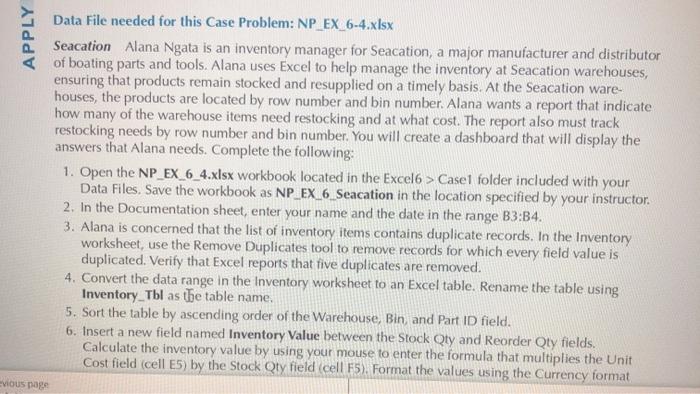
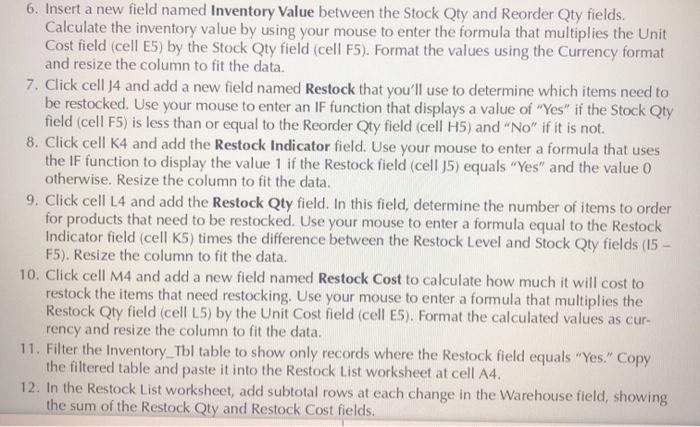
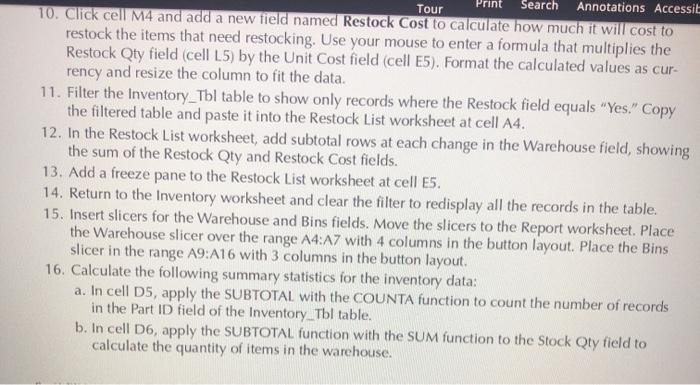
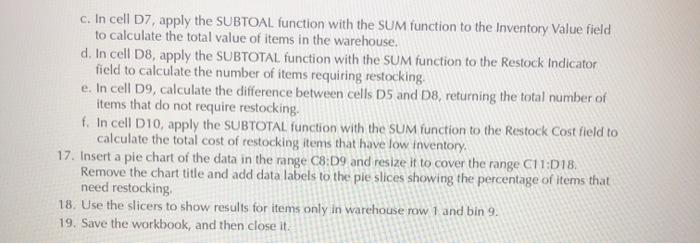
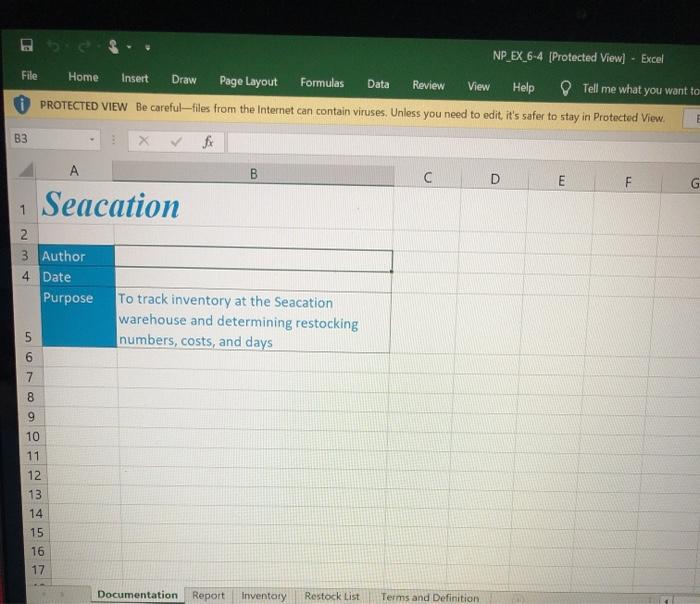
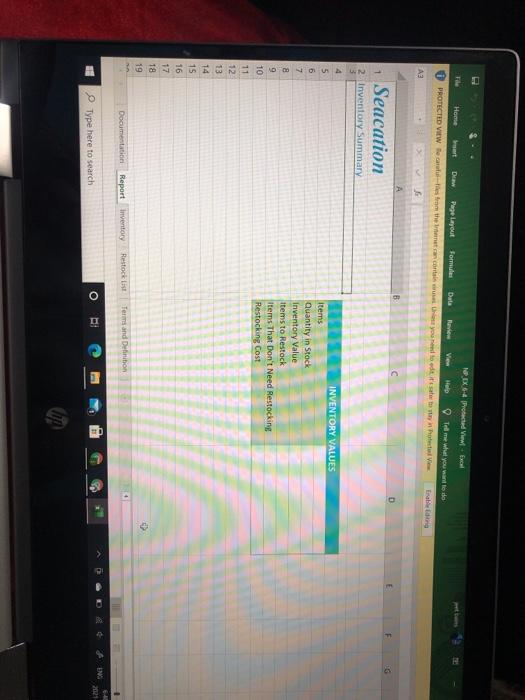
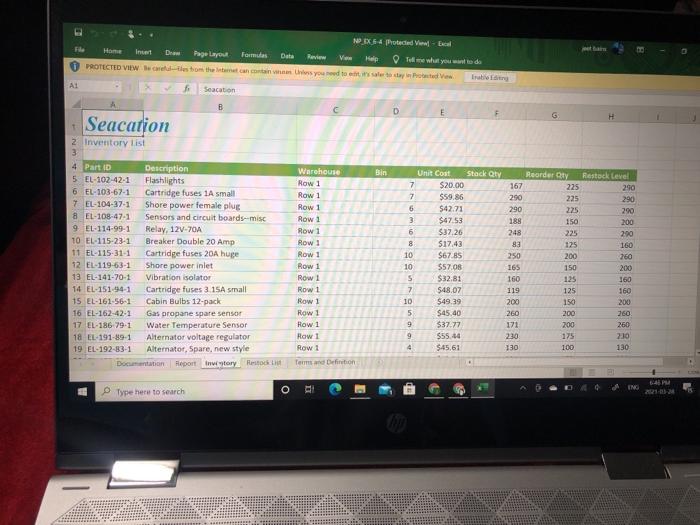
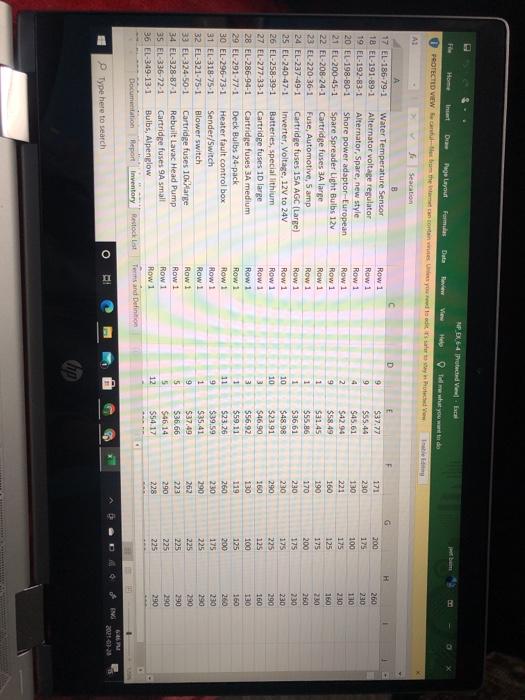
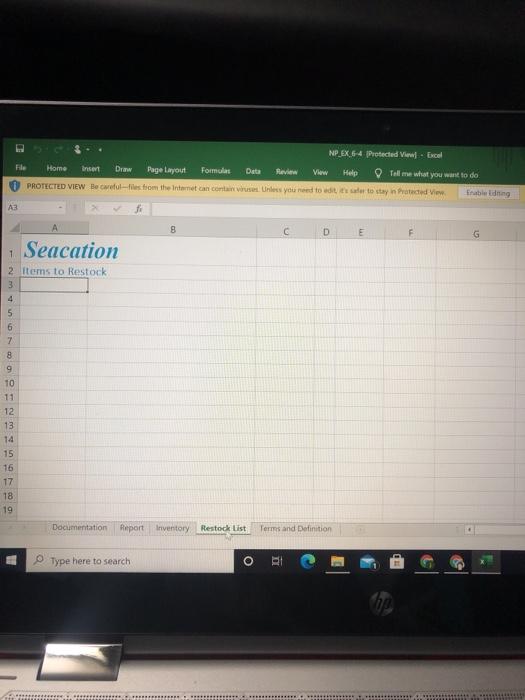
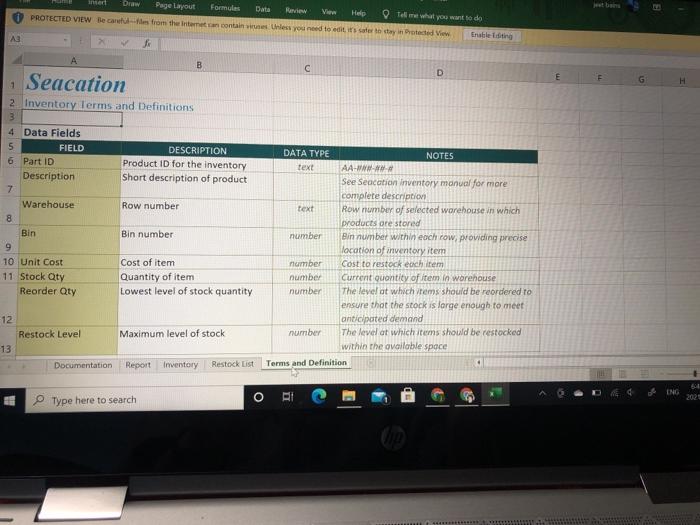
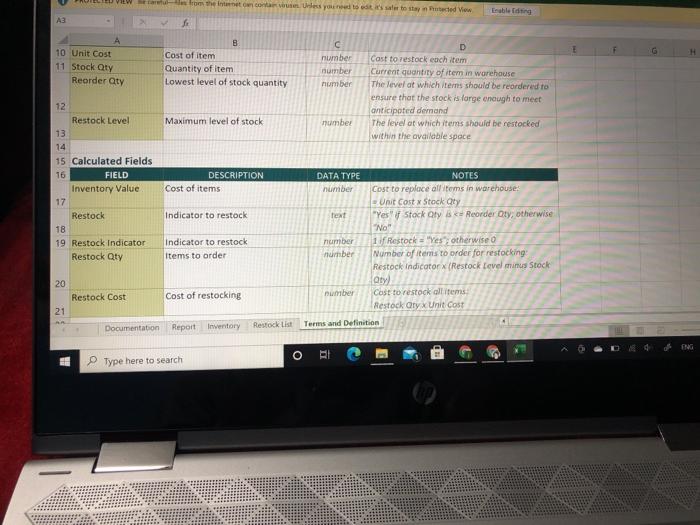
APPLY Data File needed for this Case Problem: NP_EX_6-4.xlsx Seacation Alana Ngata is an inventory manager for Seacation, a major manufacturer and distributor of boating parts and tools. Alana uses Excel to help manage the inventory at Seacation warehouses, ensuring that products remain stocked and resupplied on a timely basis. At the Seacation ware- houses, the products are located by row number and bin number. Alana wants a report that indicate how many of the warehouse items need restocking and at what cost. The report also must track restocking needs by row number and bin number. You will create a dashboard that will display the answers that Alana needs. Complete the following: 1. Open the NP_EX_6_4.xlsx workbook located in the Excel6 > Case1 folder included with your Data Files. Save the workbook as NP_EX_6_Seacation in the location specified by your instructor 2. In the Documentation sheet, enter your name and the date in the range B3:34. 3. Alana is concerned that the list of inventory items contains duplicate records. In the Inventory worksheet, use the Remove Duplicates tool to remove records for which every field value is duplicated. Verify that Excel reports that five duplicates are removed. 4. Convert the data range in the Inventory worksheet to an Excel table. Rename the table using Inventory_Tbl as the table name. 5. Sort the table by ascending order of the Warehouse, Bin, and Part ID field. 6. Insert a new field named Inventory Value between the Stock Qty and Reorder Qty fields. Calculate the inventory value by using your mouse to enter the formula that multiplies the Unit Cost field (cell E5) by the Stock Qty field (cell 45). Format the values using the Currency format vious page 6. Insert a new field named Inventory Value between the Stock Qty and Reorder Qty fields. Calculate the inventory value by using your mouse to enter the formula that multiplies the Unit Cost field cell 85) by the Stock Qty field (cell F5). Format the values using the Currency format and resize the column to fit the data. 7. Click cell 34 and add a new field named Restock that you'll use to determine which items need to be restocked. Use your mouse to enter an IF function that displays a value of "Yes" if the Stock Qty field (cell F5) is less than or equal to the Reorder Qty field (cell H5) and "No" if it is not. 8. Click cell K4 and add the Restock Indicator field. Use your mouse to enter a formula that use the IF function to display the value 1 if the Restock field (cell 15) equals "Yes" and the value 0 otherwise. Resize the column to fit the data. 9. Click cell L4 and add the Restock Qty field. In this field, determine the number of items to order for products that need to be restocked. Use your mouse to enter a formula equal to the Restock Indicator field (cell K5) times the difference between the Restock Level and Stock Qty fields (15 - F5). Resize the column to fit the data. 10. Click cell M4 and add a new field named Restock Cost to calculate how much it will cost to restock the items that need restocking. Use your mouse to enter a formula that multiplies the Restock Qty field (cell L5) by the Unit Cost field (cell E5). Format the calculated values as cur- rency and resize the column to fit the data, 11. Filter the Inventory_Tbl table to show only records where the Restock field equals "Yes." Copy the filtered table and paste it into the Restock List worksheet at cell A4. 12. In the Restock List worksheet, add subtotal rows at each change in the Warehouse field, showing the sum of the Restock Qty and Restock Cost fields. Search Tour Annotations Accessit 10. Click cell M4 and add a new field named Restock Cost to calculate how much it will cost to restock the items that need restocking. Use your mouse to enter a formula that multiplies the Restock Qty field (cell 15) by the Unit Cost field (cell E5). Format the calculated values as cur- rency and resize the column to fit the data. 11. Filter the Inventory_Thl table to show only records where the Restock field equals "Yes." Copy the filtered table and paste it into the Restock List worksheet at cell A4. 12. In the Restock List worksheet, add subtotal rows at each change in the Warehouse field, showing the sum of the Restock Qty and Restock Cost fields. 13. Add a freeze pane to the Restock List worksheet at cell 05. 14. Return to the Inventory worksheet and clear the filter to redisplay all the records in the table. 15. Insert slicers for the Warehouse and Bins fields. Move the slicers to the Report worksheet. Place the Warehouse slicer over the range A4:A7 with 4 columns in the button layout. Place the Bins slicer in the range A9:A16 with 3 columns in the button layout. 16. Calculate the following summary statistics for the inventory data: a. In cell D5, apply the SUBTOTAL with the COUNTA function to count the number of records in the Part ID field of the Inventory_Tbl table. b. In cell D6, apply the SUBTOTAL function with the SUM function to the Stock Qty field to calculate the quantity of items in the warehouse. c. In cell D7, apply the SUBTOAL function with the SUM function to the Inventory Value field to calculate the total value of items in the warehouse. d. In cell D8, apply the SUBTOTAL function with the SUM function to the Restock Indicator field to calculate the number of items requiring restocking e. In cell D9, calculate the difference between cells D5 and D8, returning the total number of items that do not require restocking. f. In cell D10, apply the SUBTOTAL function with the SUM function to the Restock Cost field to calculate the total cost of restocking items that have low inventory 17. Insert a pie chart of the data in the range C8:09 and resize it to cover the range C11:018. Remove the chart title and add data labels to the ple slices showing the percentage of items that need restocking 18. Use the slicers to show results for items only in warehouse row 1 and bin 9. 19. Save the workbook, and then close it NP_EX_6-4 [Protected View] - Excel File Home Insert Draw Page Layout Formulas Data Review View Help Tell me what you want to PROTECTED VIEW Be careful-files from the Internet can contain viruses. Unless you need to edit, it's safer to stay in Protected View B3 A B D E F F G 1 Seacation 2 3 Author 4 Date Purpose To track inventory at the Seacation warehouse and determining restocking numbers, costs, and days 6 7 8 9 10 11 12 13 14 15 16 17 Documentation Report Inventory Restock List Terms and Definition NEX 6-4 Protected Www - Excel File Home Page Layout Formules Data Review View Tell me what you want to do PROTECTED VIEW De Gare there you inte AE A B C D 1 Seacation 2 Inventory Summary 4 5 6 7 INVENTORY VALUES Items Quantity in Stock Inventory Value Items to Restock Items That Don't Need Restocking Restocking Cost 8 9 10 11 12 14 15 16 17 18 19 Documentation Report Inventory Restock list Terms and Definition 64 ENG O Type here to search NDX Protected - Excel Home int Page Layout Formulas Data View Help Tolme what you want to do PROTECTED VIEW Beetles to the same can contain his you to stay conta Al Seacation B D E G Seacation 290 T 2 Inventory list 3 4 Part ID Description 5 EL-102-42-1 Flashlights 6 EL-103-67-1 Cartridge fuses 1A small 7. EL-104-37-1 Shore power female plus 8 EL-108-47.1 Sensors and circuit boards misc 9. EL-114-99-1 Relay, 12V-70A 10 L-115-23-1 Breaker Double 20 Amp 11 EL-115-31-1 Cartridge fuses 20A huge 12 EL-119-63-1 Shore power inlet 13 EL-141-70-1 Vibration isolator 14 EL-151.94-1 Cartridge fuses 3 15A small 15 EL-161-56-1 Cabin Bulbs 12-pack 16 EL-162-42-1 Gas propane spare sensor 17 EL-186 79-1 Water Temperature Sensor 18 EL-191-89-1 Alternator voltage regulator 19 EL-192-83-1 Alternator, Spare, new style Documentation Report tutory to Warehouse Row 1 Row 1 Row 1 Row 1 Row 1 Row Row 1 Row 1 Row 1 Row 1 Row 1 Row 1 Row 1 Row 1 Row 1 Terms and Definition Un Cost Stack Oy Reorder ty Restock Level 7 $20.00 167 225 290 7 $59.86 290 225 290 6 $42.71 290 225 290 3 $47.53 188 150 200 6 $37.26 248 225 8 $17.43 83 125 160 10 $67.85 250 200 260 10 $57.08 165 150 200 5 $32.81 160 125 160 7 $48.07 119 125 160 10 $49.39 200 150 200 5 $45.40 260 200 250 9 $37.77 171 200 260 9 $55.14 230 175 2.10 $45,61 130 100 130 Type here to search ING HT O 6:41 PM 22102 NP.X64 Practed faca File Hoe D Page Layout Formus Data View Hele Tow what you do PROTECTED VIEW Because the Wrecortaines et dit AL fi Seacation D F G R 9 9 4 2 9 1 1 1 10 10 17 EL-186-79-1 Water Temperature Sensor 18 EL-191-89-1 Alternator voltage regulator 19 EL-192-83-1 Alternator, Spare, new style 20 EL-198-80-1 Shore power adaptor-European 21 EL-200-45-1 Spare Spreader Light Bulbs 12v 22. EL-208-24-1 Cartridge fuses 3A large 23 EL-220-36-1 Fuse, Automotive, 5 amp 24 EL-237-49-1 Cartridge fuses 15A AGC (Large) 25 EL-240-47-1 Inverter, Voltage, 12V to 24V 26 EL-258-39-1 Batteries, special lithium 27 EL-277-33-1 Cartridge fuses 10 large 28 EL-286-94-1 Cartridge fuses 3A medium 29 EL-291-77-1 Deck Bulbs 24-pack 30 EL-296-23-1 Heater fault control box 31 EL-318-75-1 Sender/Switch 32 EL-321-75-1 Blower switch 33 EL-324-50-1 Cartridge fuses 10large 34 EL-328-87-1 Rebuilt Lavac Head Pump 35 EL-336-72-1 Cartridge fuses 9A small 36 EL-349-13-1 Bulbs, Alpenglow Documentation Report Inventory Restock List c Row 1 Row 1 Row 1 Row 1 Row 1 Row 1 Row 1 Row 1 Row 1 Row 1 Row 1 Row 1 Row 1 Row 1 Row 1 Row Row 1 Row 1 Row 1 Row 1 Terms and Definition E $37.77 $55.44 $45.61 $42.94 $58.49 $31.45 $55.86 536,61 $48.98 $23.91 $46.90 556.92 $59.11 $23.26 $39.59 $35.41 $37.49 536.66 $46.14 $54.17 171 230 130 22: 160 190 170 230 230 290 160 130 119 260 230 290 262 223 290 228 200 175 100 175 125 175 200 175 175 225 125 100 125 260 230 1:10 2:30 160 230 260 230 230 290 160 130 160 260 230 3 3 1 11 9 1 9 5 5 200 175 225 225 225 225 225 290 290 290 290 12 DI O EN E 6467 2021-01-28 Type here to search NP EX 6-4 Protected - Excel View Home D Page Layout Formulas Data Revi Help Tell me what you want to do PROTECTED VIEW Be carefullestrom the Internet can contant unless you need to edit to stay in Protected View A3 8 D E G 1 Seacation 2 items to Restock 3 4 5 6 7 8 9 TO 11 12 13 14 15 16 17 18 19 Documentation Report Inventory Restock List Terms and Definition Type here to search O ERRER ment Draw Page Layout Formules Data Review V He Tell me what you want to do PROTECTED VIEW Be care from the Internet contain Unless you need to take to cay teed View 3 2 fi D B Seacation 2. Inventory Terms and Definitions DESCRIPTION Product ID for the inventory Short description of product Row number 4 Data Fields 5 FIELD 6 Part ID Description 7 Warehouse 8 Bin 9 10 Unit Cost 11 Stock Qty Reorder Qty Bin number Cost of item Quantity of item Lowest level of stock quantity DATA TYPE NOTES text AA-WWW. See Seacation inventory manual for more complete description text Row number of selected warehouse in which products are stored number Bin number within each row, providing precise location of inventory item number Cost to restock each item number Current quantity of tem in worehouse number The level at which rems should be reordered to ensure that the stock is large enough to meet anticipated demand number The level at which items should be restocked within the available space Terms and Definition 12 Restock Level 13 Maximum level of stock Documentation Report Inventory Restock List ING Type here to search O 44*** PAUILLE VIEW on the Internet controless you need to sto stay in bed View Esblading H 10 Unit Cost 11 Stock Qty Reorder aty B Cost of item Quantity of item Lowest level of stock quantity number number number D Cast to restock each item Current quantity of item in warehouse The level at which items should be reordered to ensure that the stock is large enough to meet anticipated demand The level of which items should be restocked within the available space Maximum level of stock number 12 Restock Level 13 14 15 Calculated fields 16 FIELD Inventory Value 17 Restock 18 19 Restock Indicator Restock Qty DESCRIPTION Cost of items Indicator to restock Indicator to restock items to order DATA TYPE NOTES number Cost to replace all items in warehouse Unit Cost x Stock Qty Text "Yes Stock Qly Reorder Oly, otherwise "No" number 1. Restock"Yes", otherwise number Number of items to order for restocking Restock Indicatorx (Restock Level minus Stock Qty number Cost to restock all items Restock Oryx Unit Cost Terms and Definition 20 Restock Cost Cost of restocking 21 Documentation Report Inventory Restock List of ENG O Type here to search APPLY Data File needed for this Case Problem: NP_EX_6-4.xlsx Seacation Alana Ngata is an inventory manager for Seacation, a major manufacturer and distributor of boating parts and tools. Alana uses Excel to help manage the inventory at Seacation warehouses, ensuring that products remain stocked and resupplied on a timely basis. At the Seacation ware- houses, the products are located by row number and bin number. Alana wants a report that indicate how many of the warehouse items need restocking and at what cost. The report also must track restocking needs by row number and bin number. You will create a dashboard that will display the answers that Alana needs. Complete the following: 1. Open the NP_EX_6_4.xlsx workbook located in the Excel6 > Case1 folder included with your Data Files. Save the workbook as NP_EX_6_Seacation in the location specified by your instructor 2. In the Documentation sheet, enter your name and the date in the range B3:34. 3. Alana is concerned that the list of inventory items contains duplicate records. In the Inventory worksheet, use the Remove Duplicates tool to remove records for which every field value is duplicated. Verify that Excel reports that five duplicates are removed. 4. Convert the data range in the Inventory worksheet to an Excel table. Rename the table using Inventory_Tbl as the table name. 5. Sort the table by ascending order of the Warehouse, Bin, and Part ID field. 6. Insert a new field named Inventory Value between the Stock Qty and Reorder Qty fields. Calculate the inventory value by using your mouse to enter the formula that multiplies the Unit Cost field (cell E5) by the Stock Qty field (cell 45). Format the values using the Currency format vious page 6. Insert a new field named Inventory Value between the Stock Qty and Reorder Qty fields. Calculate the inventory value by using your mouse to enter the formula that multiplies the Unit Cost field cell 85) by the Stock Qty field (cell F5). Format the values using the Currency format and resize the column to fit the data. 7. Click cell 34 and add a new field named Restock that you'll use to determine which items need to be restocked. Use your mouse to enter an IF function that displays a value of "Yes" if the Stock Qty field (cell F5) is less than or equal to the Reorder Qty field (cell H5) and "No" if it is not. 8. Click cell K4 and add the Restock Indicator field. Use your mouse to enter a formula that use the IF function to display the value 1 if the Restock field (cell 15) equals "Yes" and the value 0 otherwise. Resize the column to fit the data. 9. Click cell L4 and add the Restock Qty field. In this field, determine the number of items to order for products that need to be restocked. Use your mouse to enter a formula equal to the Restock Indicator field (cell K5) times the difference between the Restock Level and Stock Qty fields (15 - F5). Resize the column to fit the data. 10. Click cell M4 and add a new field named Restock Cost to calculate how much it will cost to restock the items that need restocking. Use your mouse to enter a formula that multiplies the Restock Qty field (cell L5) by the Unit Cost field (cell E5). Format the calculated values as cur- rency and resize the column to fit the data, 11. Filter the Inventory_Tbl table to show only records where the Restock field equals "Yes." Copy the filtered table and paste it into the Restock List worksheet at cell A4. 12. In the Restock List worksheet, add subtotal rows at each change in the Warehouse field, showing the sum of the Restock Qty and Restock Cost fields. Search Tour Annotations Accessit 10. Click cell M4 and add a new field named Restock Cost to calculate how much it will cost to restock the items that need restocking. Use your mouse to enter a formula that multiplies the Restock Qty field (cell 15) by the Unit Cost field (cell E5). Format the calculated values as cur- rency and resize the column to fit the data. 11. Filter the Inventory_Thl table to show only records where the Restock field equals "Yes." Copy the filtered table and paste it into the Restock List worksheet at cell A4. 12. In the Restock List worksheet, add subtotal rows at each change in the Warehouse field, showing the sum of the Restock Qty and Restock Cost fields. 13. Add a freeze pane to the Restock List worksheet at cell 05. 14. Return to the Inventory worksheet and clear the filter to redisplay all the records in the table. 15. Insert slicers for the Warehouse and Bins fields. Move the slicers to the Report worksheet. Place the Warehouse slicer over the range A4:A7 with 4 columns in the button layout. Place the Bins slicer in the range A9:A16 with 3 columns in the button layout. 16. Calculate the following summary statistics for the inventory data: a. In cell D5, apply the SUBTOTAL with the COUNTA function to count the number of records in the Part ID field of the Inventory_Tbl table. b. In cell D6, apply the SUBTOTAL function with the SUM function to the Stock Qty field to calculate the quantity of items in the warehouse. c. In cell D7, apply the SUBTOAL function with the SUM function to the Inventory Value field to calculate the total value of items in the warehouse. d. In cell D8, apply the SUBTOTAL function with the SUM function to the Restock Indicator field to calculate the number of items requiring restocking e. In cell D9, calculate the difference between cells D5 and D8, returning the total number of items that do not require restocking. f. In cell D10, apply the SUBTOTAL function with the SUM function to the Restock Cost field to calculate the total cost of restocking items that have low inventory 17. Insert a pie chart of the data in the range C8:09 and resize it to cover the range C11:018. Remove the chart title and add data labels to the ple slices showing the percentage of items that need restocking 18. Use the slicers to show results for items only in warehouse row 1 and bin 9. 19. Save the workbook, and then close it NP_EX_6-4 [Protected View] - Excel File Home Insert Draw Page Layout Formulas Data Review View Help Tell me what you want to PROTECTED VIEW Be careful-files from the Internet can contain viruses. Unless you need to edit, it's safer to stay in Protected View B3 A B D E F F G 1 Seacation 2 3 Author 4 Date Purpose To track inventory at the Seacation warehouse and determining restocking numbers, costs, and days 6 7 8 9 10 11 12 13 14 15 16 17 Documentation Report Inventory Restock List Terms and Definition NEX 6-4 Protected Www - Excel File Home Page Layout Formules Data Review View Tell me what you want to do PROTECTED VIEW De Gare there you inte AE A B C D 1 Seacation 2 Inventory Summary 4 5 6 7 INVENTORY VALUES Items Quantity in Stock Inventory Value Items to Restock Items That Don't Need Restocking Restocking Cost 8 9 10 11 12 14 15 16 17 18 19 Documentation Report Inventory Restock list Terms and Definition 64 ENG O Type here to search NDX Protected - Excel Home int Page Layout Formulas Data View Help Tolme what you want to do PROTECTED VIEW Beetles to the same can contain his you to stay conta Al Seacation B D E G Seacation 290 T 2 Inventory list 3 4 Part ID Description 5 EL-102-42-1 Flashlights 6 EL-103-67-1 Cartridge fuses 1A small 7. EL-104-37-1 Shore power female plus 8 EL-108-47.1 Sensors and circuit boards misc 9. EL-114-99-1 Relay, 12V-70A 10 L-115-23-1 Breaker Double 20 Amp 11 EL-115-31-1 Cartridge fuses 20A huge 12 EL-119-63-1 Shore power inlet 13 EL-141-70-1 Vibration isolator 14 EL-151.94-1 Cartridge fuses 3 15A small 15 EL-161-56-1 Cabin Bulbs 12-pack 16 EL-162-42-1 Gas propane spare sensor 17 EL-186 79-1 Water Temperature Sensor 18 EL-191-89-1 Alternator voltage regulator 19 EL-192-83-1 Alternator, Spare, new style Documentation Report tutory to Warehouse Row 1 Row 1 Row 1 Row 1 Row 1 Row Row 1 Row 1 Row 1 Row 1 Row 1 Row 1 Row 1 Row 1 Row 1 Terms and Definition Un Cost Stack Oy Reorder ty Restock Level 7 $20.00 167 225 290 7 $59.86 290 225 290 6 $42.71 290 225 290 3 $47.53 188 150 200 6 $37.26 248 225 8 $17.43 83 125 160 10 $67.85 250 200 260 10 $57.08 165 150 200 5 $32.81 160 125 160 7 $48.07 119 125 160 10 $49.39 200 150 200 5 $45.40 260 200 250 9 $37.77 171 200 260 9 $55.14 230 175 2.10 $45,61 130 100 130 Type here to search ING HT O 6:41 PM 22102 NP.X64 Practed faca File Hoe D Page Layout Formus Data View Hele Tow what you do PROTECTED VIEW Because the Wrecortaines et dit AL fi Seacation D F G R 9 9 4 2 9 1 1 1 10 10 17 EL-186-79-1 Water Temperature Sensor 18 EL-191-89-1 Alternator voltage regulator 19 EL-192-83-1 Alternator, Spare, new style 20 EL-198-80-1 Shore power adaptor-European 21 EL-200-45-1 Spare Spreader Light Bulbs 12v 22. EL-208-24-1 Cartridge fuses 3A large 23 EL-220-36-1 Fuse, Automotive, 5 amp 24 EL-237-49-1 Cartridge fuses 15A AGC (Large) 25 EL-240-47-1 Inverter, Voltage, 12V to 24V 26 EL-258-39-1 Batteries, special lithium 27 EL-277-33-1 Cartridge fuses 10 large 28 EL-286-94-1 Cartridge fuses 3A medium 29 EL-291-77-1 Deck Bulbs 24-pack 30 EL-296-23-1 Heater fault control box 31 EL-318-75-1 Sender/Switch 32 EL-321-75-1 Blower switch 33 EL-324-50-1 Cartridge fuses 10large 34 EL-328-87-1 Rebuilt Lavac Head Pump 35 EL-336-72-1 Cartridge fuses 9A small 36 EL-349-13-1 Bulbs, Alpenglow Documentation Report Inventory Restock List c Row 1 Row 1 Row 1 Row 1 Row 1 Row 1 Row 1 Row 1 Row 1 Row 1 Row 1 Row 1 Row 1 Row 1 Row 1 Row Row 1 Row 1 Row 1 Row 1 Terms and Definition E $37.77 $55.44 $45.61 $42.94 $58.49 $31.45 $55.86 536,61 $48.98 $23.91 $46.90 556.92 $59.11 $23.26 $39.59 $35.41 $37.49 536.66 $46.14 $54.17 171 230 130 22: 160 190 170 230 230 290 160 130 119 260 230 290 262 223 290 228 200 175 100 175 125 175 200 175 175 225 125 100 125 260 230 1:10 2:30 160 230 260 230 230 290 160 130 160 260 230 3 3 1 11 9 1 9 5 5 200 175 225 225 225 225 225 290 290 290 290 12 DI O EN E 6467 2021-01-28 Type here to search NP EX 6-4 Protected - Excel View Home D Page Layout Formulas Data Revi Help Tell me what you want to do PROTECTED VIEW Be carefullestrom the Internet can contant unless you need to edit to stay in Protected View A3 8 D E G 1 Seacation 2 items to Restock 3 4 5 6 7 8 9 TO 11 12 13 14 15 16 17 18 19 Documentation Report Inventory Restock List Terms and Definition Type here to search O ERRER ment Draw Page Layout Formules Data Review V He Tell me what you want to do PROTECTED VIEW Be care from the Internet contain Unless you need to take to cay teed View 3 2 fi D B Seacation 2. Inventory Terms and Definitions DESCRIPTION Product ID for the inventory Short description of product Row number 4 Data Fields 5 FIELD 6 Part ID Description 7 Warehouse 8 Bin 9 10 Unit Cost 11 Stock Qty Reorder Qty Bin number Cost of item Quantity of item Lowest level of stock quantity DATA TYPE NOTES text AA-WWW. See Seacation inventory manual for more complete description text Row number of selected warehouse in which products are stored number Bin number within each row, providing precise location of inventory item number Cost to restock each item number Current quantity of tem in worehouse number The level at which rems should be reordered to ensure that the stock is large enough to meet anticipated demand number The level at which items should be restocked within the available space Terms and Definition 12 Restock Level 13 Maximum level of stock Documentation Report Inventory Restock List ING Type here to search O 44*** PAUILLE VIEW on the Internet controless you need to sto stay in bed View Esblading H 10 Unit Cost 11 Stock Qty Reorder aty B Cost of item Quantity of item Lowest level of stock quantity number number number D Cast to restock each item Current quantity of item in warehouse The level at which items should be reordered to ensure that the stock is large enough to meet anticipated demand The level of which items should be restocked within the available space Maximum level of stock number 12 Restock Level 13 14 15 Calculated fields 16 FIELD Inventory Value 17 Restock 18 19 Restock Indicator Restock Qty DESCRIPTION Cost of items Indicator to restock Indicator to restock items to order DATA TYPE NOTES number Cost to replace all items in warehouse Unit Cost x Stock Qty Text "Yes Stock Qly Reorder Oly, otherwise "No" number 1. Restock"Yes", otherwise number Number of items to order for restocking Restock Indicatorx (Restock Level minus Stock Qty number Cost to restock all items Restock Oryx Unit Cost Terms and Definition 20 Restock Cost Cost of restocking 21 Documentation Report Inventory Restock List of ENG O Type here to search









 Study Help