







Question: Apply reverse engineering and make it look like un normalized form. This is a database problem for a debt collector company. We have the normalized
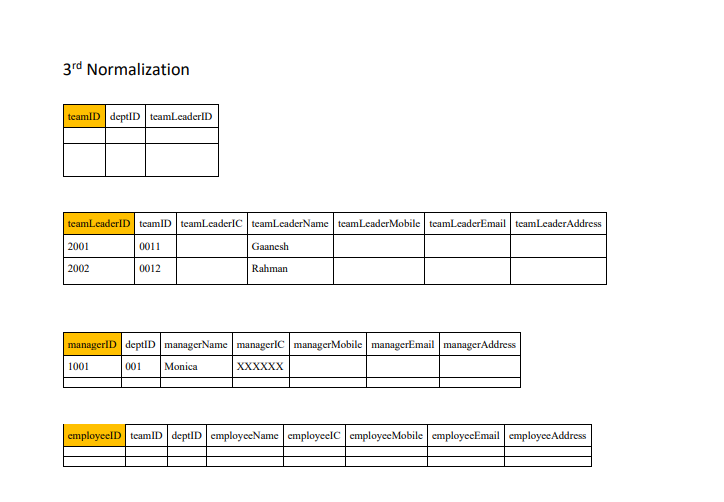
Apply reverse engineering and make it look like un normalized form.
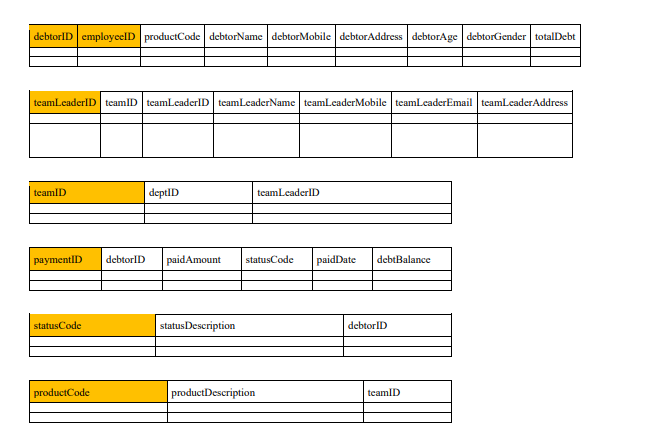
This is a database problem for a debt collector company. We have the normalized version tables for all of the attributes; now we've been asked to reverse engineer for all of the tables and get them in their UNF=un-normalized form.
3rd Normalization \begin{tabular}{|l|l|l|l|l|l|l|l|l|} \hline debtorID & employeeID & productCode & debtorName & debtorMobile & debtorAddress & debtorAge & debtorGender & totalDebt \\ \hline & & & & & & & & \\ \hline \end{tabular} \begin{tabular}{|l|l|l|} \hline teamID & deptID & teamLeaderID \\ \hline & & \\ \hline & & \\ \hline \end{tabular} \begin{tabular}{|l|l|l|l|l|l|} \hline paymentID & debtorID & paidAmount & statusCode & paidDate & debtBalance \\ \hline & & & & & \\ \hline & & & & & \\ \hline \end{tabular} \begin{tabular}{|l|l|l|} \cline { 2 - 3 } statusCode & statusDescription & debtorID \\ \hline & & \\ \hline & & \\ \hline \end{tabular} \begin{tabular}{|l|l|l|} \hline productCode & productDescription & teamID \\ \hline & & \\ \hline & & \\ \hline \end{tabular}
Step by Step Solution
There are 3 Steps involved in it

Get step-by-step solutions from verified subject matter experts
 Study Help