







Question: As fast as possible please The code shown below is intended to read a push button to turn an LED on when the button is
 As fast as possible please
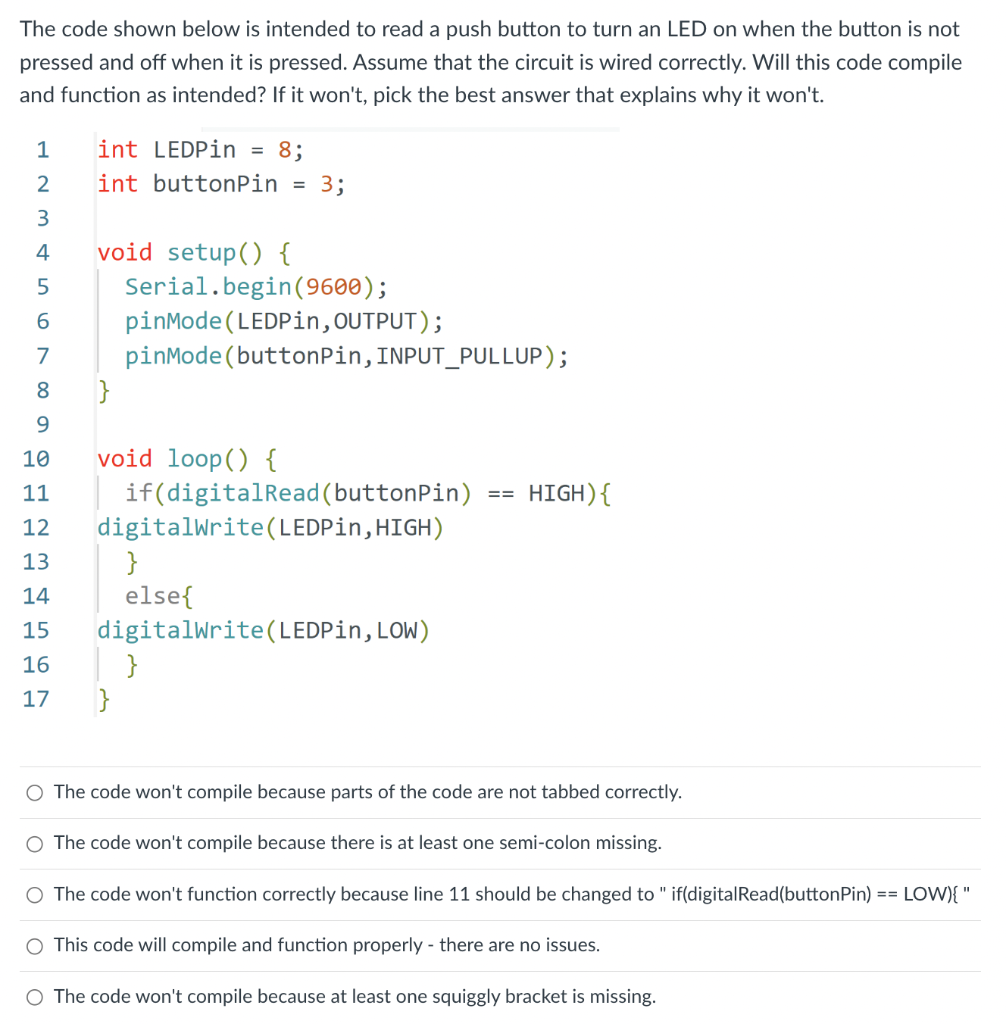
The code shown below is intended to read a push button to turn an LED on when the button is not pressed and off when it is pressed. Assume that the circuit is wired correctly. Will this code compile and function as intended? If it won't, pick the best answer that explains why it won't. \( \begin{aligned} 1 & \text { int LEDPin }=8 ; \\ 2 & \text { int buttonPin }=3 ; \\ 3 & \\ 4 & \text { void setup() }\{ \\ 5 & \text { Serial.begin }(9600) ; \\ 6 & \text { pinMode(LEDPin, OUTPUT); } \\ 7 & \text { pinMode(buttonPin, INPUT_PULLUP); } \\ 8 & \text { \} } \\ 9 & \\ 10 & \text { void loop() }\{ \\ 11 & \text { if(digitalRead(buttonPin) == HIGH) }\{ \\ 12 & \text { digitalWrite(LEDPin, HIGH) } \\ 13 & \text { \} } \\ 14 & \text { else }\{ \\ 15 & \text { digitalWrite(LEDPin, LOW) } \\ 16 & \text { \} } \\ 17 & \text { \} }\end{aligned} \) The code won't compile because parts of the code are not tabbed correctly. The code won't compile because there is at least one semi-colon missing. The code won't function correctly because line 11 should be changed to " if(digitalRead(buttonPin) == LOW)\{ " This code will compile and function properly - there are no issues. The code won't compile because at least one squiggly bracket is missing
Step by Step Solution
There are 3 Steps involved in it

Get step-by-step solutions from verified subject matter experts
 Study Help