







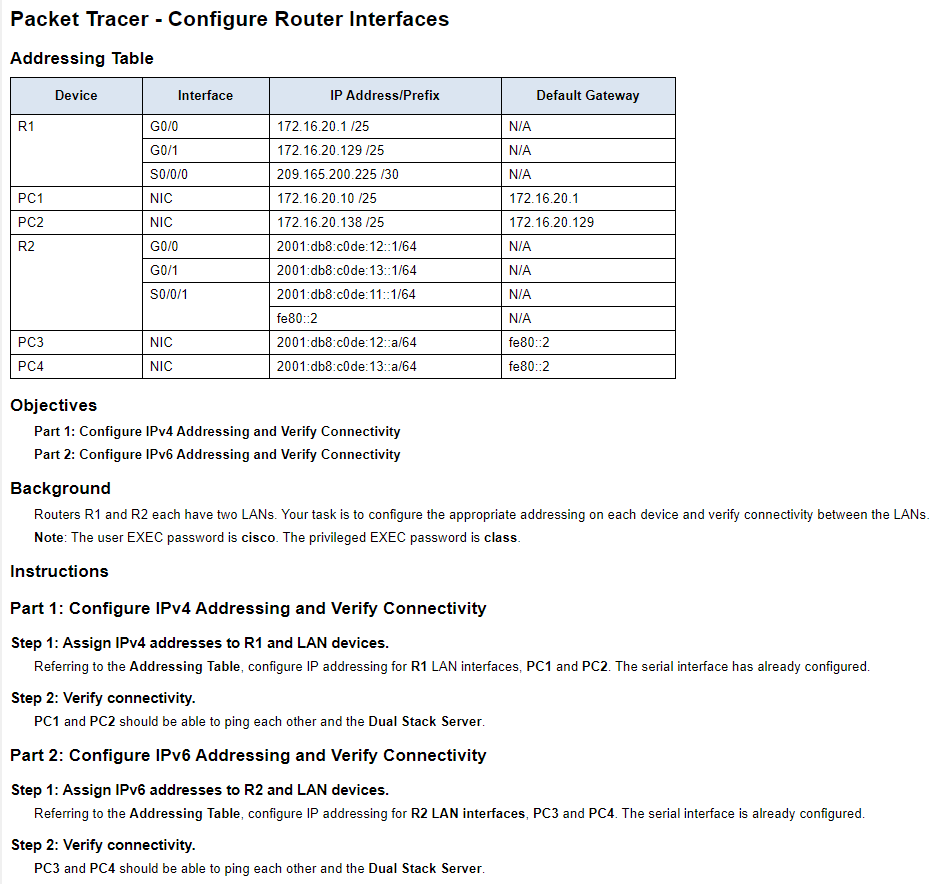
Question: ASAP Thanks Packet Tracer - Configure Router Interfaces Addressing Table Device Interface Default Gateway R1 GO/O G0/1 S0/0/0 N/A N/A N/A 172.16.20.1 172.16.20.129 PC1 NIC
ASAP Thanks
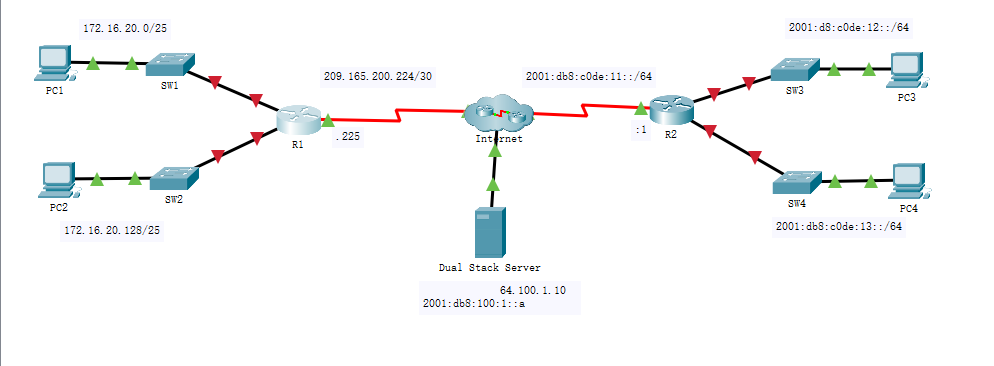
Packet Tracer - Configure Router Interfaces Addressing Table Device Interface Default Gateway R1 GO/O G0/1 S0/0/0 N/A N/A N/A 172.16.20.1 172.16.20.129 PC1 NIC PC2 IP Address/Prefix 172.16.20.1 /25 172.16.20.129/25 209.165.200.225/30 172.16.20.10 /25 172.16.20.138/25 2001:db8:c0de: 12::1/64 2001:db8:c0de:13::1/64 2001:db8:c0de: 11:1/64 fe80::2 2001:db8:c0de: 12-a/64 2001:db8c0de:13:a/64 R2 NIC GO/O G0/1 S0/0/1 N/A N/A N/A N/A fe80::2 fe80::2 PC3 PC4 NIC NIC Objectives Part 1: Configure IPv4 Addressing and Verify Connectivity Part 2: Configure IPv6 Addressing and Verify Connectivity Background Routers R1 and R2 each have two LANs. Your task is to configure the appropriate addressing on each device and verify connectivity between the LANs. Note: The user EXEC password is cisco. The privileged EXEC password is class. Instructions Part 1: Configure IPv4 Addressing and Verify Connectivity Step 1: Assign IPv4 addresses to R1 and LAN devices. Referring to the Addressing Table, configure IP addressing for R1 LAN interfaces, PC1 and PC2. The serial interface has already configured. Step 2: Verify connectivity. PC1 and PC2 should be able to ping each other and the Dual Stack Server. Part 2: Configure IPv6 Addressing and Verify Connectivity Step 1: Assign IPv6 addresses to R2 and LAN devices. Referring to the Addressing Table, configure IP addressing for R2 LAN interfaces, PC3 and PC4. The serial interface is already configured. Step 2: Verify connectivity. PC3 and PC4 should be able to ping each other and the Dual Stack Server. 172. 16. 20.0/25 2001:48:c0de:12::/64 209. 165. 200. 224/30 2001: db8: code: 11::/64 SW1 PC1 ST3 PC3 225 R2 Ri Intrnet ST2 PC2 SW4 PC4 2001: db8:c0de: 13::/64 172. 16. 20. 128/25 Dual Stack Server 64. 100. 1. 10 2001: db8:100:1
Step by Step Solution
There are 3 Steps involved in it

Get step-by-step solutions from verified subject matter experts
 Study Help