







Question: Assignment #3 Points: 10 Continue to reference the videos provided for formatting purposes and review the videos referenced in Module 2. This assignment is a
Assignment #3 Points: 10
Continue to reference the videos provided for formatting purposes and review the videos
referenced in Module 2. This assignment is a continuation on Functions.
Important Note: If we have reviewed previous formatting/skills and it is used in the
recreation excel document, you are to add the formatting/skill. For Example, if I show grid
lines on the recreation excel document but do not mention them in the specifications, you are
to put grid lines in the assignment. This includes all formatting/skills that I have covered
(bold, italicized, centering, shading, borders, etc..). The assignments are used to build your
skills in excel. These skills are common skills that are used in business applications and should
be easily identifiable.
If you are unfamiliar with the icons located on the format bar, please ask reference.
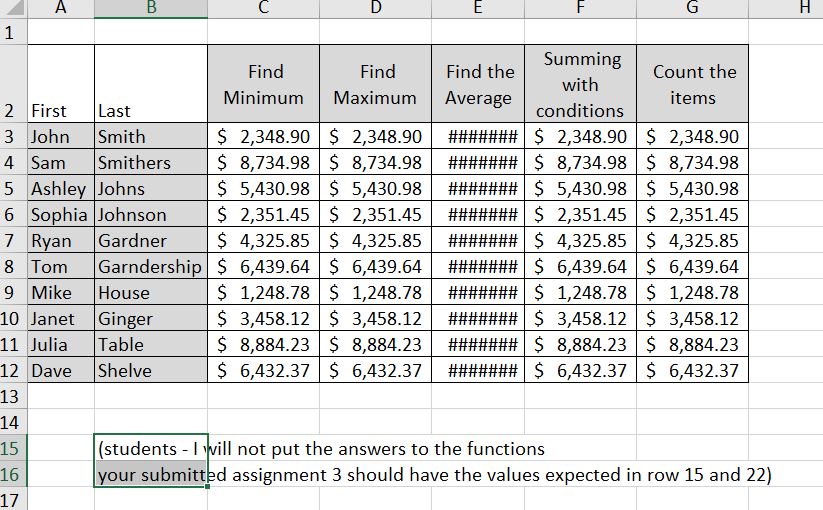
Use Assignment 3 recreate document to complete this assignment.
Specifications:
1. In cell C15 use a statistical function to find the minimum of the values in column C.
2. In cell D15 use a statistical function to find the maximum of the values in column D.
3. Why are there ##### signs in the columns. Can you fix this? How? Type your answer
on row 22. Then fix the issue.
4. In cell E15 use a statistical function to find the average of the values in column E.
5. In cell F15 use a Math & Trig function to find the Sum if it meets the following
conditions in column F. Sum the values over $3000 in Column F using a sumif function.
6. In cell G15 use a statistical function to find count the number of values in column G
7. Change the name of "Sheet 1" to Functions
8. Save the file as an excel worksheet as "your last name"_assign3
9. Submit the saved file in the drop box located in module 2. The assignment is due on
Wednesday at 6pm. See calendar for details
\f
Step by Step Solution
There are 3 Steps involved in it

Get step-by-step solutions from verified subject matter experts
 Study Help