







Question: Assignment Instructions X Use arrow keys to scroll the content Step Instructions Point Value 1 Start Word. Download and open the file named Exp22_AppCapstone_Intro_Culinary.docx. Grader
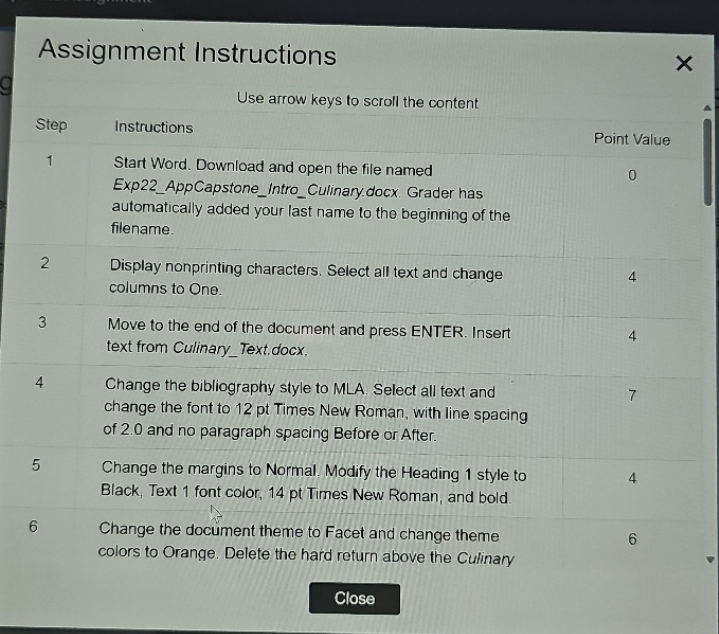
Assignment Instructions X Use arrow keys to scroll the content Step Instructions Point Value 1 Start Word. Download and open the file named Exp22_AppCapstone_Intro_Culinary.docx. Grader has automatically added your last name to the beginning of the filename. 2 Display nonprinting characters. Select all text and change 4 columns to One. 3 Move to the end of the document and press ENTER. Insert 4 text from Culinary_Text.docx. 4 Change the bibliography style to MLA. Select all text and change the font to 12 pt Times New Roman, with line spacing of 2.0 and no paragraph spacing Before or After. 5 Change the margins to Normal. Modify the Heading 1 style to 4 Black, Text 1 font color, 14 pt Times New Roman, and bold. 6 Change the document theme to Facet and change theme 6 colors to Orange. Delete the hard return above the Culinary Close
Step by Step Solution
There are 3 Steps involved in it

Get step-by-step solutions from verified subject matter experts
 Study Help