







Question: Attention:this is just one question which is separated into several steps,so i send so many pictures. Please don't use gets which is warning that is
Attention:this is just one question which is separated into several steps,so i send so many pictures. Please don't use gets which is warning that is considered as error in my computer. Lastly,please use the given code below.
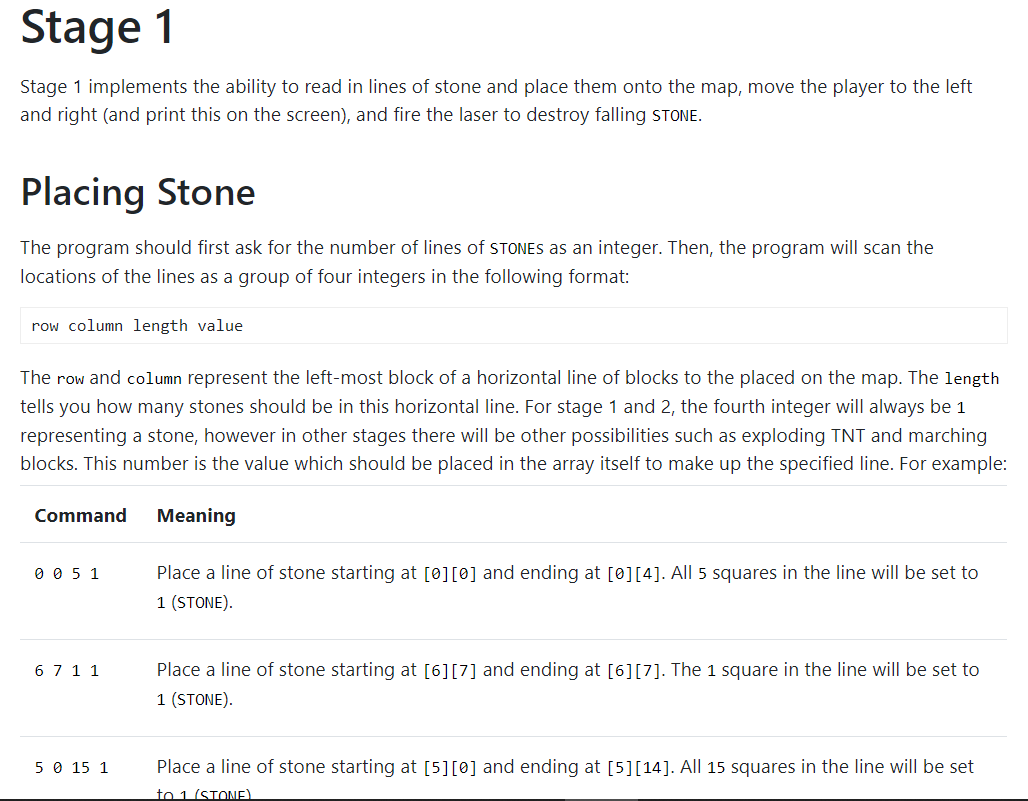
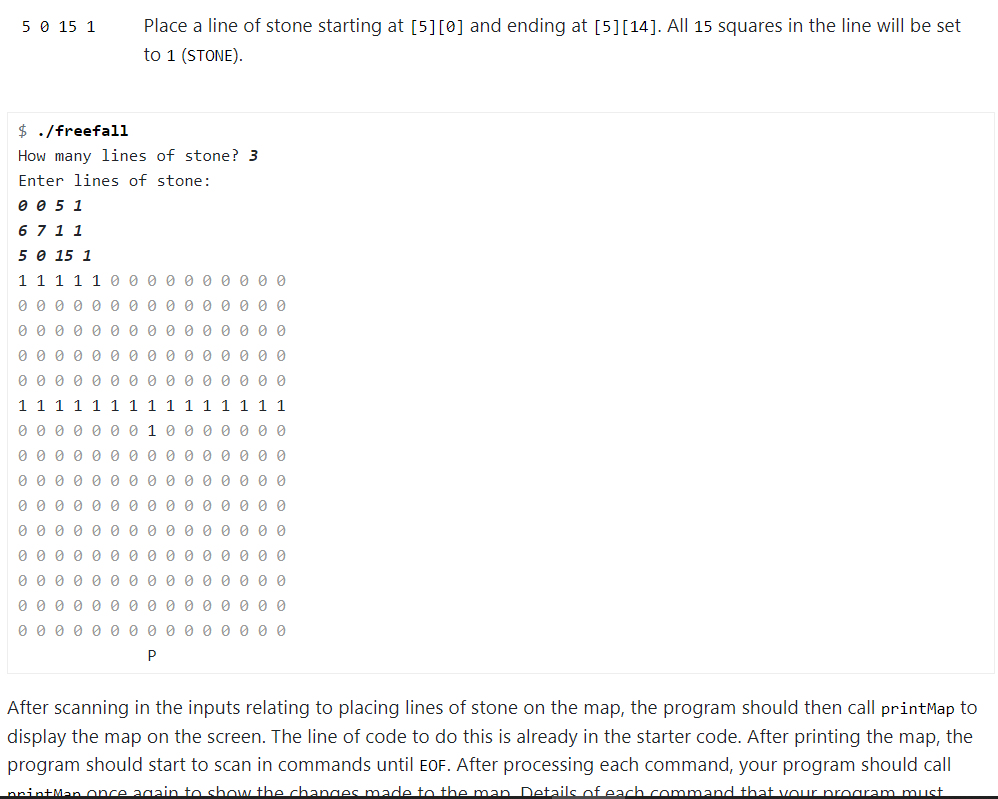
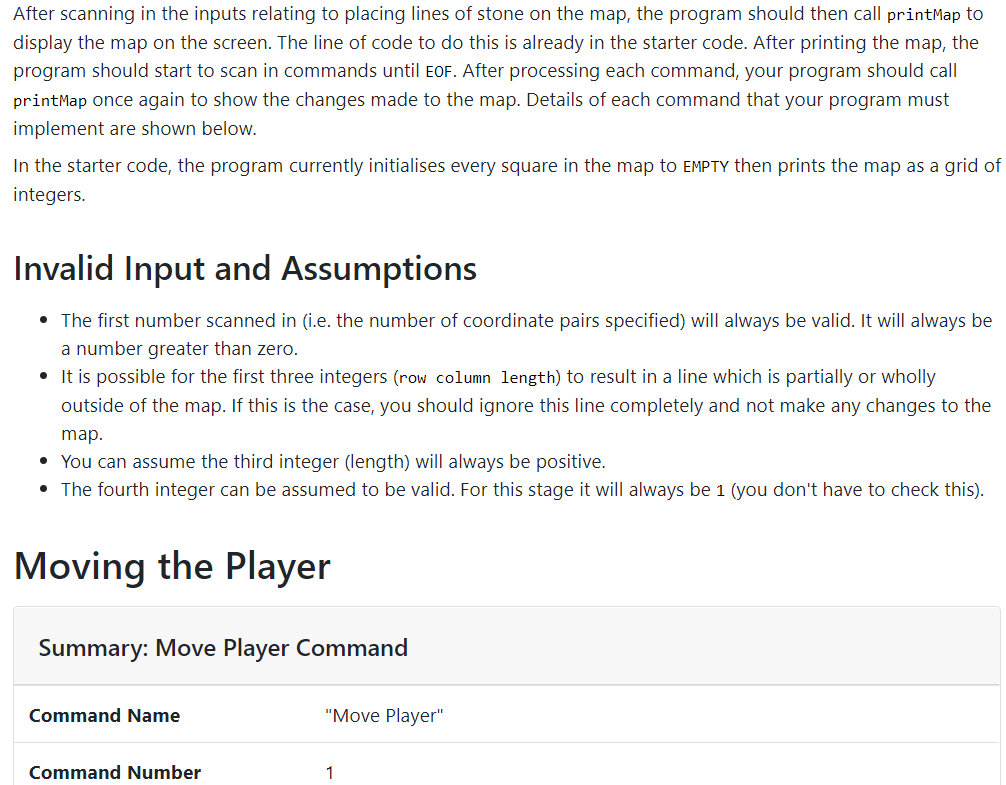
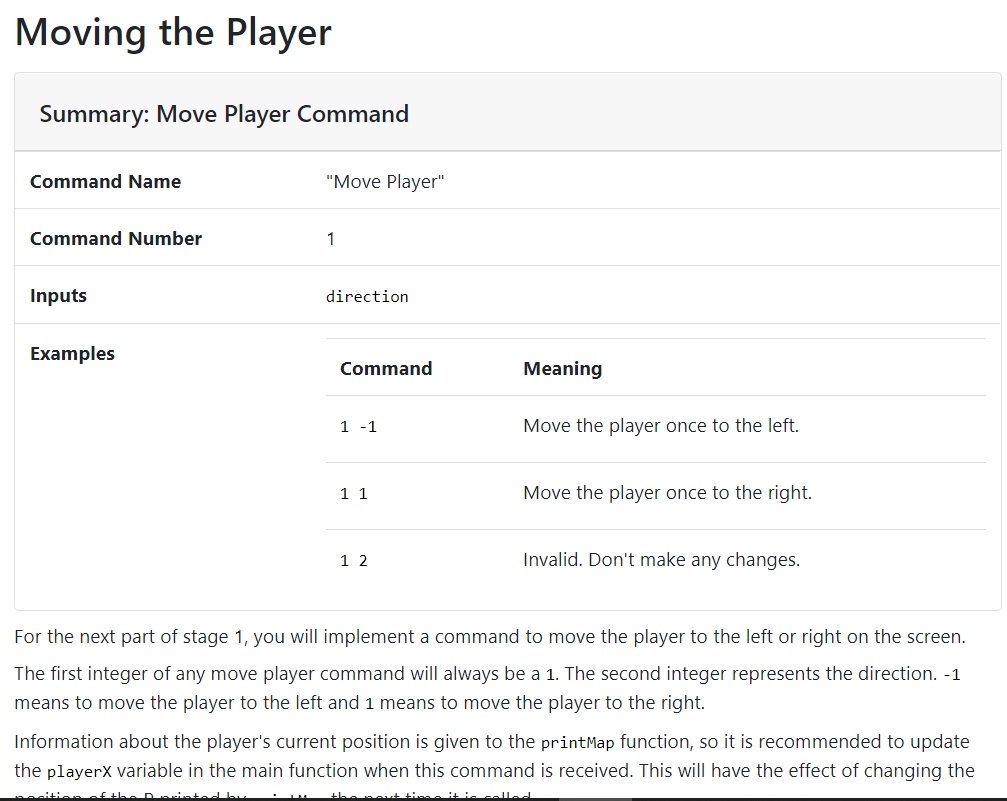
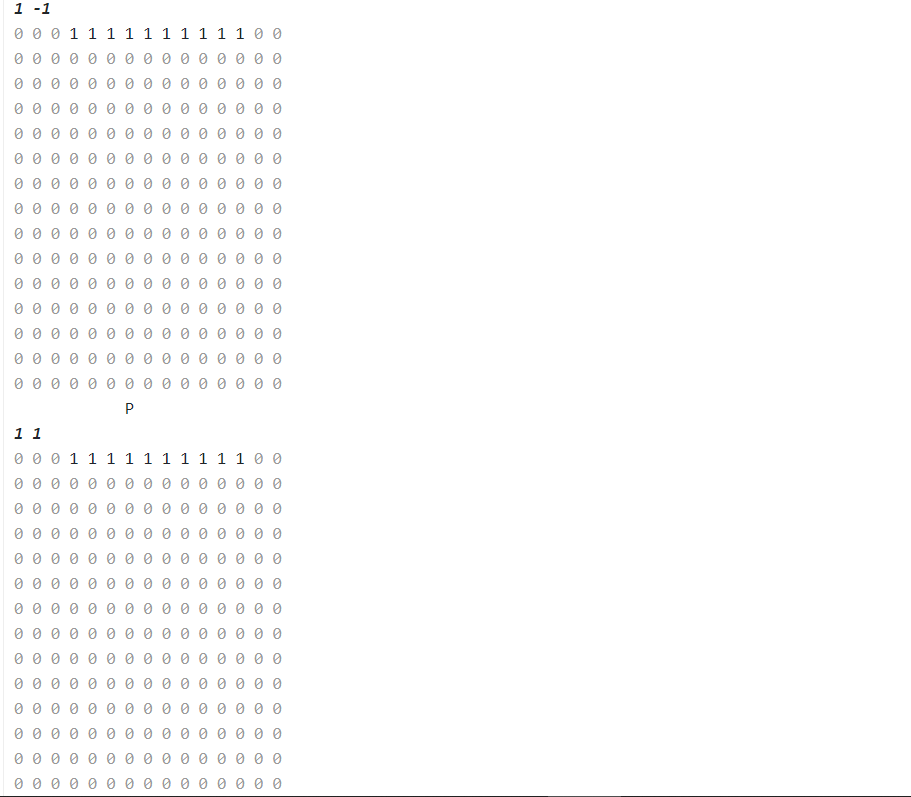
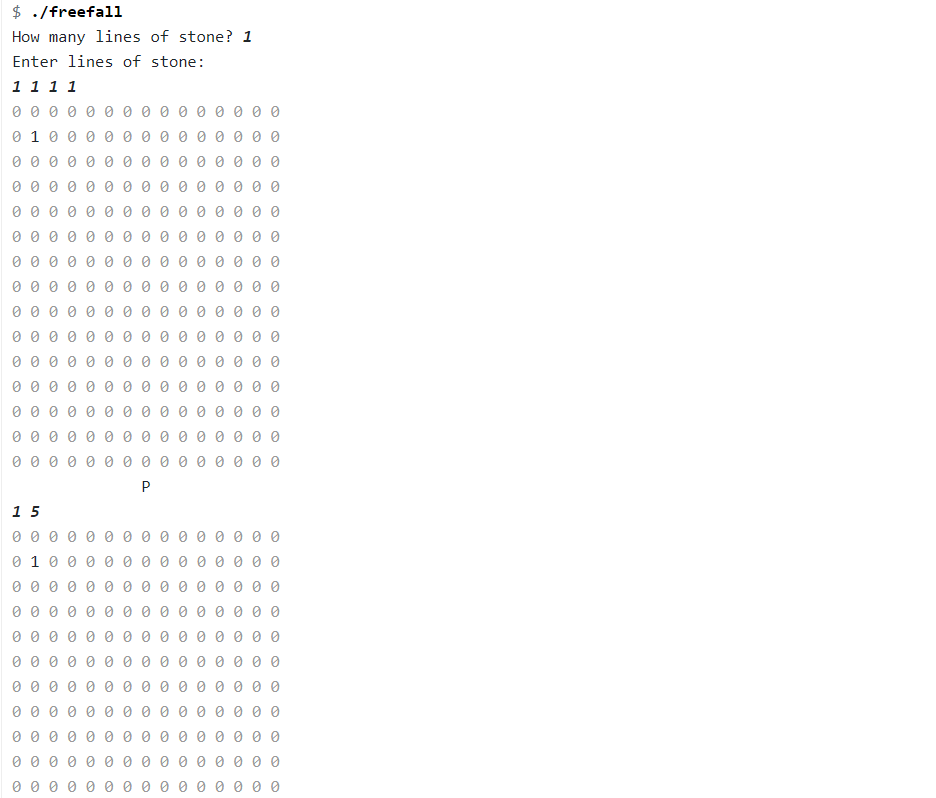
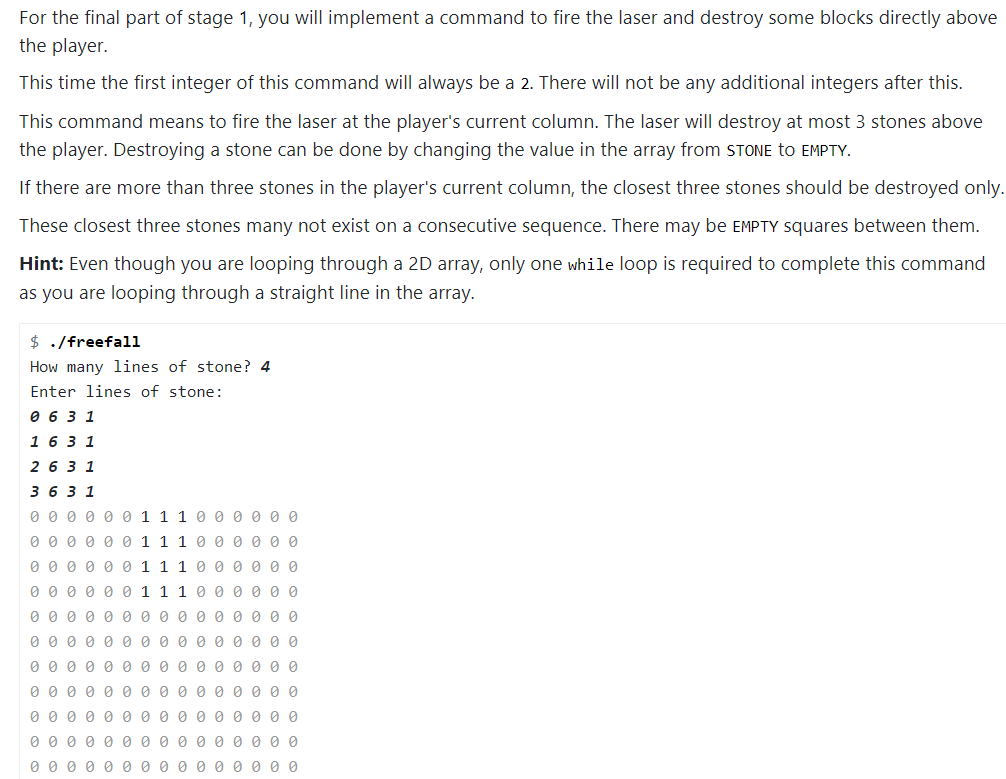
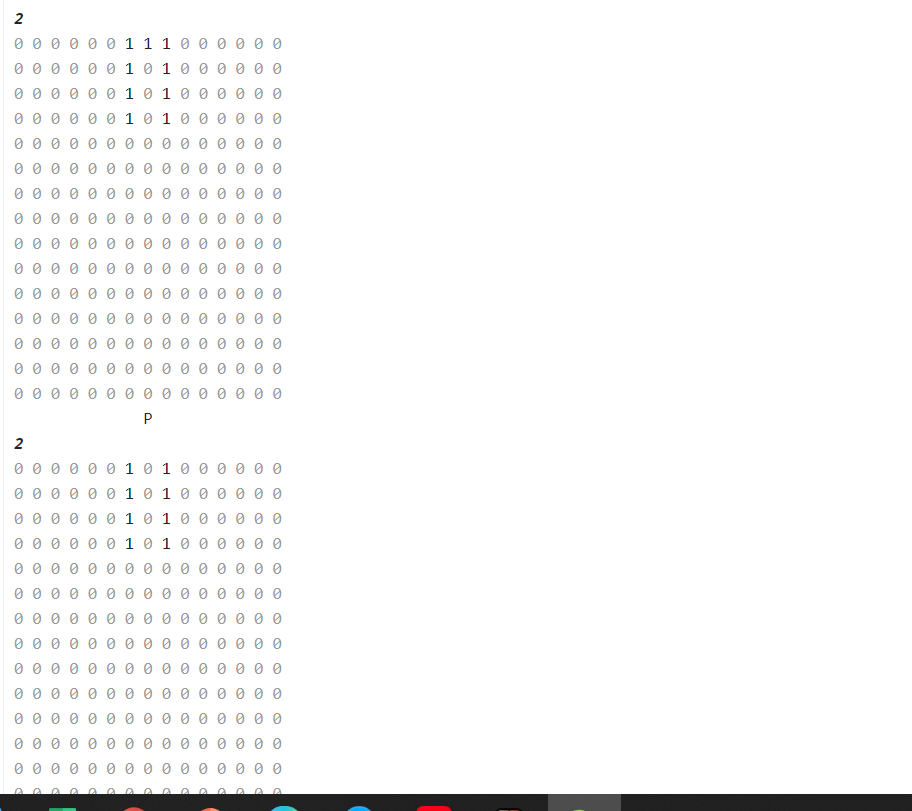
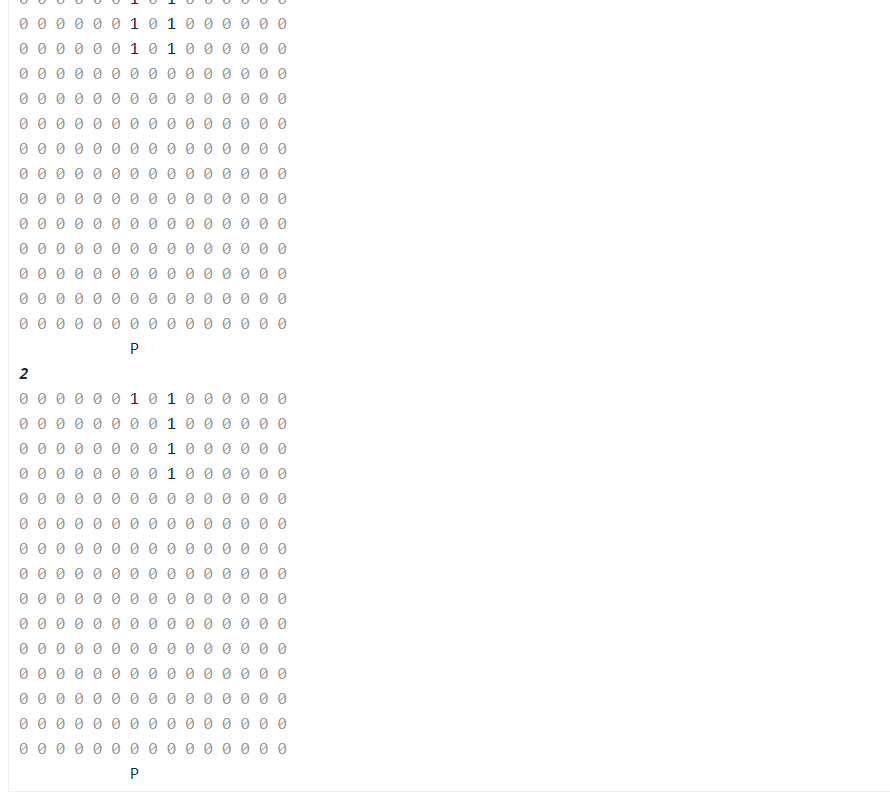
#include#include #include #define SIZE 15 #define EMPTY 0 #define STONE 1 // TODO: Add any extra #defines here. void printMap(int map[SIZE][SIZE], int playerX); // TODO: Add any extra function prototypes here. int main (void) { // This line creates our 2D array called "map" and sets all // of the blocks in the map to EMPTY. int map[SIZE][SIZE] = {EMPTY}; // This line creates out playerX variable. The player starts in the // middle of the map, at position 7. int playerX = SIZE / 2; printf("How many lines of stone? "); // TODO: Scan in the number of lines of blocks. printf("Enter lines of stone: "); // TODO: Scan in the lines of blocks. printMap(map, playerX); // TODO: Scan in commands until EOF. // After each command is processed, you should call printMap. return 0; } // Print out the contents of the map array. Then print out the player line // which will depends on the playerX variable. void printMap(int map[SIZE][SIZE], int playerX) { // Print values from the map array. int i = 0; while (i Stage 1 Stage 1 implements the ability to read in lines of stone and place them onto the map, move the player to the left and right and print this on the screen), and fire the laser to destroy falling STONE. Placing Stone The program should first ask for the number of lines of STONES as an integer. Then, the program will scan the locations of the lines as a group of four integers in the following format: row column length value The row and column represent the left-most block of a horizontal line of blocks to the placed on the map. The length tells you how many stones should be in this horizontal line. For stage 1 and 2, the fourth integer will always be 1 representing a stone, however in other stages there will be other possibilities such as exploding TNT and marching blocks. number is the value should be placed in array to nake up the specified line. For example: Command Meaning 0 0 5 1 Place a line of stone starting at [0][0] and ending at [0][4]. All 5 squares in the line will be set to 1 (STONE). 6 7 1 1 Place a line of stone starting at [6][7] and ending at [6][7]. The 1 square in the line will be set to 1 (STONE). 5 0 15 1 Place a line of stone starting at [5][0] and ending at [5][14]. All 15 squares in the line will be set ta 1 (STOME 5 0 15 1 Place a line of stone starting at [5][0] and ending at [5][14]. All 15 squares in the line will be set to 1 (STONE). $ ./freefall How many lines of stone? 3 Enter lines of stone: 005 1 6 7 1 1 5 15 1 1 1 1 1 1 0 000000000 11111111111111 1 1 0000000 000000000000000 After scanning in the inputs relating to placing lines of stone on the map, the program should then call printMap to display the map on the screen. The line of code to do this is already in the starter code. After printing the map, the program should start to scan in commands until EOF. After processing each command, your program should call nointMan once again to show the changes made to the man Details of each command that vaur nraaram must After scanning in the inputs relating to placing lines of stone on the map, the program should then call printMap to display the map on the screen. The line of code to do this is already in the starter code. After printing the map, the program should start to scan in commands until EOF. After processing each command, your program should call printMap once again to show the changes made to the map. Details of each command that your program must implement are shown below. In the starter code, the program currently initialises every square in the map to EMPTY then prints the map as a grid of integers. Invalid Input and Assumptions The first number scanned in (i.e. the number of coordinate pairs specified) will always be valid. It will always be a number greater than zero. It is possible for the first three integers (row column length) to result in a line which is partially or wholly outside of the map. If this is the case, you should ignore this line completely and not make any changes to the map. You can assume the third integer (length) will always be positive. The fourth integer can be assumed to be valid. For this stage it will always be 1 (you don't have to check this). Moving the Player Summary: Move Player Command Command Name "Move Player" Command Number 1 Moving the Player Summary: Move Player Command Command Name "Move Player" Command Number 1 Inputs direction Examples Command Meaning 1 -1 Move the player once to the left. 1 1 Move the player once to the right. 1 2 Invalid. Don't make any changes. For the next part of stage 1, you will implement a command to move the player to the left or right on the screen. The first integer of any move player command will always be a 1. The second integer represents the direction. -1 means to move the player to the left and 1 means to move the player to the right. Information about the player's current position is given to the printMap function, so it is recommended to update the playerx variable in the main function when this command is received. This will have the effect of changing the Information about the player's current position is given to the printMap function, so it is recommended to update the playerx variable in the main function when this command is received. This will have the effect of changing the position of the P printed by printMap the next time it is called. Note that after each command has been scanned in and processed the map is printed once again. $ ./freefall How many lines of stone? 1 Enter lines of stone: 0 3 10 1 0 0 0 1 1 1 1 1 1 1 1 1 1 0 0 000000 eeeeee 000000000000000 000000 00000000 00000000 0 00000000000000 1 -1 0 0 0 1 1 1 1 1 1 1 1 1 1 0 0 0 00000000000000 000000000000000 000000000000000 0 1 -1 000111111111100 P 1 1 0 0 0 1 1 1 1 1 1 1 1 1 1 0 0 $ ./freefali How many lines of stone? 1 Enter lines of stone: 1 1 1 1 01 1 5 01 OOO Invalid Input and Assumptions The second integer of a move player command may be something else other than -1 or 1. In this case, your program should print out the map unchanged. Your program may be given a sequence of move player commands which would theoretically move the player off the map. Ensure the player is always below a column of the map. If the player is on an edge column and a move player command is received which would push it over the edge, your program should print out the map unchanged. Firing the Laser Summary: Fire Laser Command Command Name "Fire Laser" Command Number 2 Inputs (none) Examples Command Meaning 2 Fire the laser upwards. For the final part of stage 1, you will implement a command to fire the laser and destroy some blocks directly above For the final part of stage 1, you will implement a command to fire the laser and destroy some blocks directly above the player This time the first integer of this command will always be a 2. There will not be any additional integers after this. This command means to fire the laser at the player's current column. The laser will destroy at most 3 stones above the player. Destroying a stone can be done by changing the value in the array from STONE TO EMPTY. If there are more than three stones in the player's current column, the closest three stones should be destroyed only. These closest three stones many not exist on a consecutive sequence. There may be EMPTY squares between them. Hint: Even though you are looping through a 2D array, only one while loop is required to complete this command as you are looping through a straight line in the array. $ ./freefall How many lines of stone? 4 Enter lines of stone: 0 6 3 1 1 6 3 1 2 6 3 1 36 3 1 OOOOOO11100OOOO 0 0 0 0 0 0 1 1 1 0 0 0 0 0 0 000000111000000 000000111000000 o o o o o o o o o o o o o o o OOOOOOOOOOOOOOO OOOOOOOOO 00000 o o o o o o o o o o o o o o o 000000 OOOOO OOOOOOOOOOOOOOO 0 0 0 0 0 0 0 0 0 0 0 0 0 0 0 2 0 0 0 0 0 0 1 1 1 0 0 000000101000000 OOOOO 0101000000 000000101000000 2 2 000000101 11 000000101000000 000000101000000 0000 0 0000000000 0 000 0 000 0000 000000000000000 OOOOOOOOOOO 2 OOOOO O 1 01 OOOOOO 0000001 01 00000 0 0000000 0000000 00000000 00000000 P 2 1 0 1 000 000 1 00000000 1 000000 1 00000000 0000000 0 0000000 00000000 0000000 P Stage 1 Stage 1 implements the ability to read in lines of stone and place them onto the map, move the player to the left and right and print this on the screen), and fire the laser to destroy falling STONE. Placing Stone The program should first ask for the number of lines of STONES as an integer. Then, the program will scan the locations of the lines as a group of four integers in the following format: row column length value The row and column represent the left-most block of a horizontal line of blocks to the placed on the map. The length tells you how many stones should be in this horizontal line. For stage 1 and 2, the fourth integer will always be 1 representing a stone, however in other stages there will be other possibilities such as exploding TNT and marching blocks. number is the value should be placed in array to nake up the specified line. For example: Command Meaning 0 0 5 1 Place a line of stone starting at [0][0] and ending at [0][4]. All 5 squares in the line will be set to 1 (STONE). 6 7 1 1 Place a line of stone starting at [6][7] and ending at [6][7]. The 1 square in the line will be set to 1 (STONE). 5 0 15 1 Place a line of stone starting at [5][0] and ending at [5][14]. All 15 squares in the line will be set ta 1 (STOME 5 0 15 1 Place a line of stone starting at [5][0] and ending at [5][14]. All 15 squares in the line will be set to 1 (STONE). $ ./freefall How many lines of stone? 3 Enter lines of stone: 005 1 6 7 1 1 5 15 1 1 1 1 1 1 0 000000000 11111111111111 1 1 0000000 000000000000000 After scanning in the inputs relating to placing lines of stone on the map, the program should then call printMap to display the map on the screen. The line of code to do this is already in the starter code. After printing the map, the program should start to scan in commands until EOF. After processing each command, your program should call nointMan once again to show the changes made to the man Details of each command that vaur nraaram must After scanning in the inputs relating to placing lines of stone on the map, the program should then call printMap to display the map on the screen. The line of code to do this is already in the starter code. After printing the map, the program should start to scan in commands until EOF. After processing each command, your program should call printMap once again to show the changes made to the map. Details of each command that your program must implement are shown below. In the starter code, the program currently initialises every square in the map to EMPTY then prints the map as a grid of integers. Invalid Input and Assumptions The first number scanned in (i.e. the number of coordinate pairs specified) will always be valid. It will always be a number greater than zero. It is possible for the first three integers (row column length) to result in a line which is partially or wholly outside of the map. If this is the case, you should ignore this line completely and not make any changes to the map. You can assume the third integer (length) will always be positive. The fourth integer can be assumed to be valid. For this stage it will always be 1 (you don't have to check this). Moving the Player Summary: Move Player Command Command Name "Move Player" Command Number 1 Moving the Player Summary: Move Player Command Command Name "Move Player" Command Number 1 Inputs direction Examples Command Meaning 1 -1 Move the player once to the left. 1 1 Move the player once to the right. 1 2 Invalid. Don't make any changes. For the next part of stage 1, you will implement a command to move the player to the left or right on the screen. The first integer of any move player command will always be a 1. The second integer represents the direction. -1 means to move the player to the left and 1 means to move the player to the right. Information about the player's current position is given to the printMap function, so it is recommended to update the playerx variable in the main function when this command is received. This will have the effect of changing the Information about the player's current position is given to the printMap function, so it is recommended to update the playerx variable in the main function when this command is received. This will have the effect of changing the position of the P printed by printMap the next time it is called. Note that after each command has been scanned in and processed the map is printed once again. $ ./freefall How many lines of stone? 1 Enter lines of stone: 0 3 10 1 0 0 0 1 1 1 1 1 1 1 1 1 1 0 0 000000 eeeeee 000000000000000 000000 00000000 00000000 0 00000000000000 1 -1 0 0 0 1 1 1 1 1 1 1 1 1 1 0 0 0 00000000000000 000000000000000 000000000000000 0 1 -1 000111111111100 P 1 1 0 0 0 1 1 1 1 1 1 1 1 1 1 0 0 $ ./freefali How many lines of stone? 1 Enter lines of stone: 1 1 1 1 01 1 5 01 OOO Invalid Input and Assumptions The second integer of a move player command may be something else other than -1 or 1. In this case, your program should print out the map unchanged. Your program may be given a sequence of move player commands which would theoretically move the player off the map. Ensure the player is always below a column of the map. If the player is on an edge column and a move player command is received which would push it over the edge, your program should print out the map unchanged. Firing the Laser Summary: Fire Laser Command Command Name "Fire Laser" Command Number 2 Inputs (none) Examples Command Meaning 2 Fire the laser upwards. For the final part of stage 1, you will implement a command to fire the laser and destroy some blocks directly above For the final part of stage 1, you will implement a command to fire the laser and destroy some blocks directly above the player This time the first integer of this command will always be a 2. There will not be any additional integers after this. This command means to fire the laser at the player's current column. The laser will destroy at most 3 stones above the player. Destroying a stone can be done by changing the value in the array from STONE TO EMPTY. If there are more than three stones in the player's current column, the closest three stones should be destroyed only. These closest three stones many not exist on a consecutive sequence. There may be EMPTY squares between them. Hint: Even though you are looping through a 2D array, only one while loop is required to complete this command as you are looping through a straight line in the array. $ ./freefall How many lines of stone? 4 Enter lines of stone: 0 6 3 1 1 6 3 1 2 6 3 1 36 3 1 OOOOOO11100OOOO 0 0 0 0 0 0 1 1 1 0 0 0 0 0 0 000000111000000 000000111000000 o o o o o o o o o o o o o o o OOOOOOOOOOOOOOO OOOOOOOOO 00000 o o o o o o o o o o o o o o o 000000 OOOOO OOOOOOOOOOOOOOO 0 0 0 0 0 0 0 0 0 0 0 0 0 0 0 2 0 0 0 0 0 0 1 1 1 0 0 000000101000000 OOOOO 0101000000 000000101000000 2 2 000000101 11 000000101000000 000000101000000 0000 0 0000000000 0 000 0 000 0000 000000000000000 OOOOOOOOOOO 2 OOOOO O 1 01 OOOOOO 0000001 01 00000 0 0000000 0000000 00000000 00000000 P 2 1 0 1 000 000 1 00000000 1 000000 1 00000000 0000000 0 0000000 00000000 0000000 P
![1 // TODO: Add any extra #defines here. void printMap(int map[SIZE][SIZE], int](https://dsd5zvtm8ll6.cloudfront.net/si.experts.images/questions/2024/09/66f50fef5e544_43066f50feef0b07.jpg)
![all // of the blocks in the map to EMPTY. int map[SIZE][SIZE]](https://dsd5zvtm8ll6.cloudfront.net/si.experts.images/questions/2024/09/66f50ff125799_43266f50ff0b99ff.jpg)
Step by Step Solution
There are 3 Steps involved in it
1 Expert Approved Answer
Step: 1 Unlock

Question Has Been Solved by an Expert!
Get step-by-step solutions from verified subject matter experts
Step: 2 Unlock
Step: 3 Unlock
 Study Help