







Question: Based on the code and techniques, private void btnTask4_Click(object sender, EventArgs e) { string s = ; for (int r = 0; r { for
Based on the code and techniques,
private void btnTask4_Click(object sender, EventArgs e)
{
string s = "";
for (int r = 0; r
{
for (int j = 0; j
s += "*";
s += " ";
}
txtMultiLineOut.Text = s
}
generate a firstTriangle button that obtains the number of lines from txtIn and displays the following triangle in the txtMultipleLineOut assuming n=5.
* ** *** **** *****
Here's my code and it's output.
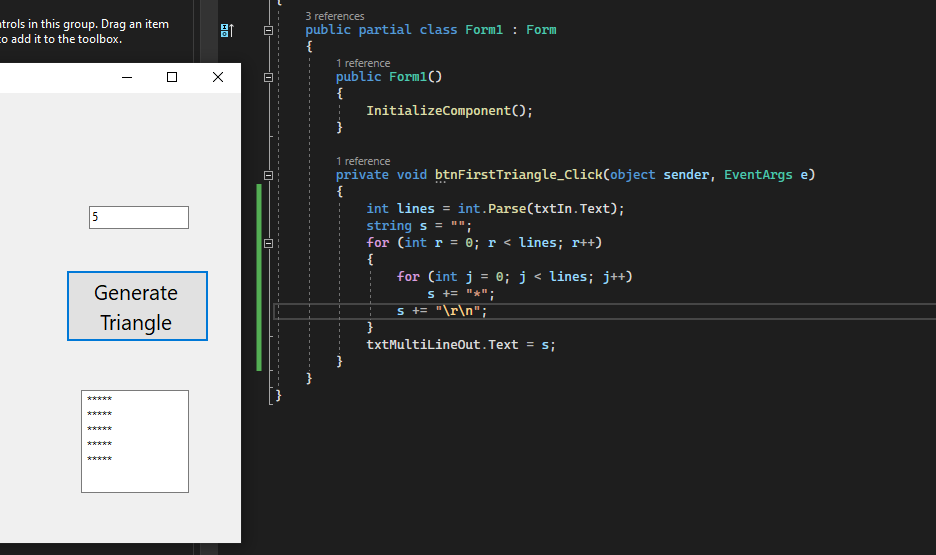
trols in this group. Drag an item o add it to the toolbox
Step by Step Solution
There are 3 Steps involved in it
1 Expert Approved Answer
Step: 1 Unlock

Question Has Been Solved by an Expert!
Get step-by-step solutions from verified subject matter experts
Step: 2 Unlock
Step: 3 Unlock
 Study Help