







Question: Public Class Form1 Private Sub btnRecord_Click(sender As Object, e As EventArgs) Handles btnRecord.Click lstDisplay.Items.Clear() Dim intRow As Integer Dim intColumn As String intColumn = InputBox(Please
Public Class Form1
Private Sub btnRecord_Click(sender As Object, e As EventArgs) Handles btnRecord.Click
lstDisplay.Items.Clear()
Dim intRow As Integer
Dim intColumn As String
intColumn = InputBox("Please enter number of columns")
Dim strAdd(intRow, intColumn) As Integer
Dim strRow(intRow), strColumn(intColumn) As String
Dim strShow(intRow, intColumn) As Integer
Dim strOutput1, strOutput2 As String
lstDisplay.Items.Add(txtDate.Text)
strOutput1 &= strColumn(0)
For intCount1 As Integer = 1 To intColumn
strColumn(intCount1) = InputBox("Please enter the name of item # " & intCount1)
strOutput1 &= strColumn(intCount1) & vbTab
Next
lstDisplay.Items.Add(strOutput1)
For intCount2 As Integer = 1 To intRow
strRow(intCount2) = InputBox("Please enter " & intCount2 & " name")
Next
For intRow2 As Integer = 0 To intRow
strOutput2 = String.Empty
strOutput2 = strRow(intRow2) & vbTab
For intColumn2 As Integer = 1 To intColumn
strShow(intRow2, intColumn2) = InputBox("Please enter " & strRow(intRow2) & " 's " & strColumn(intColumn2))
strOutput2 &= strShow(intRow2, intColumn2) & vbTab
Next
lstDisplay.Items.Add(strOutput2)
Next
End Sub
End Class
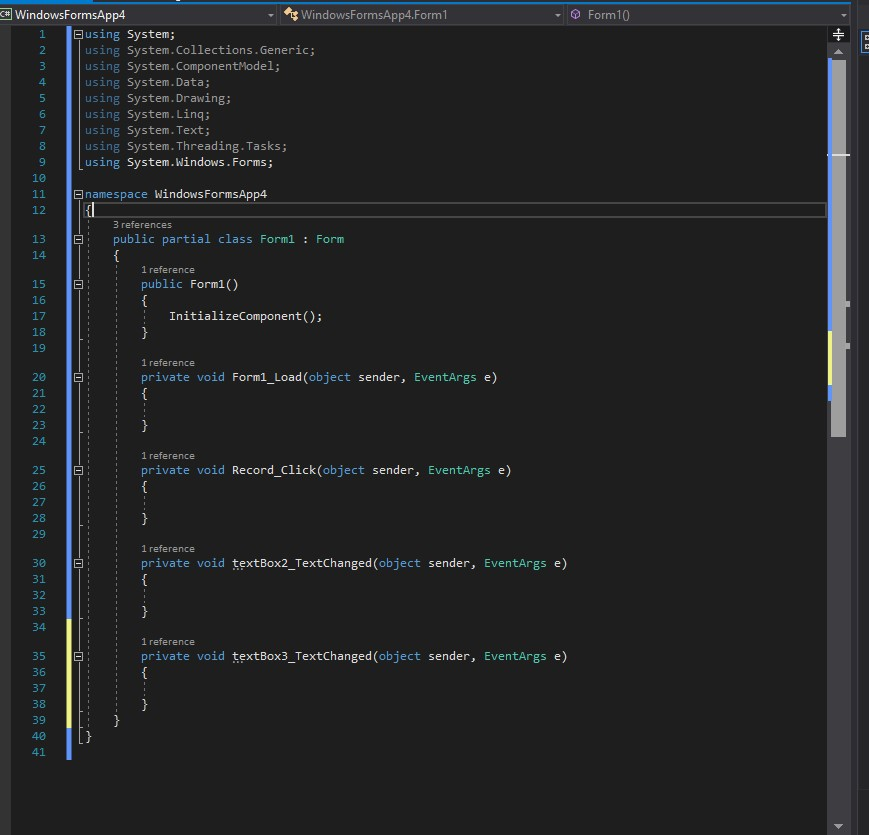
Would like to be shown how to plug in this code correctly above.
C, WindowsFormsApp4 WindowsFormsApp4.Form1 Form10 using System; using System.Collections.Generic; using System. ComponentModel; using System.Data; using System.Drawing; using System. Linq; using System.Text; using System.Threading.Tasks; using System.Win 4 dows. Forms 10 12 13 namespace WindowsFormsApp4 3 references public partial class Formi Form 1 reference :public Form1() 16 17 InitializeComponent(); 19 1 reference 20 ; private void Form1_Load (object sender, EventArgs e) 21 23 1 1 reference :private void Record_Click(object sender, EventArgs e) 26 27 29 1 reference : private void textBox2_TextChanged (object sender, EventArgs e) 30 31 32 ' 1 reference : private void textBox3_TextChanged (object sender, EventArgs e) 36 37 38 39 40 41
Step by Step Solution
There are 3 Steps involved in it

Get step-by-step solutions from verified subject matter experts
 Study Help