



Question: Based on this picture, what different information is revealed about the other hosts? Find a host with open ports and list the ports and their
Based on this picture, what different information is revealed about the other hosts? Find a host with open ports and list the ports and their services in your answer. What other information is revealed about that open host?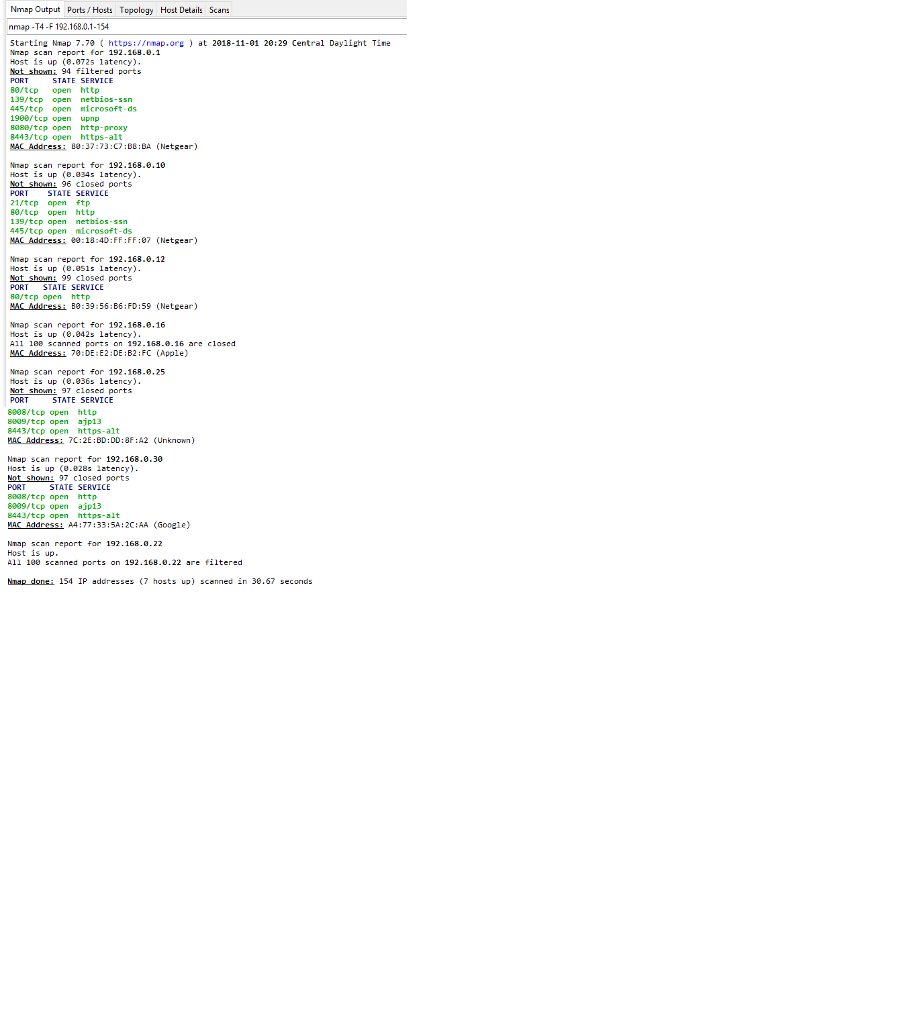
Nmap Output Ports/Hosts Topology Host Details Scans nmap -T4-F 192.168.0.1-154 Starting Nmap 7.79 httpsinmap. nap scan report for 192.169.8.1 Host is up (0.872s latency) Not shoi 94 filtered ports at 2018-11-91 20:29 Central Daylight Tine 80/tcp open http 139/tcp open netbios-5sn 445/tcp open nicrosoft-ds 1908/tcp open upnp 808/tep open http-proxy 8443/tcp open https-alt VAC Address: 89:37:73:C7:BB:BA (Netgear) Nnap scan report for 192.168.0.10 Host is up (e.834s latency) ot sho 96 closed ports STATE SERVICE 21/tcp open ftp 80/tep opern http 139/tcp open 445/tcp open microsoft-ds VAC Addressi e9:13:40:FF:FF:87 (Netgear) netbios-ssn Nnap scan report for 192.168.0.12 Host is up (e.851s latency) ot sho 99 closed ports PORT STATE SERVICE 88/tcp open http MAC Address i B0: 39: 56: B6: FD: 59 ( Netgear ) nap scan report for 192.168.0.16 Host is up (8.942s latency). A11 100 scanned parts on 192-168.0.16 are closed VAC Address: 79 DE E2 DE B2 FC (Apple) nap scan report for 192.168.0.25 Host is up (8.936s latency). ot sho: 97 closed ports PORT STATE SERVICE 8008/tcp open http 8809/tcp open ajp13 8443/tcp open https-alt MAC Addressi 7C:2E BD:DD:8F:A2 (Unknown) Nmap scan report for 192.168.0.30 Host is up (8.e28s latency) Not shonE 97 closed ports PORT 8808/tep open http 8809/tcp open ajp13 8443/tcp open https-alt MAC Addressi A4:77:33:5A:2C:AA Gooele) STATE SERVICE NTap scan report for 192.168.0.22 Host is up A11 100 scanned ports on 192.168.0.22 are filtered NnaR done: 154 IP addresses (7 hosts up) scanned in 30.67 seconds
Step by Step Solution
There are 3 Steps involved in it

Get step-by-step solutions from verified subject matter experts