







Question: BASH PORT SCANNER Find portscanner.sh 1#!/bin/bash 2 3 # Basic bash port scanner 5 host=$1 6. startport=$2 7 stopport=$3 8 9 function pingcheck 10 11
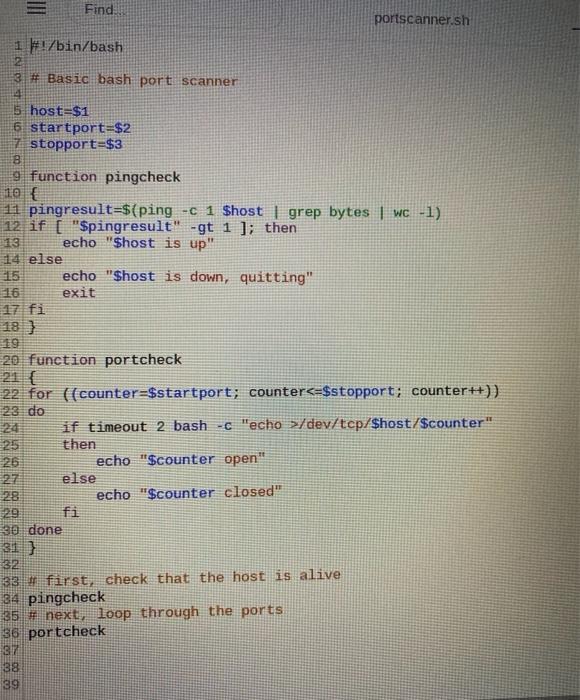
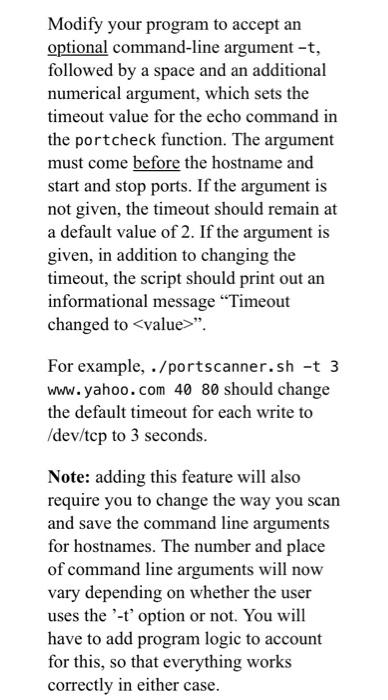
Find portscanner.sh 1#!/bin/bash 2 3 # Basic bash port scanner 5 host=$1 6. startport=$2 7 stopport=$3 8 9 function pingcheck 10 11 pingresult=$(ping -c 1 $host | grep bytes | WC-1) 12 if [ "$pingresult" -gt 1 ]; then echo "$host is up" 14 else 15 echo "$host is down, quitting" 16 exit 20 function portcheck 21 { 22 for ((counter=$startport; counterc=$stopport; counter++)) 23 do if timeout 2 bash-c "echo >/dev/tcp/$host/$counter" then 26 echo "$counter open" 27 else 28 echo "$counter closed" 29 30 done 31] 32 33 first check that the host is alive 34 pingcheck 35 # next, loop through the ports 36 portcheck 137 38 39 Modify your program to accept an optional command-line argument -t, followed by a space and an additional numerical argument, which sets the timeout value for the echo command in the portcheck function. The argument must come before the hostname and start and stop ports. If the argument is not given, the timeout should remain at a default value of 2. If the argument is given, in addition to changing the timeout, the script should print out an informational message "Timeout changed to
Step by Step Solution
There are 3 Steps involved in it

Get step-by-step solutions from verified subject matter experts
 Study Help