





Question: Bash Scripting: I need with the stops I am unable to complete. I am not quite sure how to proceed further, I keep on getting

Bash Scripting: I need with the stops I am unable to complete. I am not quite sure how to proceed further, I keep on getting a blank when I attempt to grep and cut. Plese do not cut corners. I really need to know each step. Thank you very much.
Bash Scripting: I need with the stops I am unable to complete.

I am not quite sure how to proceed further, I keep on

PART OF THE SCRIPTING THAT WILL BE A PART OF THE ANSWER:
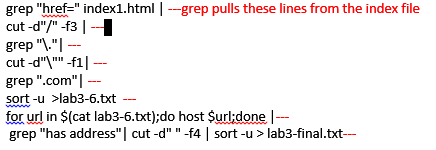
getting a blank when I attempt to grep and cut. Plese do

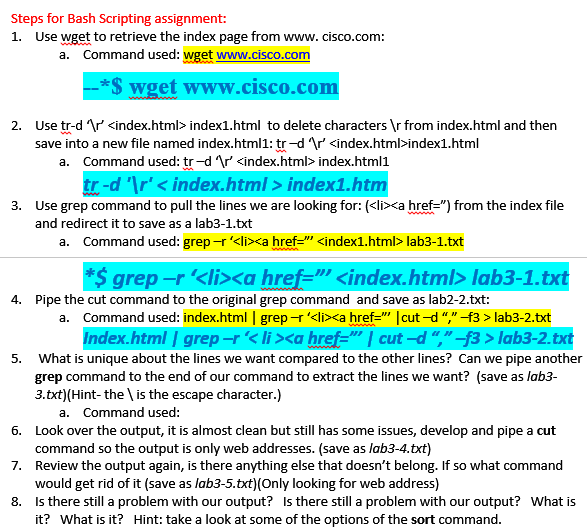
Steps for Bash Scripting assignment: 1. Use wget to retrieve the index page from www. cisco.com: a. Command used: wget www.cisco.com S wget www.cisco.co 2. r' index1.html to delete characters from index.html and then Use tr-d save into a new file named index.html1: tr-d r'index1.html a. Command used: tr-d Ar' index.html1 tr-d 'Ir' index1.ht 3. Use grep command to pull the lines we are looking for: (

  • lab3-1.txt *$ grep-r' lab3-1. Command used: index.html 1 grep-r '
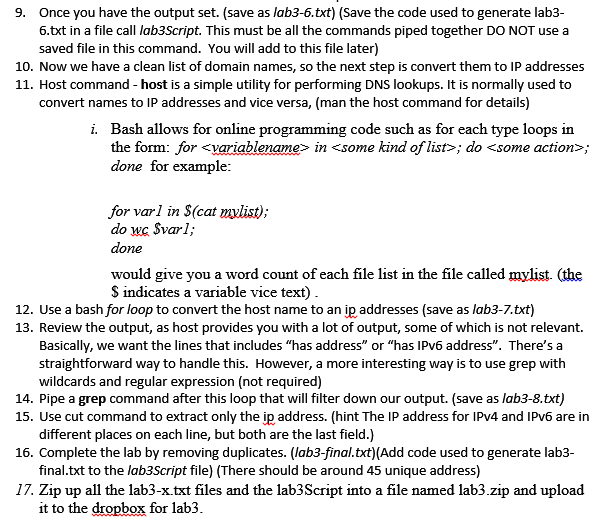
  • lab3-2 5. What is unique about the lines we want compared to the other lines? Can we pipe another grep command to the end of our command to extract the lines we want? (save as lab3 3.txt)(Hint-the \ is the escape character.) a. Command used: Look over the output, it is almost clean but still has some issues, develop and pipe a cut command so the output is only web addresses. (save as lab3-4.txt) Review the output again, is there anything else that doesn't belong. If so what command would get rid of it (save as lab3-5.txt)(Only looking for web address) Is there still a problem with our output? Is there still a problem with our output? What is it? What is it? Hint: take a look at some of the options of the sort command 6. 7. 8. Steps for Bash Scripting assignment: 1. Use wget to retrieve the index page from www. cisco.com: a. Command used: wget www.cisco.com S wget www.cisco.co 2. r' index1.html to delete characters from index.html and then Use tr-d save into a new file named index.html1: tr-d r'index1.html a. Command used: tr-d Ar' index.html1 tr-d 'Ir' index1.ht 3. Use grep command to pull the lines we are looking for: (
  • lab3-1.txt *$ grep-r' lab3-1. Command used: index.html 1 grep-r '
  • lab3-2 5. What is unique about the lines we want compared to the other lines? Can we pipe another grep command to the end of our command to extract the lines we want? (save as lab3 3.txt)(Hint-the \ is the escape character.) a. Command used: Look over the output, it is almost clean but still has some issues, develop and pipe a cut command so the output is only web addresses. (save as lab3-4.txt) Review the output again, is there anything else that doesn't belong. If so what command would get rid of it (save as lab3-5.txt)(Only looking for web address) Is there still a problem with our output? Is there still a problem with our output? What is it? What is it? Hint: take a look at some of the options of the sort command 6. 7. 8
  • Step by Step Solution

    There are 3 Steps involved in it

    1 Expert Approved Answer
    Step: 1 Unlock blur-text-image
    Question Has Been Solved by an Expert!

    Get step-by-step solutions from verified subject matter experts

    Step: 2 Unlock
    Step: 3 Unlock

    Students Have Also Explored These Related Databases Questions!