







Question: Normal No Spacd.... Heading 1 Heading 2 Paragraph Intermediate Spreadsheet Concepts Exercise 8 Construct a spreadsheet for Mike's Mail Order Company. 1. 2. 3. Enter
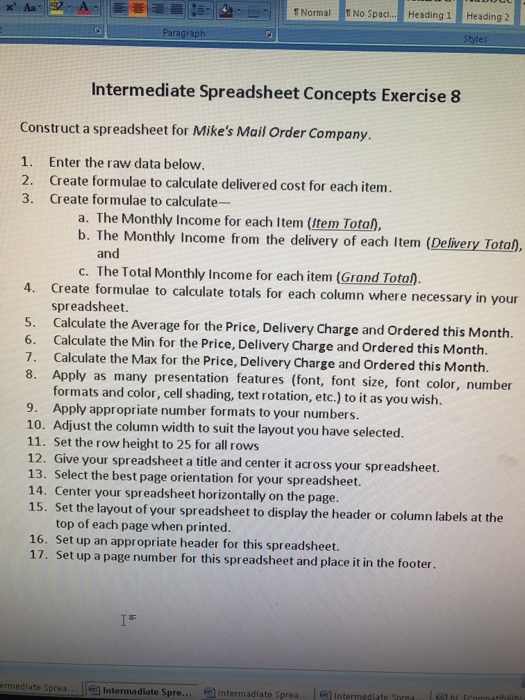
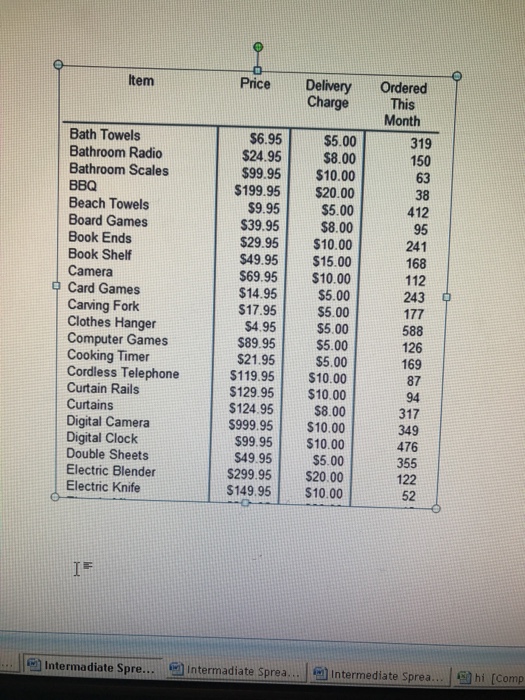
Normal No Spacd.... Heading 1 Heading 2 Paragraph Intermediate Spreadsheet Concepts Exercise 8 Construct a spreadsheet for Mike's Mail Order Company. 1. 2. 3. Enter the raw data below. Create formulae to calculate delivered cost for each item. Create formulae to calculate- a. The Monthly Income for each Item (ltem Total), b. The Monthly Income from the delivery of each Item (Delivery Tota), and c. The Total Monthly Income for each item (Grand Tota). 4. Create formulae to calculate totals for each column where necessary in your spreadsheet. 5. Calculate the Average for the Price, Delivery Charge and Ordered this Month. 6. Calculate the Min for the Price, Delivery Charge and Ordered this Month. 7. Calculate the Max for the Price, Delivery Charge and Ordered this Month. 8. Apply as many presentation features (font, font size, font color, number formats and color, cell shading, text rotation, etc.) to it as you wish 9. Apply appropriate number formats to your numbers 10. Adjust the column width to suit the layout you have selected. 11. Set the row height to 25 for all rows 12. Give your spreadsheet a title and center it across your spreadsheet. 13. Select the best page orientation for your spreadsheet. 14. Center your spreadsheet horizontally on the page. 15. Set the layout of your spreadsheet to display the header or column labels at the top of each page when printed. 16. Set up an appropriate header for this spreadsheet. 17. Set up a page number for this spreadsheet and place it in the footer nediate Sprea. Intermadiate Spre intermadiate Sprea I-1 interm
Step by Step Solution
There are 3 Steps involved in it

Get step-by-step solutions from verified subject matter experts
 Study Help