







Question: Basically create directories and files based off this picture using C. a1part1 changes to a1p2 In cs3377 directory, create a subdirectory (a1p2) and cd to
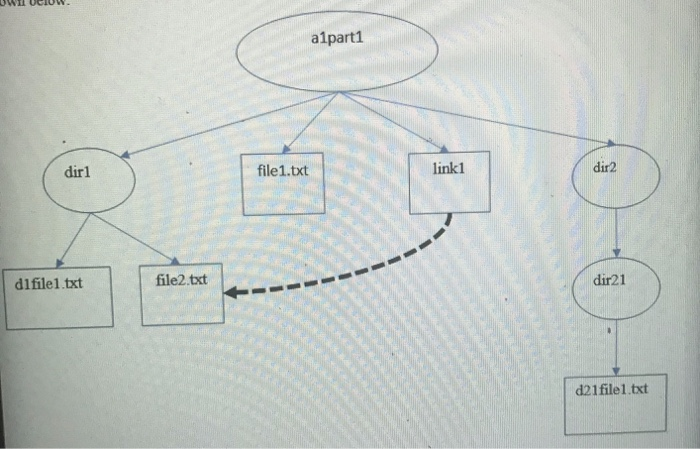
Basically create directories and files based off this picture using C. a1part1 changes to a1p2
In cs3377 directory, create a subdirectory (a1p2) and cd to a1p2.
Task #1Write a C/C++ program (a1p2task1.c, and its executable named a1p2task1) to create a few directories and files as you have done in Part1. Your executable is named "a1p2task1".You may use system("command" ) function call to run "command". To change directory, you may use chdir( ) function call along with getcwd( ) function call.
Copy and paste your program listing (a1p2task1.c) here
Copy and paste the log of how to compile this program
Copy and paste the run of your program here (./a1p2task1)
Task #2. Write c/c++ program (a1p2task2.c and its executable named a1p2task2).
Note. This may sound a bit odd first but it will make sense after all (or later).
The program (a1p2task2) will (a) compile a1p2task1.c program (which you have written in Part2 Task#1, to make its executable a1p2task1prog) and (b) then it will run this program.
You may use system("command") in your program. For example, to compile a program (a1p2task1.c), you call in your program: system("gcc a1p2task1.c -o a1p2task1prog"). To run a program (a1p2task1prog) after the compilation, you call in your program: system("./a1p2task1prog").
Copy and paste your program listing here
Listing of how to compile this program and its log
Output/Log of the program run (a1p2task2) here
Listing of Makefile to compile these programs
Submit two files (to be attached for your upload): (1) this word document with your answer and (2) a zip file (including each program (source), its executable, and its log of the run, and Makefile).
a1part1 dirl file1.txt link1 dir2 d1file1.txt file2.txt dir21 d21 file1 txt
Step by Step Solution
There are 3 Steps involved in it

Get step-by-step solutions from verified subject matter experts
 Study Help