







Question: Below is some data for patients seen at five different urgent care locations. 1. Create a formula in column F that returns the length of
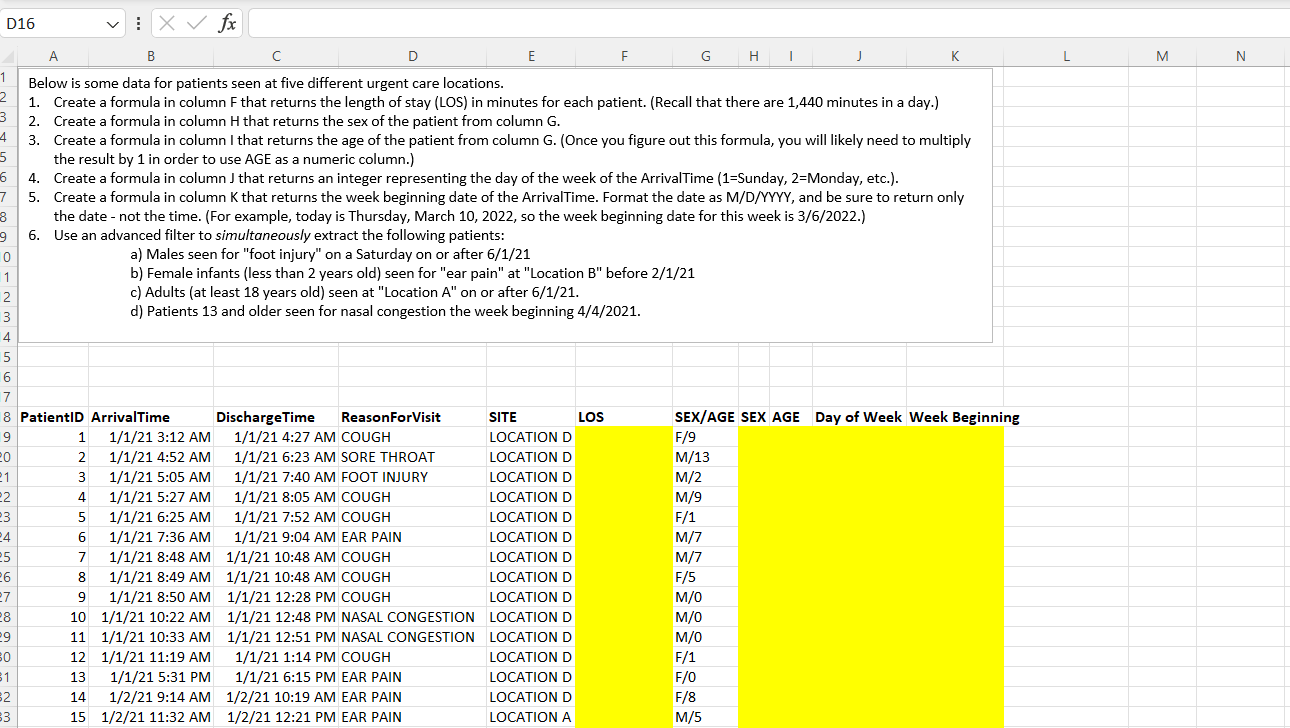
Below is some data for patients seen at five different urgent care locations. 1. Create a formula in column F that returns the length of stay (LOS) in minutes for each patient. (Recall that there are 1,440 minutes in a day.) 2. Create a formula in column H that returns the sex of the patient from column G. 3. Create a formula in column I that returns the age of the patient from column G. (Once you figure out this formula, you will likely need to multiply the result by 1 in order to use AGE as a numeric column.) 4. Create a formula in column J that returns an integer representing the day of the week of the ArrivalTime (1=Sunday, 2=Monday, etc.). 5. Create a formula in column K that returns the week beginning date of the ArrivalTime. Format the date as M/D/YYYY, and be sure to return only the date - not the time. (For example, today is Thursday, March 10, 2022, so the week beginning date for this week is 3/6/2022.) 6. Use an advanced filter to simultaneously extract the following patients: a) Males seen for "foot injury" on a Saturday on or after 6/1/21 b) Female infants (less than 2 years old) seen for "ear pain" at "Location B " before 2/1/21 c) Adults (at least 18 years old) seen at "Location A " on or after 6/1/21. d) Patients 13 and older seen for nasal congestion the week beginning 4/4/2021
Step by Step Solution
There are 3 Steps involved in it

Get step-by-step solutions from verified subject matter experts
 Study Help