







Question: below robot_arm.js code; //---------------------------------------------------------------------------- // State Variable Setup //---------------------------------------------------------------------------- // This variable will store the WebGL rendering context var gl; //Collect shape information into neat
![into neat package var shapes = { wireCube: {points:[], colors:[], start:0, size:0,](https://s3.amazonaws.com/si.experts.images/answers/2024/09/66dbf025ef36d_89366dbf02564bbc.jpg)
![type: 0}, solidCube: {points:[], colors:[], start:0, size:0, type: 0}, axes: {points:[], colors:[],](https://s3.amazonaws.com/si.experts.images/answers/2024/09/66dbf026c93a5_89466dbf0263f64d.jpg)
below robot_arm.js code;
//---------------------------------------------------------------------------- // State Variable Setup //----------------------------------------------------------------------------
// This variable will store the WebGL rendering context var gl;
//Collect shape information into neat package var shapes = { wireCube: {points:[], colors:[], start:0, size:0, type: 0}, solidCube: {points:[], colors:[], start:0, size:0, type: 0}, axes: {points:[], colors:[], start:0, size:0, type: 0}, };
//Variables for Transformation Matrices var mv = new mat4(); var p = new mat4(); var mvLoc, projLoc;
//Model state variables var shoulder = 0, elbow = 0;
//---------------------------------------------------------------------------- // Define Shape Data //----------------------------------------------------------------------------
//Some colours var red = vec4(1.0, 0.0, 0.0, 1.0); var green = vec4(0.0, 1.0, 0.0, 1.0); var blue = vec4(0.0, 0.0, 1.0, 1.0); var lightred = vec4(1.0, 0.5, 0.5, 1.0); var lightgreen = vec4(0.5, 1.0, 0.5, 1.0); var lightblue = vec4(0.5, 0.5, 1.0, 1.0); var white = vec4(1.0, 1.0, 1.0, 1.0);
//Generate Axis Data: use LINES to draw. Three axes in red, green and blue shapes.axes.points = [ vec4( 2.0, 0.0, 0.0, 1.0), //x axis, will be green vec4( -2.0, 0.0, 0.0, 1.0), vec4( 0.0, 2.0, 0.0, 1.0), //y axis, will be red vec4( 0.0, -2.0, 0.0, 1.0), vec4( 0.0, 0.0, 2.0, 1.0), //z axis, will be blue vec4( 0.0, 0.0, -2.0, 1.0) ];
shapes.axes.colors = [ green,green, red, red, blue, blue ];
//Define points for a unit cube var cubeVerts = [ vec4( 0.5, 0.5, 0.5, 1), //0 vec4( 0.5, 0.5, -0.5, 1), //1 vec4( 0.5, -0.5, 0.5, 1), //2 vec4( 0.5, -0.5, -0.5, 1), //3 vec4(-0.5, 0.5, 0.5, 1), //4 vec4(-0.5, 0.5, -0.5, 1), //5 vec4(-0.5, -0.5, 0.5, 1), //6 vec4(-0.5, -0.5, -0.5, 1), //7 ];
//Look up patterns from cubeVerts for different primitive types //Wire Cube - draw with LINE_STRIP var wireCubeLookups = [ 0,4,6,2,0, //front 1,0,2,3,1, //right 5,1,3,7,5, //back 4,5,7,6,4, //right 4,0,1,5,4, //top 6,7,3,2,6, //bottom ];
//Solid Cube - draw with TRIANGLES, 2 triangles per face var solidCubeLookups = [ 0,4,6, 0,6,2, //front 1,0,2, 1,2,3, //right 5,1,3, 5,3,7,//back 4,5,7, 4,7,6,//left 4,0,1, 4,1,5,//top 6,7,3, 6,3,2,//bottom ];
//Expand Wire Cube data: this wire cube will be white... for (var i =0; i
//Expand Solid Cube data: each face will be a different color so you can see // the 3D shape better without lighting. var colorNum = 0; var colorList = [lightblue, lightgreen, lightred, blue, red, green]; for (var i = 0; i
//load data into points and colors arrays - runs once as page loads. var points = []; var colors = [];
//Convenience function: // - adds shape data to points and colors arrays // - adds primitive type to a shape function loadShape(myShape, type) { myShape.start = points.length; points = points.concat(myShape.points); colors = colors.concat(myShape.colors); myShape.size = points.length - myShape.start; myShape.type = type; }
//---------------------------------------------------------------------------- // Initialization Event Function //----------------------------------------------------------------------------
window.onload = function init() { // Set up a WebGL Rendering Context in an HTML5 Canvas var canvas = document.getElementById("gl-canvas"); gl = canvas.getContext("webgl2"); if (!gl) { canvas.parentNode.innerHTML("Cannot get WebGL2 Rendering Context"); }
// Configure WebGL // eg. - set a clear color // - turn on depth testing gl.viewport(0, 0, gl.drawingBufferWidth, gl.drawingBufferHeight); gl.enable(gl.DEPTH_TEST); gl.clearColor(0.0, 0.0, 0.0, 1.0); gl.enable(gl.CULL_FACE);
// Load shaders and initialize attribute buffers var program = initShaders(gl, "shader.vert", "shader.frag"); gl.useProgram(program);
// Set up data to draw // Mostly done globally in this program... loadShape(shapes.wireCube, gl.LINE_STRIP); loadShape(shapes.solidCube, gl.TRIANGLES); loadShape(shapes.axes, gl.LINES);
// Load the data into GPU data buffers and // Associate shader attributes with corresponding data buffers //***Vertices*** var vertexBuffer = gl.createBuffer(); gl.bindBuffer(gl.ARRAY_BUFFER, vertexBuffer); gl.bufferData(gl.ARRAY_BUFFER, flatten(points), gl.STATIC_DRAW); program.vPosition = gl.getAttribLocation(program, "vPosition"); gl.vertexAttribPointer(program.vPosition, 4, gl.FLOAT, gl.FALSE, 0, 0); gl.enableVertexAttribArray(program.vPosition);
//***Colors*** var colorBuffer = gl.createBuffer(); gl.bindBuffer(gl.ARRAY_BUFFER, colorBuffer); gl.bufferData(gl.ARRAY_BUFFER, flatten(colors), gl.STATIC_DRAW); program.vColor = gl.getAttribLocation(program, "vColor"); gl.vertexAttribPointer(program.vColor, 4, gl.FLOAT, gl.FALSE, 0, 0); gl.enableVertexAttribArray(program.vColor);
// Get addresses of shader uniforms projLoc = gl.getUniformLocation(program, "p"); mvLoc = gl.getUniformLocation(program, "mv");
//Set up projection matrix var aspect = canvas.clientWidth/canvas.clientHeight; //p = ortho(-3.4*aspect, 3.4*aspect, -3.4, 3.4, 1.0, 20.0); p = perspective(40.0, aspect, 0.1, 100.0);
gl.uniformMatrix4fv(projLoc, gl.FALSE, flatten(transpose(p)));
//Set initial view var eye = vec3(0.0, 1.0, 10.0); var at = vec3(0.0, 0.0, 0.0); var up = vec3(0.0, 1.0, 0.0);
mv = lookAt(eye, at, up);
//Animate - draw continuously requestAnimationFrame(animate); };
//---------------------------------------------------------------------------- // Animation and Rendering Event Functions //----------------------------------------------------------------------------
//animate() //updates and displays the model based on elapsed time //sets up another animation event as soon as possible var prevTime = 0; function animate() { requestAnimationFrame(animate); //Do time corrected animation var curTime = new Date().getTime(); if (prevTime != 0) { //Calculate elapsed time in seconds var timePassed = (curTime - prevTime)/1000.0; //Update any active animations handleKeys(timePassed); } prevTime = curTime; //Draw render(); }
function render() { gl.clear(gl.DEPTH_BUFFER_BIT | gl.COLOR_BUFFER_BIT); var armShape = shapes.wireCube; var matStack = []; //Save view transform matStack.push(mv); //Position Shoulder Joint mv = mult(mv,translate(-2.0, 0.0, 0.0)); //Shoulder Joint mv = mult(mv,rotate(shoulder, vec3(0,0,1))); //Position Upper Arm Cube mv = mult(mv,translate(1.0, 0.0, 0.0)); //Scale and Draw Upper Arm matStack.push(mv); mv = mult(mv,scale(2.0, 0.4, 1.0)); gl.uniformMatrix4fv(mvLoc, gl.FALSE, flatten(transpose(mv))); gl.drawArrays(armShape.type, armShape.start, armShape.size); //Undo Scale mv = matStack.pop();
//Position Elbow Joint mv = mult(mv, translate(1.0, 0.0, 0.0)); //Elbow Joint mv = mult(mv, rotate(elbow,vec3(0,0,1))); //Position Forearm Cube mv = mult(mv, translate(1, 0.0, 0.0)); //Scale and Draw Forearm matStack.push(mv); mv = mult(mv, scale(2.0, 0.4, 1.0)); gl.uniformMatrix4fv(mvLoc, gl.FALSE, flatten(transpose(mv))); gl.drawArrays(armShape.type, armShape.start, armShape.size); //Undo Scale mv = matStack.pop();
//Restore mv to initial state mv = matStack.pop(); }
//---------------------------------------------------------------------------- // Keyboard Event Functions //----------------------------------------------------------------------------
//This array will hold the pressed or unpressed state of every key var currentlyPressedKeys = [];
//Store current state of shift key var shift;
document.onkeydown = function handleKeyDown(event) { currentlyPressedKeys[event.keyCode] = true; shift = event.shiftKey;
//Get unshifted key character var c = event.keyCode; var key = String.fromCharCode(c);
//Place key down detection code here }
document.onkeyup = function handleKeyUp(event) { currentlyPressedKeys[event.keyCode] = false; shift = event.shiftKey; //Get unshifted key character var c = event.keyCode; var key = String.fromCharCode(c);
//Place key up detection code here }
//isPressed(c) //Utility function to lookup whether a key is pressed //Only works with unshifted key symbol // ie: use "E" not "e" // use "5" not "%" function isPressed(c) { var code = c.charCodeAt(0); return currentlyPressedKeys[code]; }
//handleKeys(timePassed) //Continuously called from animate to cause model updates based on //any keys currently being held down function handleKeys(timePassed) { //Place continuous key actions here - anything that should continue while a key is //held
//Calculate how much to move based on time since last update
//add the following controls //"x/X: to rotate the arm on the X axis so you can see it from different angles" //"y/Y: to rotate the arm on the Y axis so you can see it from different angles" //"a/A: to rotate the fingers on the x-axis with positive direction" //"b/B: to rotate the fingers on the x-axis with negative direction (all fingers sholuld rotate)" //"m/M: to rotate the fingers on the y-axis with positive direction (all fingers sholuld rotate)" //"n/N: to rotate the fingers on the y-axis with negative direction (all fingers sholuld rotate)" //"t/T: toggle between solid and wire cubes" //"p/P: toggle between perspective and ortho projections"
var s = 90.0; //rotation speed in degrees per second var d = s*timePassed; //degrees to rotate on this frame //Shoulder Updates if (shift && isPressed("S")) {
if (shoulder -90) shoulder = (shoulder - d); else shoulder = -90; } //Elbow Updates if (shift && isPressed("E")) { if (elbow -144) elbow = (elbow - d); else elbow = -144; }
}
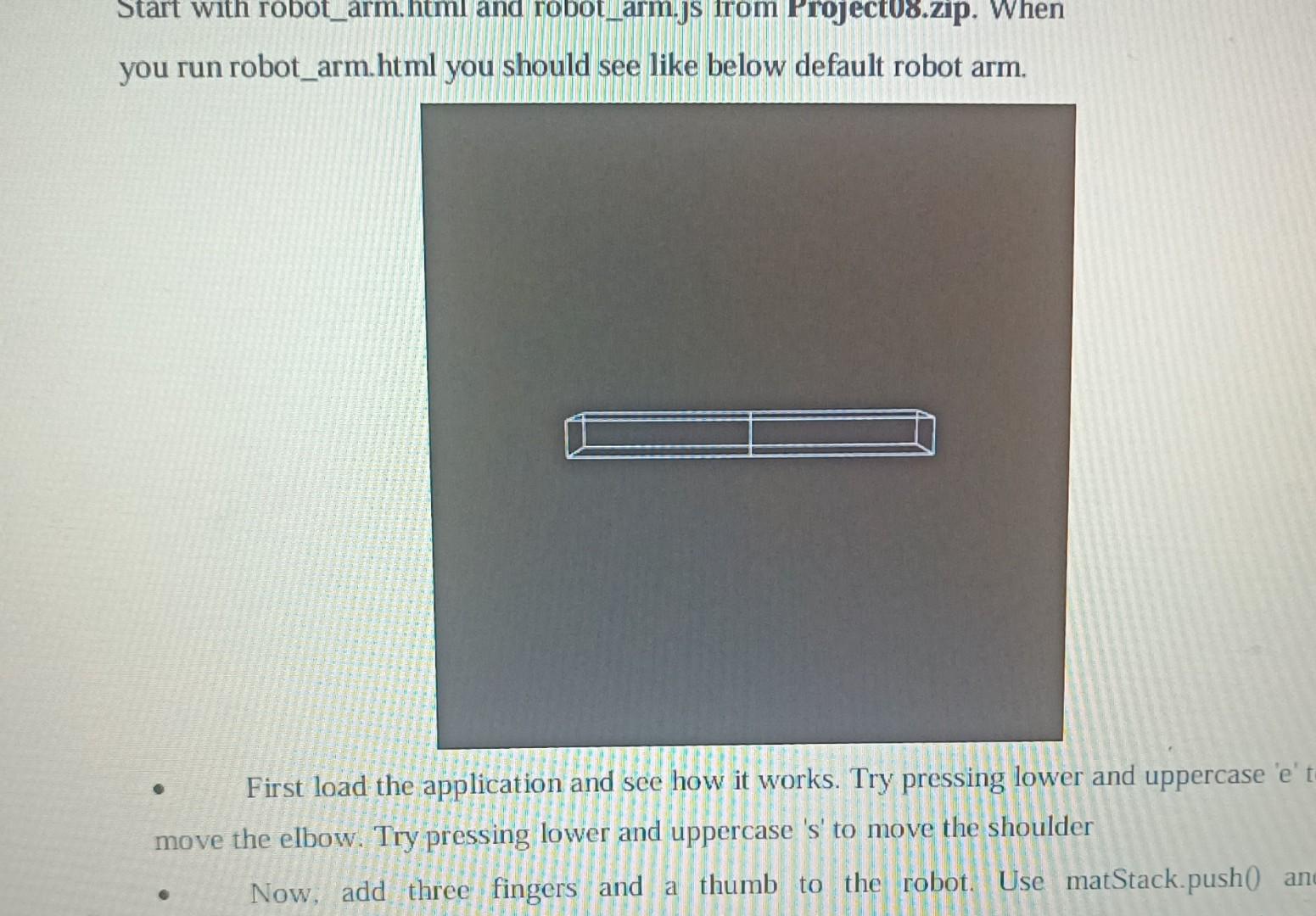
you run robot_arm.html you should see like below default robot arm. - First load the application and see how it works. Try pressing lower and uppercase ' e ' move the elbow. Try pressing lower and uppercase 's' to move the shoulder - Now, add three fingers and a thumb to the robot. Use matStack.push0 First load the application and see how it works. Try pressing lower and uppercase ' e ' to move the elbow. Try pressing lower and uppercase 's' to move the shoulder - Now, add three fingers and a thumb to the robot. Use matStack.push() and matStack.pop0 to separate the transformations for each digit. Do not attempt to "untransform" with an inverse rotate, translate or scale. - Finally, add some code that will make the finger and thumb move apart when ' f ' is pressed and together when ' F ' is pressed. The center of rotation should be at the wrist. 3 You can interact with this sample solution to see how your arm might work. Click on it and use the keys described above. I have also added some additional controls: - x/X : to rotate the arm on the X axis so you can see it from different angles - y/Y : to rotate the arm on the Y axis so you can see it from different angles - a/A : to rotate the fingers on the x-axis with positive direction - b/B : to rotate the fingers on the x-axis with negative direction - m/M : to rotate the fingers on the y-axis with positive direction - n/N : to rotate the fingers on the y-axis with negative direction - t/T : toggle between solid and wire cubes - p/P : toggle between perspective and ortho projections
Step by Step Solution
There are 3 Steps involved in it

Get step-by-step solutions from verified subject matter experts
 Study Help