







Question: blem 2. Use Google sheets to find these limits. In column A, put about 15 numbers approaching 0 , e.g., put a 1 in A1,
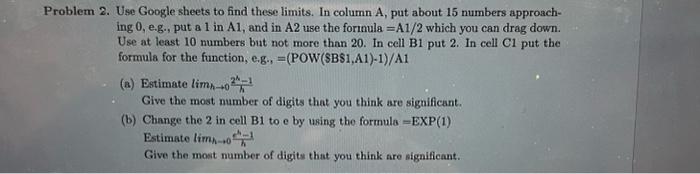
blem 2. Use Google sheets to find these limits. In column A, put about 15 numbers approaching 0 , e.g., put a 1 in A1, and in A2 use the formula =A1/2 which you can drag down. Use at least 10 numbers but not more than 20. In cell B1 put 2. In cell C1 put the formula for the function, e.g., =(POW(SB81,A1)1)/A1 (a) Dstimate limh0h2h1 Give the most number of digits that you think are significant. (b) Change the 2 in cell B1 to e by using the formula =EXP(1) Estimate limh 0heh1 Give the most number of digits that you think are significant
Step by Step Solution
There are 3 Steps involved in it
1 Expert Approved Answer
Step: 1 Unlock

Question Has Been Solved by an Expert!
Get step-by-step solutions from verified subject matter experts
Step: 2 Unlock
Step: 3 Unlock
 Study Help