







Question: Boost 12:34 PM 1 36% Description Using the database and tables we created in Lab 1, the word document above the submission link, and SSMS
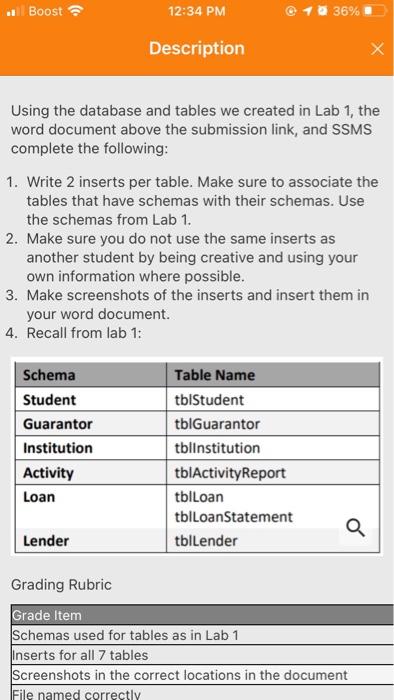
Boost 12:34 PM 1 36% Description Using the database and tables we created in Lab 1, the word document above the submission link, and SSMS complete the following: 1. Write 2 inserts per table. Make sure to associate the tables that have schemas with their schemas. Use the schemas from Lab 1. 2. Make sure you do not use the same inserts as another student by being creative and using your own information where possible. 3. Make screenshots of the inserts and insert them in your word document. 4. Recall from lab 1: Schema Student Guarantor Institution Activity Loan Table Name tblStudent tblGuarantor tblinstitution tblActivity Report tblLoan tblLoan Statement tblLender Q Lender Grading Rubric Grade Item Schemas used for tables as in Lab 1 Inserts for all 7 tables Screenshots in the correct locations in the document File named correctly Boost 12:34 PM 1 36% Description Using the database and tables we created in Lab 1, the word document above the submission link, and SSMS complete the following: 1. Write 2 inserts per table. Make sure to associate the tables that have schemas with their schemas. Use the schemas from Lab 1. 2. Make sure you do not use the same inserts as another student by being creative and using your own information where possible. 3. Make screenshots of the inserts and insert them in your word document. 4. Recall from lab 1: Schema Student Guarantor Institution Activity Loan Table Name tblStudent tblGuarantor tblinstitution tblActivity Report tblLoan tblLoan Statement tblLender Q Lender Grading Rubric Grade Item Schemas used for tables as in Lab 1 Inserts for all 7 tables Screenshots in the correct locations in the document File named correctly
Step by Step Solution
There are 3 Steps involved in it

Get step-by-step solutions from verified subject matter experts
 Study Help