







Question: Both ways I write the AND function it works correctly and gets the answer, however it is being counted wrong on the SAM system. =
Both ways I write the AND function it works correctly and gets the answer, however it is being counted wrong on the SAM system.
= AND(D2="Mixed Use", E2="Loan")
=IF(AND(D2="Mixed Use", E2="Loan"), TRUE, FALSE)
Can someone help me figure out what is the correct way it is to be written?
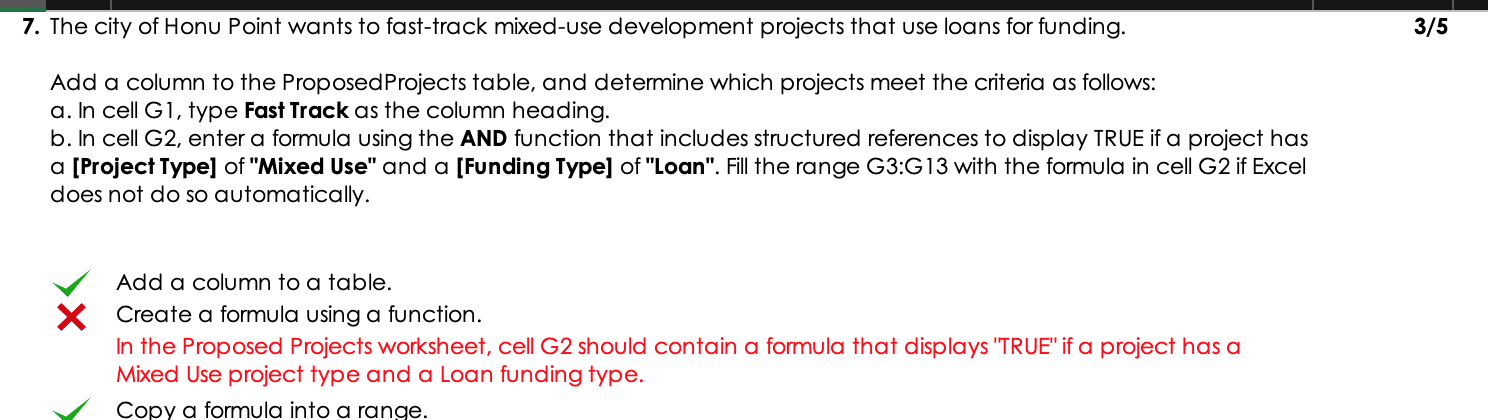
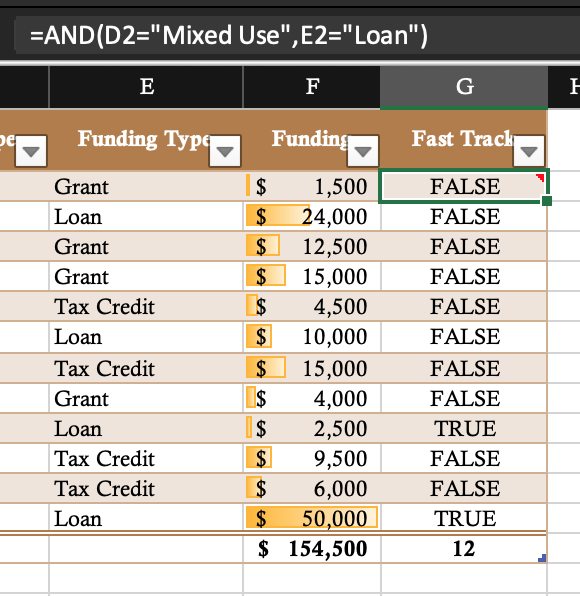
7. The city of Honu Point wants to fast-track mixed-use development projects that use loans for funding. 3/5 Add a column to the Proposed Projects table, and determine which projects meet the criteria as follows: a. In cell G1, type Fast Track as the column heading. b. In cell G2, enter a formula using the AND function that includes structured references to display TRUE if a project has a [Project Type] of "Mixed Use" and a [Funding Type] of "Loan". Fill the range G3:G13 with the formula in cell G2 if Excel does not do so automatically. Add a column to a table. X Create a formula using a function. In the Proposed Projects worksheet, cell G2 should contain a formula that displays "TRUE" if a project has a Mixed Use project type and a loan funding type. Copy a formula into a range. =AND(D2="Mixed Use", E2="Loan") E F G F Funding Type Funding Fast Track Grant Loan Grant Grant Tax Credit Loan Tax Credit Grant Loan Tax Credit Tax Credit Loan $ 1,500 $ 24,000 $ 12,500 $ 15,000 $ 4,500 $ 10,000 $ 15,000 $ 4,000 $ 2,500 $ 9,500 $ 6,000 $ 50,000 $ 154,500 FALSE FALSE FALSE FALSE FALSE FALSE FALSE FALSE TRUE FALSE FALSE TRUE 12
Step by Step Solution
There are 3 Steps involved in it

Get step-by-step solutions from verified subject matter experts
 Study Help