







Question: Brochure Thumbnails Assignment Due Sunday by 1 1 : 5 9 pm Points 1 0 Submitting a file upload As discussed in Chapter 1 of
Brochure Thumbnails Assignment
Due Sunday by :pm Points Submitting a file upload
As discussed in Chapter of our text, draw out three different design ideas for your brochure on paper. Be sure to consider your audience and message in every panel Does this fit the audience? How does this serve the goal of the brochure? We will select one of these designs to create in InDesign later in the course for the Brochure Draft.
Draw these with pencil and paper and then take a picture of your drawings with your camera phone or another camera and attach those here.
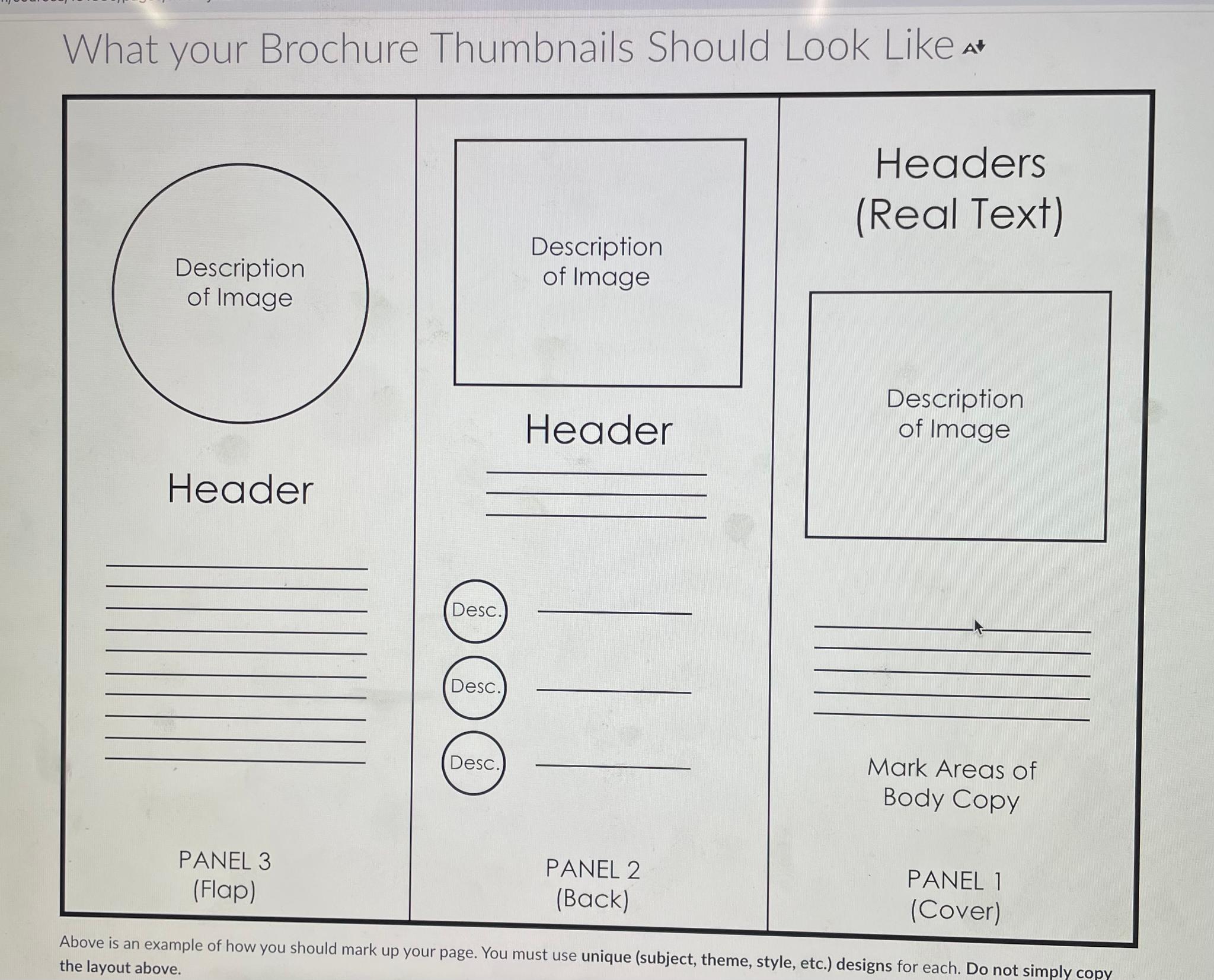
Use the following document as an example for the Brochure Thumbnails Assignment. Be sure to draw both outside and inside panels.
Remember your brochure should be in a panel horizontal format. This means your page should be in landscape and divided into three columns each. When visualizing this in InDesign, the cover is on the right most panel of the first page for the Brochure Draft The back of the brochure is in the center of the first page, and the flap is the left most panel of that page. The interior should work as a whole and make up the panels on the second page.
Your submission must include:
Unique different publications, themes, style, etc. designs consisting of panels each. Photograph these panels at a time, front and back. This should add up to images, per brochure design.
A few paragraphs per design covering your choices of type, color, layout, images, shapes, etc. Explain what different options you considered and how your messageaudience informed your different design choices.
Make sure that your design ideas are distinct, in subject as well as layout. Any and every element of the design should be experimented with so that you consider the full range of options.
Please be sure to review the instructions carefully before submitting the assignment.
What your Brochure Thumbnails Should Look Like at the layout above.
Step by Step Solution
There are 3 Steps involved in it
1 Expert Approved Answer
Step: 1 Unlock

Question Has Been Solved by an Expert!
Get step-by-step solutions from verified subject matter experts
Step: 2 Unlock
Step: 3 Unlock
 Study Help