







Question: c# explain ghis code step by step please using System.Windows.Forns; using System.Data.OleDb; / Me added the Iibrary. namespace AccessConnection i public partial class form1 :
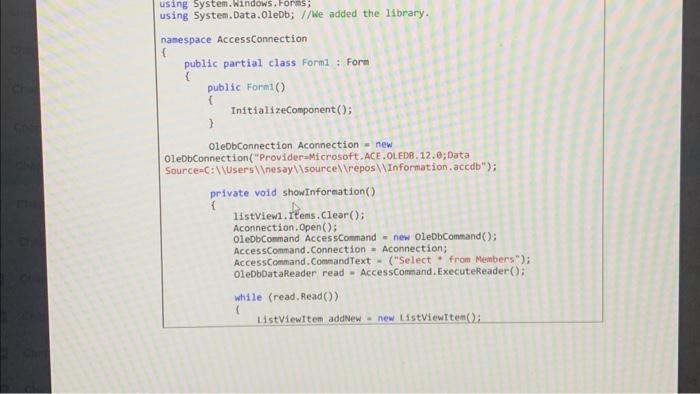
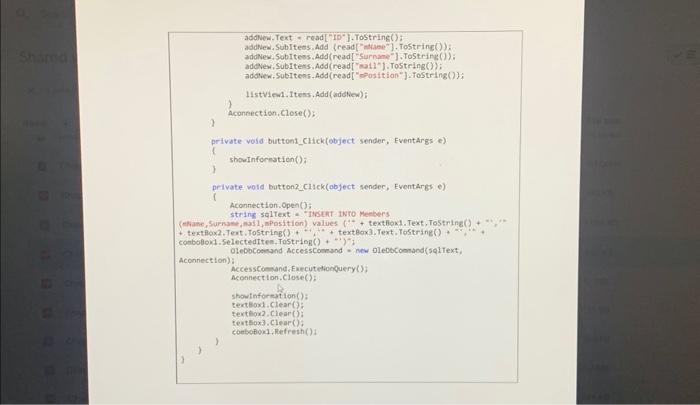
using System.Windows.Forns; using System.Data.OleDb; / Me added the Iibrary. namespace AccessConnection i public partial class form1 : Form \{ public Form1() i InftializeComponent(); \} OleDbConnection Aconnection = new OleDbConnection("Provider=Microsoft.ACE.OLEDB. 12.0; Data private vold showinformation() i 14stview, Items. Clear(); Aconnection, Open (); oleDbCommand Accesscomand = new OleDbCommand(); AccessCommand.Connection = Aconnection; AccessCommand.CommandText - ("Select " from Members") ; OleDbDataReader read = AccessCommand. ExecuteReader(); while (read.Read()) 1 itstviewftem addNew - new Listviewttem(); addNew,Text = read ["10"].ToString(): adolew, Sobitems Add (read["mame"]. Tostring()): addNew, Subiteos, Add (read[ ['Surname"], ToString()); adevew, Subitens, Add (read ["vall"] 1.ToString()); addew. Subitens. Add (read ["eosition"], Tostring()); IIstviend. Itens, Add (adeliew) ; ) Aconnection, Close(): ) private void button1_click(object sender, Eventargs e) is shourinformation(): t private woid buttonz_cilek(object sendec, Eventargs e) i Aconnection. Open(): strins sq1Text - "iviut iwro Meebers conbollond.Selectediten, fostring (+) ! Aconnection): Accessconand, Executelionpuery (): Aconnection, Close(): showteforeation(): textioni.Clear(): texteox2. Clear(5) text5ox3, Clear()) ) ) 1
Step by Step Solution
There are 3 Steps involved in it

Get step-by-step solutions from verified subject matter experts
 Study Help